Best MCP Servers 2026: Complete Guide to Model Context Protocol, Setup & AI Agent Integration
After going through the MCP server registry, hundreds of practitioner threads, and live testing integrations inside SketricGen, here's what actually holds up in production.
Key Points
- An MCP server is a lightweight process that exposes tools, data, and actions to an AI agent using a standardized protocol — no custom API code per integration.
- The most reliable MCP servers in 2026: GitHub, AWS (awslabs suite), Slack, PostgreSQL, Filesystem, and Brave Search.
- GitHub MCP Server is the most widely used for dev workflows. AWS MCP servers are the fastest-growing category, nearly doubling in search interest since mid-2025.
- Most builders install too many servers. Practitioners on r/mcp consistently report that 3 to 5 well-configured servers outperform a bloated stack.
- SketricGen connects MCP servers to 2,000+ business apps — Composio, Pipedream, and custom connectors — without writing infrastructure code.
What Is an MCP Server?
An MCP server is a program that sits between your AI agent and an external tool. It exposes specific actions — read a file, run a query, create a pull request — through a standardized interface the agent can call.
The Model Context Protocol, developed by Anthropic and donated to the Linux Foundation in December 2025, is now a vendor-neutral open standard. Any AI model that supports MCP can talk to any MCP-compliant server.
Technically, communication happens over JSON-RPC 2.0. There are two transport modes: stdio (local process, runs on your machine) and SSE (server-sent events, runs remotely over HTTP). Local stdio is faster to set up. Hosted SSE is better for team use and production agents.
For a deeper background on how MCP works under the hood, see our full MCP explainer and build guide.
MCP vs API: The One-Paragraph Answer
The core difference is statefulness and intent. A REST API responds to a single request. An MCP server maintains an ongoing session, exposes typed tools the agent can call at will, and passes structured context back, not just a JSON blob.
| MCP Server | REST API | |
|---|---|---|
| Session | Stateful | Stateless |
| Discovery | Agent auto-discovers tools | You hardcode endpoints |
| Auth | Handled by server | You manage per call |
| Best for | AI agent workflows | App-to-app data transfer |
| Setup cost | Low (config file) | Medium (custom integration) |
MCP does not replace APIs. The server itself usually wraps an existing API. What it removes is the per-integration wiring work on your side.
Best MCP Servers in 2026
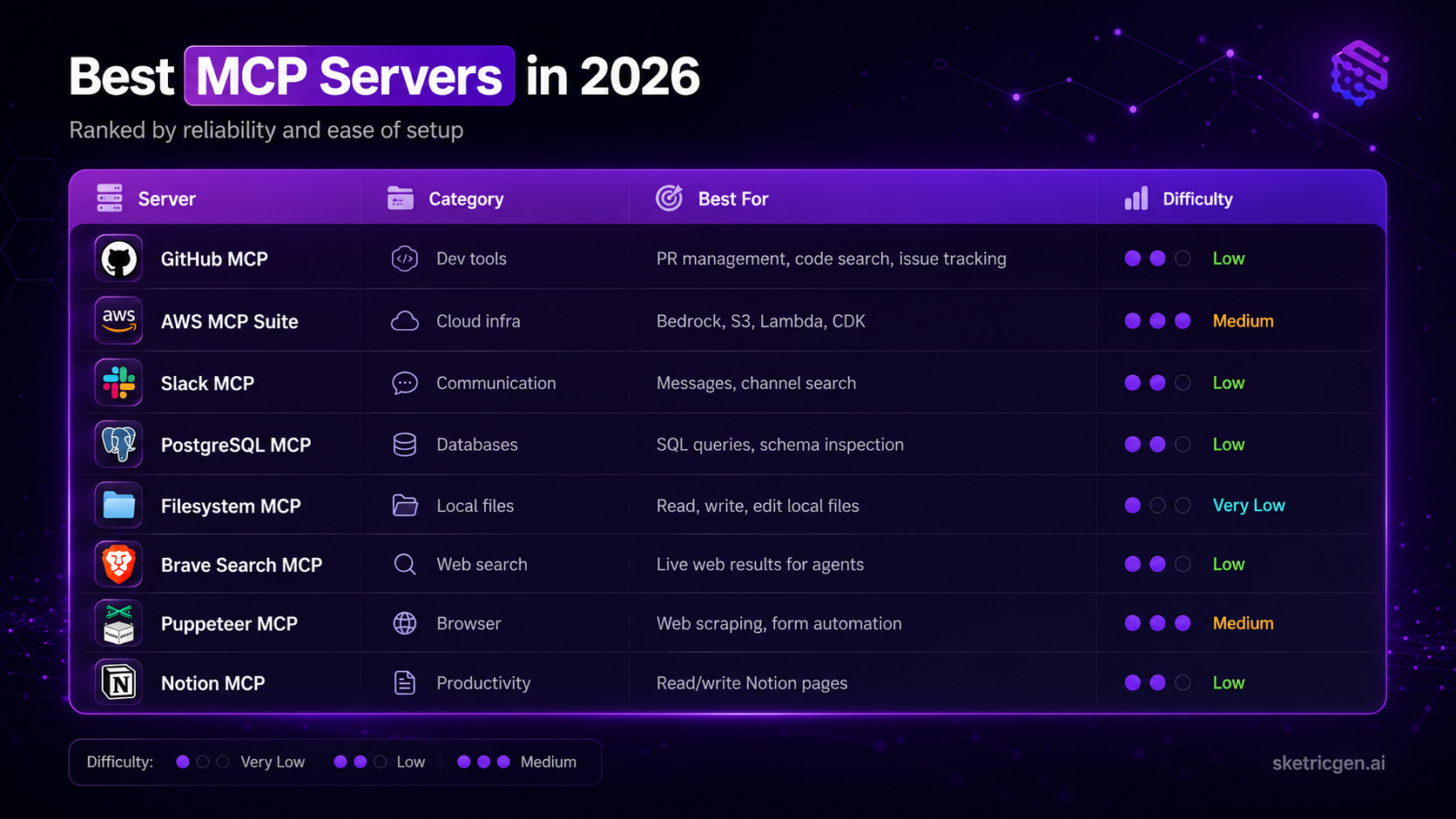
There are now thousands of MCP servers across registries. Most of them are experimental. This list covers the ones with active maintenance, documented auth flows, and real community usage.
| Server | Category | Best For | Setup Difficulty | Official? |
|---|---|---|---|---|
| GitHub MCP | Dev tools | PR management, code search, issue tracking | Low | ✅ GitHub |
| AWS MCP Suite | Cloud infra | Bedrock, S3, Lambda, CDK, cost analysis | Medium | ✅ AWS Labs |
| Slack MCP | Communication | Read/send messages, channel search | Low | ✅ Anthropic ref |
| PostgreSQL MCP | Databases | SQL queries, schema inspection | Low | ✅ Anthropic ref |
| Filesystem MCP | Local files | Read, write, edit local files | Very low | ✅ Anthropic ref |
| Brave Search MCP | Web search | Live web results for agents | Low | ✅ Anthropic ref |
| Puppeteer MCP | Browser | Web scraping, form automation | Medium | ✅ Anthropic ref |
| Notion MCP | Productivity | Read/write Notion pages and databases | Low | Community |
What practitioners are saying: A thread on r/mcp — "I spent 3 weeks building my dream MCP setup and honestly, most of it was useless" with 693 upvotes — landed on the same insight: builders who ran 3 to 5 focused servers consistently beat those who installed everything. The most cited reliable trio across that thread and "Which MCP servers actually work as advertised?": GitHub MCP, a database MCP, and Filesystem MCP. — r/mcp community, Aug–Oct 2025
GitHub MCP Server: Deep Dive
The GitHub MCP Server is GitHub's own official implementation. It gives an AI agent direct access to your repositories without you writing a single API wrapper.
What your agent can do:
- Read files, branches, and commit history from any repo
- Create and review pull requests
- Open, update, and close issues
- Search code across your org
- Manage releases and GitHub Actions workflows
It connects via a personal access token. Add it to your Claude Desktop or Cursor config in one line, or wire it directly into an agent in SketricGen's AgentSpace.
Where it fits for business teams: code review agents, automated release notes, bug triage workflows, and any pipeline that needs to read from or write to a codebase. It pairs especially well with a PostgreSQL or Filesystem MCP for full context on both code and data.
For a step-by-step setup walkthrough, the complete MCP server connection guide covers each path in detail.
AWS MCP Servers: The Growing Stack
AWS Labs released a suite of MCP servers covering its core services. Search interest in "aws mcp servers" nearly doubled between June 2025 and May 2026 — the fastest growth curve of any server category tracked this year.
The AWS MCP suite covers:
| Server | What It Does |
|---|---|
| AWS Documentation MCP | Gives agents access to AWS docs and API references |
| Amazon Bedrock MCP | Lets agents invoke Bedrock models and manage knowledge bases |
| Amazon S3 MCP | Read, write, and list objects in S3 buckets |
| AWS Lambda MCP | Invoke Lambda functions from an agent workflow |
| AWS CDK MCP | Generate and manage infrastructure as code |
| AWS Cost Analysis MCP | Query cost and usage data for a given account |
The driver here is enterprise adoption. Teams running AI agents on AWS infrastructure want those agents to interact with cloud resources directly — querying S3 for data, triggering Lambda for computation, checking costs before provisioning.
Practical use case: an AI sales agent in SketricGen pulls lead data from a PostgreSQL MCP, enriches it via Brave Search, then writes the output to an S3 bucket via the AWS S3 MCP. No custom API wiring. No external orchestration layer.
Decision rule: If your stack lives in AWS, start with the Bedrock MCP (for model access) and the Documentation MCP (so agents can self-reference AWS capabilities). Add S3 or Lambda MCP when your workflow needs direct cloud reads/writes.
Local MCP vs Hosted MCP: Quick Comparison
This question comes up constantly in practitioner threads. The short answer depends on who's using the agent.
| Local (stdio) | Hosted (SSE) | |
|---|---|---|
| Setup | 5 minutes | Requires a running server |
| Performance | Faster, no network latency | Slightly slower |
| Multi-user | One person only | Team-ready |
| Production | Not ideal | Recommended |
| Data privacy | Stays on your machine | Depends on host |
For personal dev use, local stdio is fine. For any agent shared across a team or deployed to customers, you need hosted MCP or a platform that handles the transport layer for you.
SketricGen's Custom MCP connector runs your MCP server in the cloud, handles auth, and makes it available to any agent in your workspace. No infra to manage on your end.
How to Connect an MCP Server to Your AI Agent
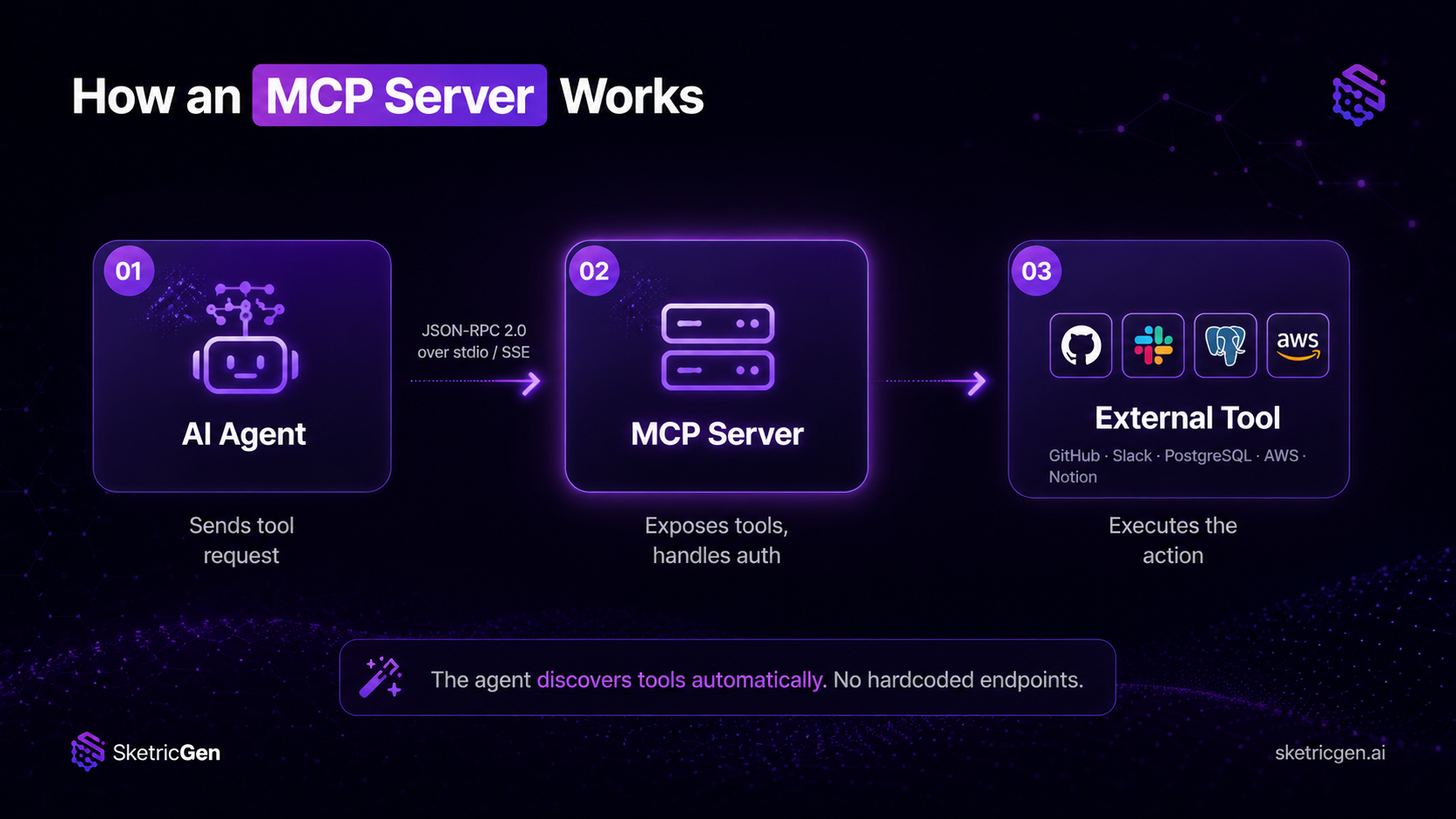
There are three paths. Which one you take depends on your technical setup and how many tools you're connecting.
Path 1 — Client config (Claude Desktop or Cursor) Edit the JSON config file to add server definitions. Works immediately. Best for personal use with 1 to 2 servers. Breaks when you need multi-server orchestration or team access.
Path 2 — No-code platform (SketricGen) Add MCP as a tool node inside AgentSpace. SketricGen handles auth, runs the server in the cloud, and connects it to 2,000+ other apps via Composio and Pipedream connectors. Best for teams building production agents.
Path 3 — Custom MCP server Write your own server using the MCP SDK. Best when you need to expose proprietary internal data or custom business logic.
For the full technical walkthrough of all three paths, see how to connect an MCP server to an AI agent.
Connecting MCP to 2,000+ Apps With SketricGen
MCP servers handle one tool at a time. Real business workflows need dozens of tools connected in sequence — pull a lead, check their LinkedIn, update the CRM, send a Slack alert, log to a spreadsheet.
That's where the gap is. Most MCP setups stop at one or two servers and manual config files. What operators actually need is an orchestration layer that chains MCP with every other tool in the stack.
SketricGen is built for this. The platform connects MCP servers alongside 2,000+ app integrations — through Composio, Pipedream, and custom connectors — in a single visual workspace. You describe the workflow in plain text, Max Orchestrator generates the agent setup, and the MCP tool node slots in alongside your CRM, database, messaging tools, and anything else.
For teams building AI lead generation workflows or multi-agent systems, MCP becomes one piece of a larger orchestrated workflow rather than the whole architecture.
You can start building in AgentSpace and add your first MCP server as a tool node in under 10 minutes.
Author Take
The question I get asked most is "which MCP servers should I start with?" My answer is almost always the same: pick one that solves a specific bottleneck you have today, not one that sounds impressive.
If your team wastes time on manual GitHub tasks, start with GitHub MCP. If you have data locked in a database your agents can't reach, start with PostgreSQL MCP. If you're on AWS and want agents to interact with cloud resources, start with the Bedrock or Documentation MCP.
Install one. Get it working. Then add a second. The practitioners who burn out on MCP are the ones who install 15 servers in week one and spend the next month debugging auth errors. Three focused servers will outperform fifteen misconfigured ones every time.
Next Steps
MCP is now stable enough to use in production. The server selection is what determines whether your agent actually works — not the protocol itself.
- Explore server options: Browse the MCP server registry and the AWS MCP suite for your use case.
- Set up your first connection: Follow the MCP server connection guide for a step-by-step walkthrough.
- Build a multi-tool agent: Open SketricGen AgentSpace, describe your workflow, and add MCP as one tool node alongside your full app stack.
If you want to see how MCP fits into a broader AI workflow architecture, the AI workflow builder explainer walks through the full picture.
FAQs
An MCP server is a program that exposes tools and data to an AI agent using the Model Context Protocol. The agent connects to it, discovers what actions are available, and calls them during a workflow — without any custom API code on your side. Think of it as a translator between your AI agent and an external tool.
An API is a stateless request-response interface. An MCP server wraps one or more APIs into a stateful session that an AI agent can interact with contextually. The agent doesn't need to know the API endpoints — the MCP server exposes them as named tools the agent can call. MCP is not replacing APIs; it's a layer on top of them.
Yes. OpenAI added MCP support to ChatGPT in 2025. Both Claude and ChatGPT now support MCP natively, which is part of why the protocol has become the de facto standard for AI agent integrations. Anthropic donated MCP to the Linux Foundation in December 2025 to cement its vendor-neutral status.
The most consistently reliable ones, based on practitioner feedback in r/mcp: GitHub MCP (official, well-maintained), Filesystem MCP (simple, no auth issues), PostgreSQL MCP (stable for SQL-heavy workflows), Brave Search MCP (live web results), and the AWS MCP suite (enterprise-grade, actively maintained by AWS Labs). Avoid lesser-known community servers that haven't been updated in the past 6 months.
Yes. Platforms like SketricGen let you add MCP servers as tool nodes inside a visual agent builder. No JSON config files, no server management. You connect the server, set the auth, and it's available to any agent in your workspace.
A local MCP server runs on your machine using stdio transport. It's fast to set up but only accessible to you. A hosted MCP server runs remotely via SSE and is accessible to multiple users and agents. For personal dev work, local is fine. For team or production use, you need hosted — or a platform that handles the hosting layer.
Three ways: (1) edit the config JSON in Claude Desktop or Cursor for personal use, (2) add it as a tool node in a platform like SketricGen for team workflows, or (3) build a custom server using the MCP SDK. The full setup guide for all three paths is in how to connect an MCP server to an AI agent.
For lead generation workflows: Brave Search MCP (prospect research), PostgreSQL MCP (query your lead database), Slack MCP (send outreach alerts), and GitHub MCP if you're selling to developers. SketricGen chains these together with CRM connectors, enrichment tools, and messaging platforms. See the AI lead gen playbook for a practical workflow breakdown.
Related blogs
View more
AI LinkedIn Post Generator: How to Research, Write & Publish Posts on Autopilot (2026)
tutorials
Instagram Auto-Reply: How to Build an AI Agent That Actually Answers Your DMs
tutorials
No-Code AI Agent Builder: The Complete Guide to Building Your First Agent (2026)
tutorials
AI Code Review Tool for GitHub: Automate PR Reviews with a No-Code Agent
tutorials
WhatsApp AI Chatbot for Customer Support: Why (and How) to Build One in 2026
tutorials