AI Agent for Lead Generation: The 2026 Playbook
Tested on inbound lead capture workflows built in SketricGen.
Key Points
- Static contact forms lose up to 37% of inbound inquiries that arrive outside business hours (per Drift's State of Conversational Marketing)
- Most lead gen chatbots fail at the same three points: the opening message, email validation, and CRM handoff
- The qualification sequence matters more than which chatbot tool you pick
- 30–40% of chatbot-captured emails are invalid without real-time verification in place (per ZeroBounce email benchmark data)
- Per-resolution billing models — like Intercom Fin at $0.99/resolution — can cost thousands per month at scale
- SketricGen lets you build a stateful lead capture agent with structured CRM output, no code required
- Brand Agents can now show a customer-facing lead capture form inside the agent itself when someone asks about contact, demo, or similar high-intent actions
At-a-Glance: Contact Form vs AI Lead Gen Agent
| Metric | Contact Form | AI Lead Gen Agent |
|---|---|---|
| After-hours capture | Silently waits (if visitor bothers) | Actively engages and qualifies 24/7 |
| Qualification | None — all leads hit CRM equally | Scores and routes by intent tier |
| Personalization | None | Reads page context, adapts questions |
| Email validation | None | Format + domain + real-time API check |
| CRM sync | Manual export or basic webhook | Typed structured fields on capture |
| First response time | Next business day | Immediate + morning sales alert |
| Visitor engagement rate | 1–3% form completion (industry avg) | 15–35% with a conversational flow |
Sources: Form completion rate — Unbounce Conversion Benchmark Report. Conversational engagement lift — Drift State of Conversational Marketing.
Why Your Contact Form Is a Leaky Bucket
Your contact form has one job: collect lead data. The problem is it only works when the visitor is motivated enough to use it, and most aren't.
The average B2B website converts 1–3% of visitors via a static form. The rest leave without a trace. More critically, around 37% of inbound inquiries arrive outside business hours — late evenings, weekends, early mornings — when no one is there to respond. A form just sits there.
Visitors who land at 11pm on a Tuesday are often decision-ready. They've done their research. They'll contact whoever responds first. If your only option is a form that routes to a shared inbox reviewed Monday morning, you've likely already lost them.
An AI lead gen agent changes that tradeoff. It engages the visitor in real time, qualifies their intent, captures validated contact data, and either books a meeting or queues the lead for a morning follow-up — with full context already in your CRM.
AI Agent vs Chatbot: What's Actually Different
The terms get used interchangeably. There's a real gap between them.
A chatbot follows a scripted decision tree. It asks "Are you interested in pricing?" and branches based on yes/no. It can't hold context across turns, can't take actions outside the conversation window, and breaks when the visitor goes off-script.
An AI lead gen agent is stateful. It remembers what's already been asked. It reads the page the visitor came from. It can call external tools — validate an email, check a calendar, push a record to HubSpot, send a Slack alert. When a visitor says "I'm not sure about budget yet," it doesn't dead-end. It pivots.
This is why the language is shifting to AI sales agent in 2026. The tool isn't just conversational anymore — it's operational. (For a deeper comparison, see AI Agent vs Chatbot: What's the Real Difference.)
What practitioners are saying: A thread on r/AI_Agents asking for useful lead gen AI agents got flooded with outbound tool recommendations — Apollo, Clay, Telescope. The inbound capture use case barely came up. Everyone's building outbound AI SDRs. Far fewer have built a well-tuned inbound agent for after-hours website traffic. That's the open lane.Brand Agents Turn the Chat into a Lead Capture Flow
In SketricGen, this is no longer just a generic lead-gen widget. We now have a dedicated customer-facing layer called Brand Agents. The previous website-focused brand agents are part of this same experience, so the concept now covers customer-facing agents across website and other channels.
Brand Agents can now embed a lead capture form inside the AI agent. That means when a visitor asks for contact, a demo, pricing follow-up, or any similar high-intent action, the agent can surface the form right in the conversation instead of sending the visitor off to a separate page.
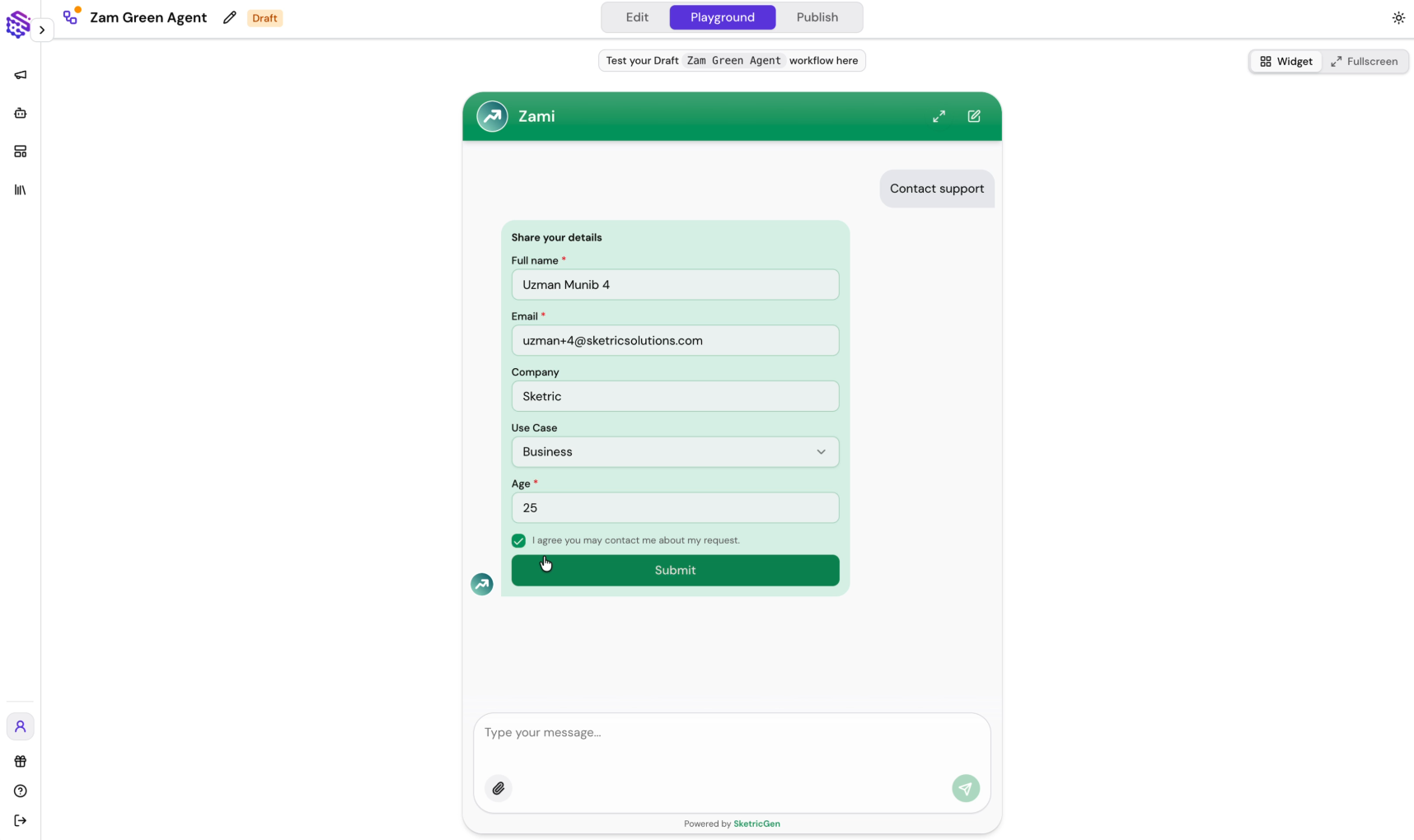
The flow is simple:
- The visitor asks for contact, a demo, or another conversion action.
- The agent detects the intent and shows the lead capture form inline.
- You customize every label on the form to match the workflow.
- You publish the Brand Agent on your website or any other supported channel.
This is the part that makes the solution feel customer-facing instead of bolted on. The conversation stays intact, the form appears at the right moment, and the lead lands in the same workflow you already use for qualification and routing.
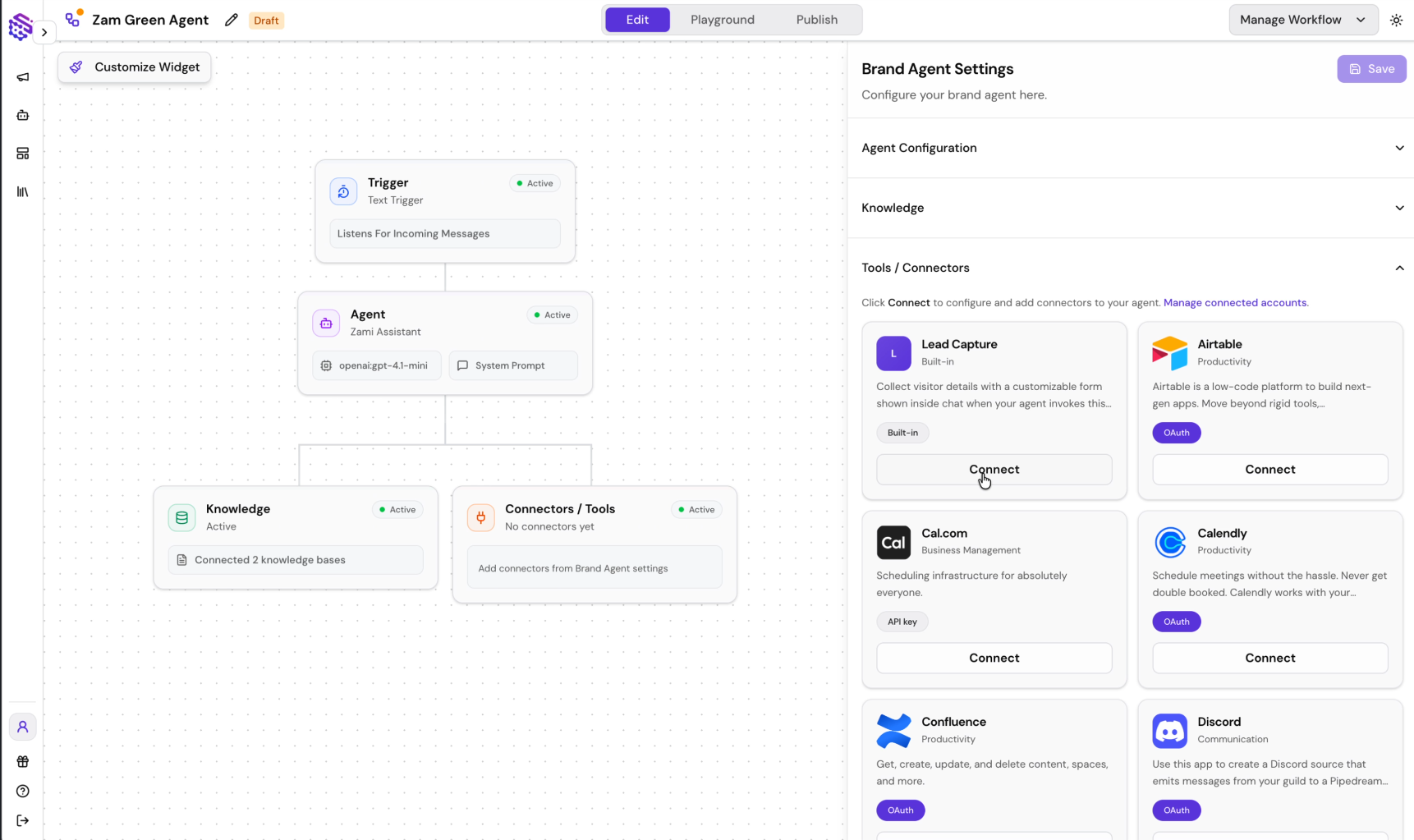
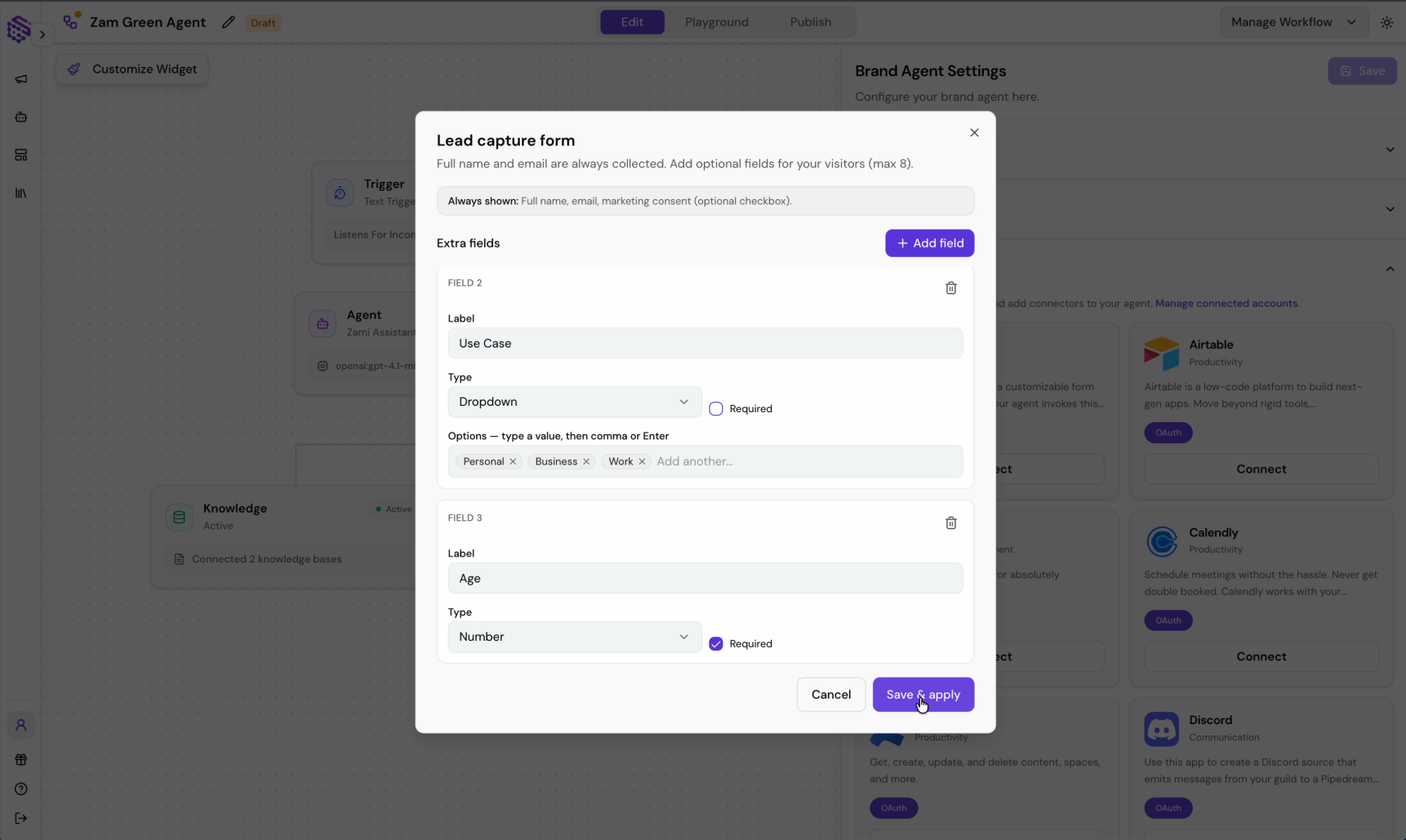 Why this matters: A visitor who is ready to contact you should not have to leave the conversation to find a separate form. Inline lead capture keeps the momentum, improves completion rates, and makes the agent feel like part of the product experience rather than a disconnected popup.
The Qualification State Machine
Most implementations skip the architecture and go straight to the tool. The bot then asks too many questions and the visitor leaves, or asks too few and pushes unqualified leads straight to CRM.
A lead gen agent should operate as a state machine — a defined set of conversation states with clear transition logic between them.
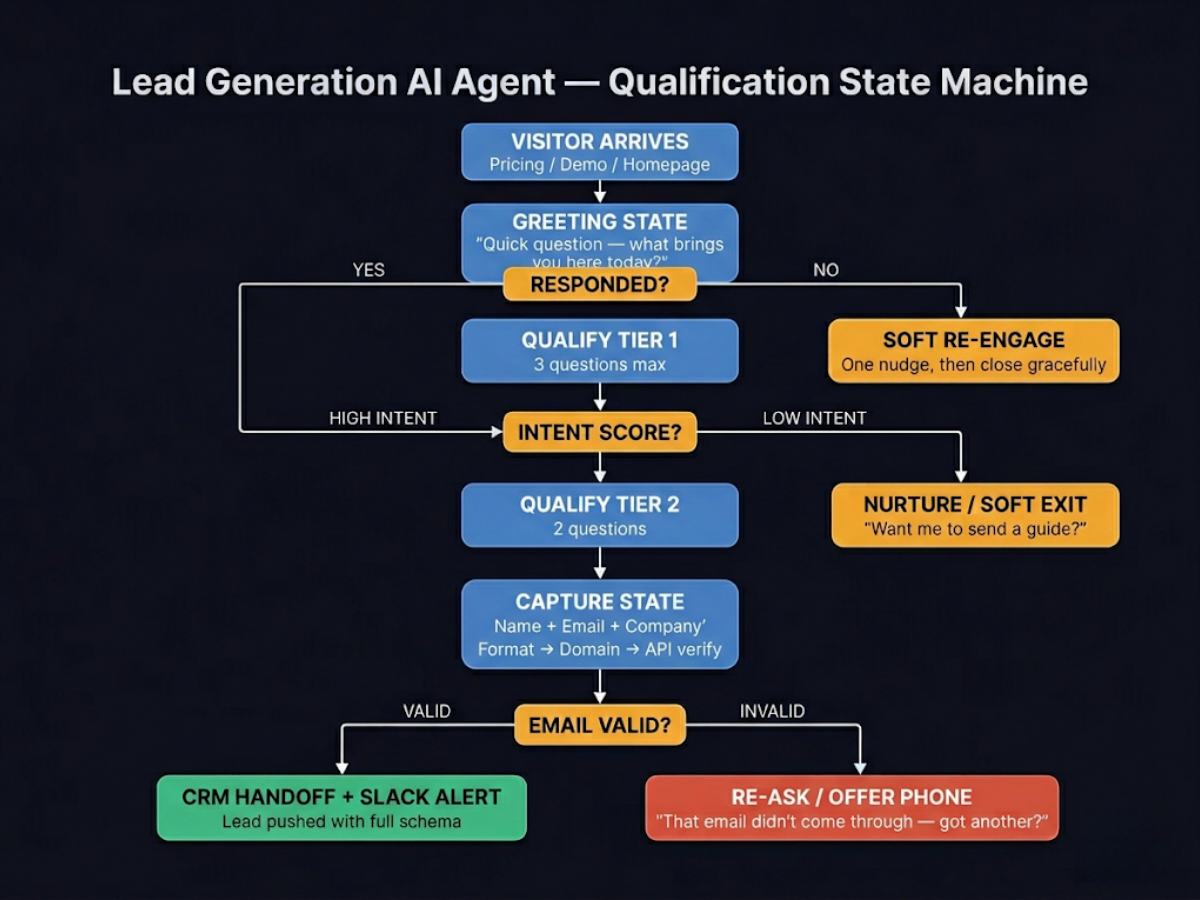
Each state transition has a rule. The agent doesn't ask for an email until it has an intent signal. It doesn't go to Tier 2 unless Tier 1 cleared. It doesn't push to CRM until the email is validated.
Author take — Sam: The biggest mistake I see is teams treating the lead agent like a form replacement. It's not. A good lead agent has states. It remembers what it already asked, knows when to escalate, and knows when to let the conversation breathe. The moment it feels like a survey, you've lost them. The state machine is the difference between an agent that qualifies and one that just annoys.What NOT to Ask in the First Message
This is where most implementations fail before they even start.
Based on real practitioner experience — including a r/LeadGeneration thread with 40+ responses from December 2025:
"Either the bot is too aggressive — pops up immediately and asks for an email — or it's so quiet nobody notices it's there."
Anti-patterns that kill engagement in message 1:
- Asking for the email upfront. The visitor hasn't gotten any value yet. They owe you nothing.
- "What's your budget?" This is a sales interrogation. You haven't earned that question.
- Multiple questions in one message. One message, one question. Every extra question in a single turn costs engagement.
- Scripted-sounding openers. "Hi! I'm [BotName]! I'd love to help you today!" — nobody reads past that.
- Popping up within 3 seconds of page load. The visitor hasn't read anything. You're interrupting before the relationship starts.
What works instead — one contextual question, tied to the page:
- On a pricing page: "Trying to figure out if we're in your budget? I can help with that."
- On a features page: "Looking for a specific use case? I can point you to the right fit."
- On a homepage: "What brought you here today?"
Context signals relevance. Relevance earns the next exchange.
The Qualification Question Stack
Qualification works in two tiers. Most visitors only need Tier 1. Tier 2 is for visitors who've already shown buying signals.
Tier 1 — intent signal (3 questions max):
| # | Question | What You're Qualifying |
|---|---|---|
| 1 | "What are you trying to solve right now?" | Use case fit |
| 2 | "Is this for your team or a client project?" | Decision-maker vs influencer |
| 3 | "How soon are you thinking of moving on this?" | Timeline / urgency |
That's enough to score intent. Clear problem, internal stakeholder, near-term timeline = move to Tier 2.
Tier 2 — deal qualification (high-intent only):
| # | Question | What You're Qualifying |
|---|---|---|
| 1 | "How big is the team this would cover?" | Deal size / plan tier |
| 2 | "Are you already using a CRM, or would this be a fresh setup?" | Integration fit |
After Tier 2, move to capture. Not before.
The soft exit for low-intent visitors:
Don't dead-end them. Offer value and capture with consent: "No problem — want me to send over a quick guide on how other [industry] teams are doing this?" A low-intent visitor today is a warm lead in two weeks.
Pro tip: The biggest drop-off in chatbot conversations happens between message 1 and message 2 — not deep in the qualification flow. If someone responds to your opener, they're already above average intent. Front-load relevance. Don't front-load questions.The CRM Hand-off Schema
This is where implementations quietly break. The agent captures leads. They go somewhere — a spreadsheet, a generic webhook, a "leads" inbox nobody checks regularly. The lead goes cold. The sales team blames the chatbot. The chatbot was fine.
Get specific about what you push, in what format, and where.
Recommended CRM field schema:
| Field | Format | Example |
|---|---|---|
lead_name | String | "Sarah Chen" |
lead_email | String (validated) | "sarah@company.com" |
company_name | String | "Acme SaaS" |
use_case | String | "After-hours lead capture for website" |
intent_tier | Enum: high / medium / low | "high" |
timeline | String | "This quarter" |
source_page | URL | "/pricing" |
capture_timestamp | ISO 8601 | "2026-04-30T23:14:00Z" |
conversation_summary | String | "15-person SaaS team. Timeline: this quarter. Interested in CRM integration. Budget not discussed." |
action_taken | Enum: meeting_booked / queued / nurture | "meeting_booked" |
Push this as structured output — typed fields, not a raw text dump. Free-text notes end up unread in a Notes field. Typed fields are filterable, reportable, and actionable in your CRM.
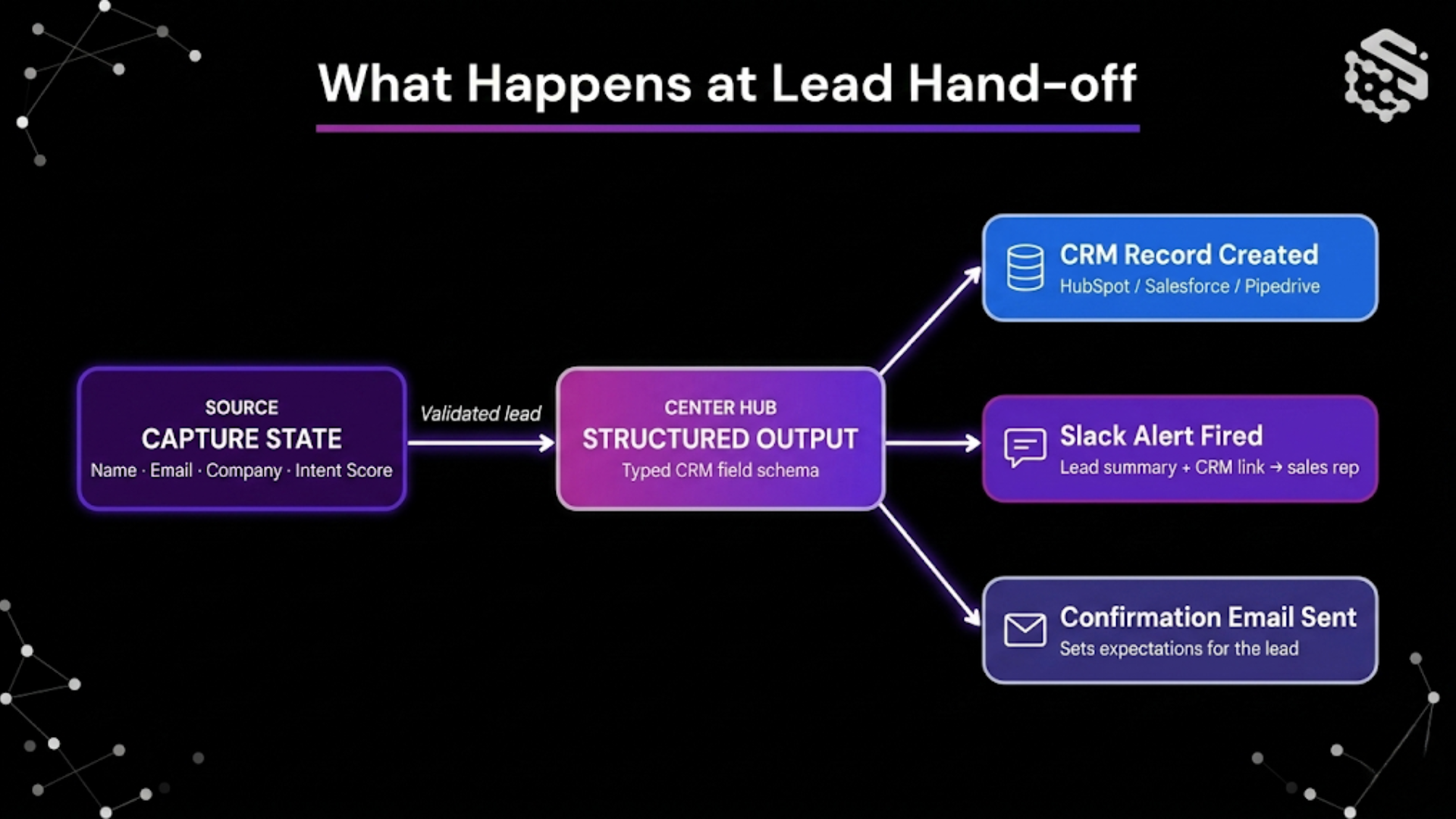
On every handoff, fire two things:
- A Slack or email alert to the assigned sales rep — lead summary + CRM record link
- An auto-confirmation to the lead — acknowledges the conversation, sets expectations on next steps
If a meeting was booked during the conversation, skip the queue. Just confirm the invite.
When the Email Is Fake
Up to 30–40% of emails captured by chatbots are invalid, per ZeroBounce's email benchmark data. This includes typos, disposable email domains (like mailinator.com), and intentional fakes from visitors who want the content without the follow-up.
Pushing raw input to CRM means your campaigns bounce, your sender reputation erodes, and real leads get mixed in with noise that takes time to clean.
Three-step fix:
- Format check. Run a basic validation on the email field before the conversation moves forward. Catches typos like
gmail..comor a missing@. - Domain MX check. Verify the domain has valid mail exchange records. Filters most disposable domains.
- Real-time verification API. Services like ZeroBounce or NeverBounce check whether the address is actually deliverable. Add this as a tool call in the capture state of your agent.
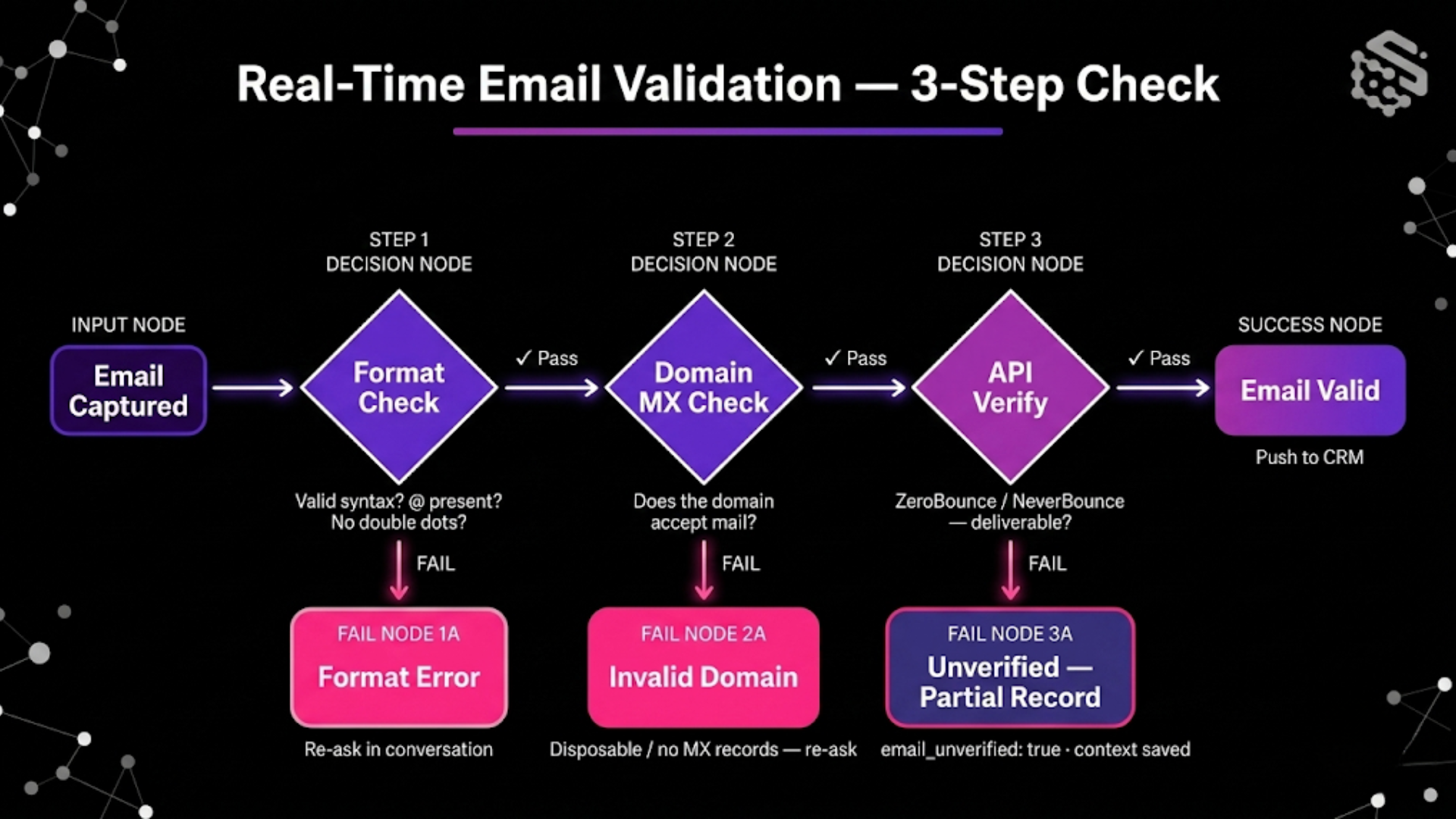
Fallback when validation fails:
Don't close the conversation. Redirect: "That email didn't quite come through on our end — could you double-check it, or would a phone number work instead?"
Give them one retry. If the second attempt also fails, capture what you have — name, company, use case — and flag the CRM record as email_unverified: true. A partial lead with context is more useful than a silent dead-end.
After-Hours Capture and Meeting Booking
After-hours visitors are often the best leads. They're researching on their own time, without interruption. Their intent is deliberate.
How to handle after-hours traffic specifically:
- Offer direct calendar booking. If the visitor qualifies and it's outside business hours, don't queue them — offer a slot. "Looks like we're offline right now — want to grab a 20-minute call for tomorrow?" A confirmed calendar invite is worth more than ten CRM records.
- Set up a morning digest. Trigger a summary alert at the start of business hours — all overnight qualified leads, with intent scores, key conversation points, and CRM links. Sales arrives knowing exactly who to call.
- Acknowledge the time. If you're tracking visitor location, a small detail builds trust: "It's late your time — want me to send this over so you can review in the morning?"
The goal isn't to close after hours. It's to make sure no qualified lead sits cold for eight hours before a human sees it.
Watch Your Per-Resolution Costs
Not all chatbot pricing is equal — and some models penalize you for getting results.
Intercom's Fin AI charges $0.99 per resolved conversation. That sounds manageable until you hit volume. At 5,000 resolutions in a month, one company reported a $4,950 bill — before any base subscription fees.
The tricky part is how "resolution" gets defined. A visitor who asks a simple question counts as a resolution. So does a visitor who qualified as a high-value lead. Same rate, regardless of outcome.
Questions to ask any vendor before you sign up:
- What exactly counts as a "resolution" under your pricing model?
- Does billing scale unbounded, or is there a monthly cap?
- Do test interactions and internal QA sessions count toward billing?
- What happens to costs if I run a high-traffic campaign?
SketricGen uses a workflow-based pricing model — not per-conversation. You build and deploy the agent; the cost doesn't compound with every interaction. See the pricing page for current plans.
Build a Lead Gen Agent Without Code on SketricGen
Here's how the build looks in practice:
1. Describe the workflow to Max Orchestrator
Type it in plain English: "Build a lead generation agent for my website. Greet visitors, ask three qualification questions, validate their email, book a meeting or queue to CRM, and alert sales on Slack."
Max runs requirement gathering, asks a few clarifying questions, then generates the full multi-agent workflow in real time — conversation states, tool connections, and routing logic included.
2. Refine in AgentSpace
The AgentSpace canvas gives you a visual view of the conversation states. Adjust the qualification questions, set the scoring thresholds, and connect your CRM from the 2000+ app marketplace. Available tools include HubSpot, Salesforce, Pipedrive, Calendly, Slack, and more.
3. Set structured outputs
Define the exact CRM field schema using structured inputs and outputs. Typed fields. No free-text dumps. Your CRM stays clean from day one.
4. Deploy
Publish as a website widget or via the Public API. The agent goes live — greeting, qualifying, capturing, and routing — with no code changes needed on your site.
If you're using Brand Agents, enable the in-agent lead capture form so contact and demo requests are handled directly inside the customer-facing conversation. Customize the form labels, deploy it on your agent, and the capture experience stays on-brand across website or other channels.
Start from the pre-built lead gen agent template if you'd rather not build from scratch. For a complete walkthrough on orchestrating multi-agent workflows, see How to Build and Use MCPs in 2026.
Next Steps
If you're running a contact form right now and losing after-hours leads, here's where to start:
- Identify your highest-traffic intent pages — pricing, demo, or feature comparison pages. That's where the agent goes first.
- Write your Tier 1 questions using the three-question framework above. Keep them specific to the page context.
- Build on SketricGen — describe the workflow to Max Orchestrator, connect your CRM, and deploy as a website widget or Brand Agent with in-conversation lead capture.
The agent handles qualification, email validation, CRM sync, lead capture, and sales alerts. Your team wakes up to qualified leads with conversation context — not a cold form inbox.
Start building on SketricGen or start from the lead gen agent template.
FAQs
In most cases, yes — with the right setup. Research from Salesforce's lead gen guide and marketing platforms consistently shows 15–35% higher engagement rates for conversational flows versus static forms. The caveat: a poorly configured chatbot can easily underperform a form. The qualification sequence and opening message matter more than the tool itself.
Three in Tier 1, no more than five total before asking for contact details. Form completion research from Typeform and practitioner consensus both point the same direction — every additional required field or question drops completion by roughly 10–20%. Qualify intent in Tier 1, go deeper only if Tier 1 clears.
It depends on whether you need inbound or outbound. For inbound capture (website visitors), tools like SketricGen, Aimdoc AI, and Lindy handle the conversational qualification flow. For outbound prospecting, Apollo, Clay, and Seamless.AI are common picks. Most teams need both — the inbound agent handles warm traffic; outbound tools build the cold list.
Not operationally. ChatGPT can help draft conversation scripts and qualification logic, but it can't run as a persistent, stateful agent that integrates with your CRM and fires Slack alerts in real time. You need an AI agent platform with tool-calling, persistent state, and deployment infrastructure to make it production-ready.
Two options: meeting booking (the agent offers a calendar slot during the conversation, visitor confirms the invite) or morning digest (qualified leads queue in CRM, sales gets an alert at start of business with intent scores and conversation summaries). Meeting booking is the higher-value path — the lead has already committed to a next step before anyone wakes up.
Via HubSpot's native chatflows or through structured output plus webhook. In SketricGen, connect HubSpot from the tools marketplace, define the CRM field schema in structured outputs, and set the handoff trigger. The lead record is created automatically on capture, with all conversation fields mapped to the right HubSpot properties.
Brand Agents are the customer-facing AI agents in SketricGen. When a visitor asks about contact, demo, or another high-intent action, the agent can surface an inline lead capture form inside the conversation instead of sending the visitor to a separate page. You can customize the form labels and publish it as part of the agent on your website or other supported channel.
Yes. Add screenshots of the inline form trigger, the customized form labels, and the publish state so readers can see the full customer-facing flow in context.
Related blogs
View more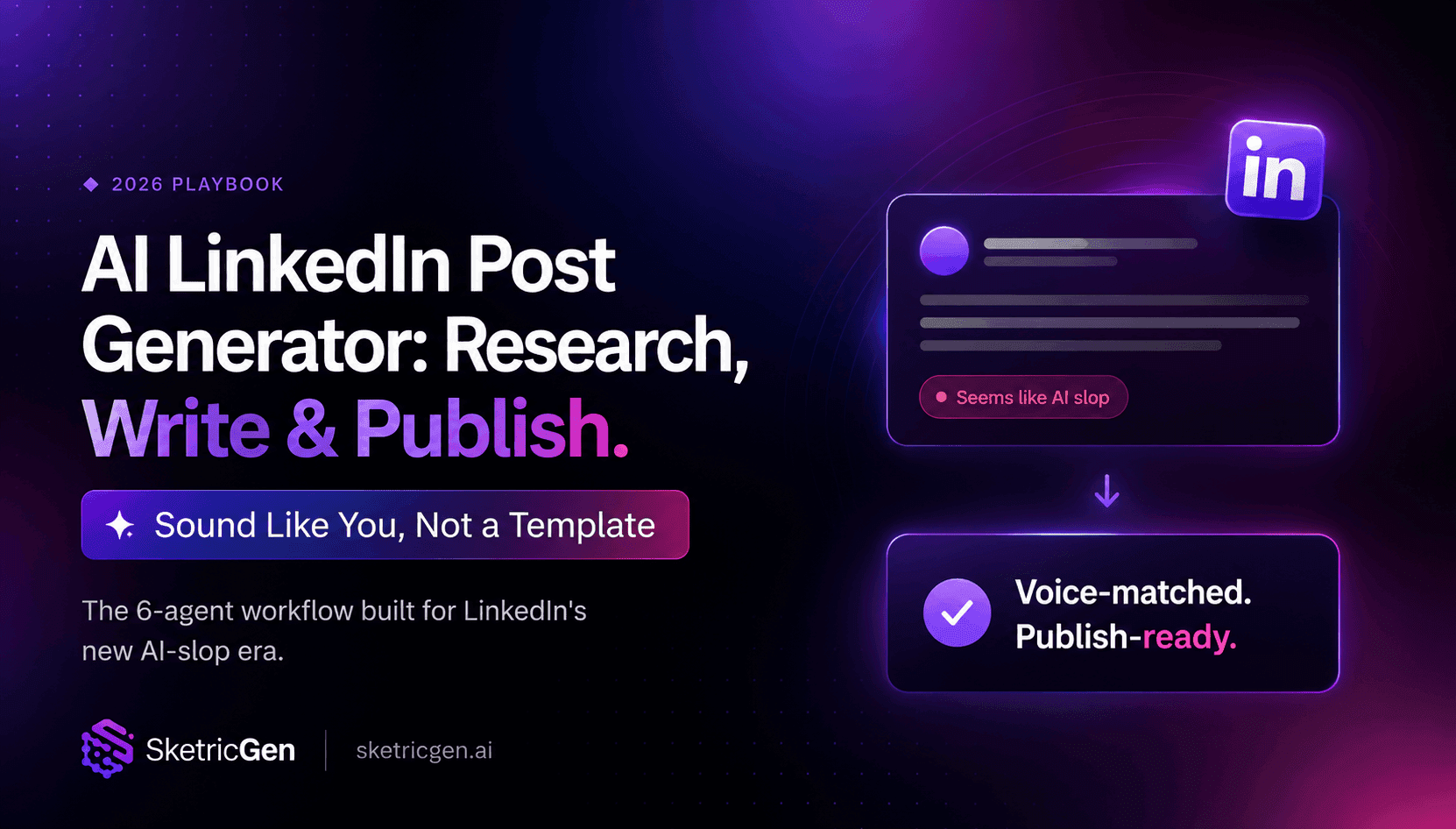
AI LinkedIn Post Generator: How to Research, Write & Publish Posts on Autopilot (2026)
tutorials
Instagram Auto-Reply: How to Build an AI Agent That Actually Answers Your DMs
tutorials
No-Code AI Agent Builder: The Complete Guide to Building Your First Agent (2026)
tutorials
AI Code Review Tool for GitHub: Automate PR Reviews with a No-Code Agent
tutorials
WhatsApp AI Chatbot for Customer Support: Why (and How) to Build One in 2026
tutorials