No-Code AI Agent Builder: The Complete Guide to Building Your First Agent (2026)
Most people who search for a no-code AI agent builder aren't actually sure which of four things they need to build. That mismatch, not the tool they picked, is usually why a "no-code agent" gets quietly abandoned three weeks after launch.
This guide fixes that in two steps. First, you'll figure out which of the four things you actually need. Then you'll build a real, working agent in SketricGen end to end, with the guardrails that practitioners who build these for a living say actually matter.
Who this is for
- You're **a founder or operator **who wants to automate a real workflow, not read another tool comparison.
- You run marketing, ops, or support and own a repetitive process that keeps landing on your desk.
- You've already read the "best no-code AI agent builder" listicles and still haven't built anything.
Key Points
- An "AI agent" and a simple automation are not the same thing. Most no-code build failures come from picking the wrong one, not from a bad tool.
- Answer four questions before you open any builder: can you draw the workflow as clear steps, does it have more than five unpredictable branches, is the cost of a wrong answer high, and will someone need to review or audit the output.
- "No-code" removes the coding, not the thinking. You still decide what the agent can and can't do on its own.
- The build itself, in SketricGen, takes six steps: pick a surface, set its instructions and starting source, connect your tools, add a sub-agent for the risky parts, test with traces, then publish or schedule.
- The biggest trust killer for a first agent isn't accuracy. It's a decision nobody can explain. Traceability beats a marginally higher accuracy number.
- Ready to build? Go straight to the no-code AI agent builder and follow the six steps below to ship your first one.
Automation or agent? How to tell which one you need
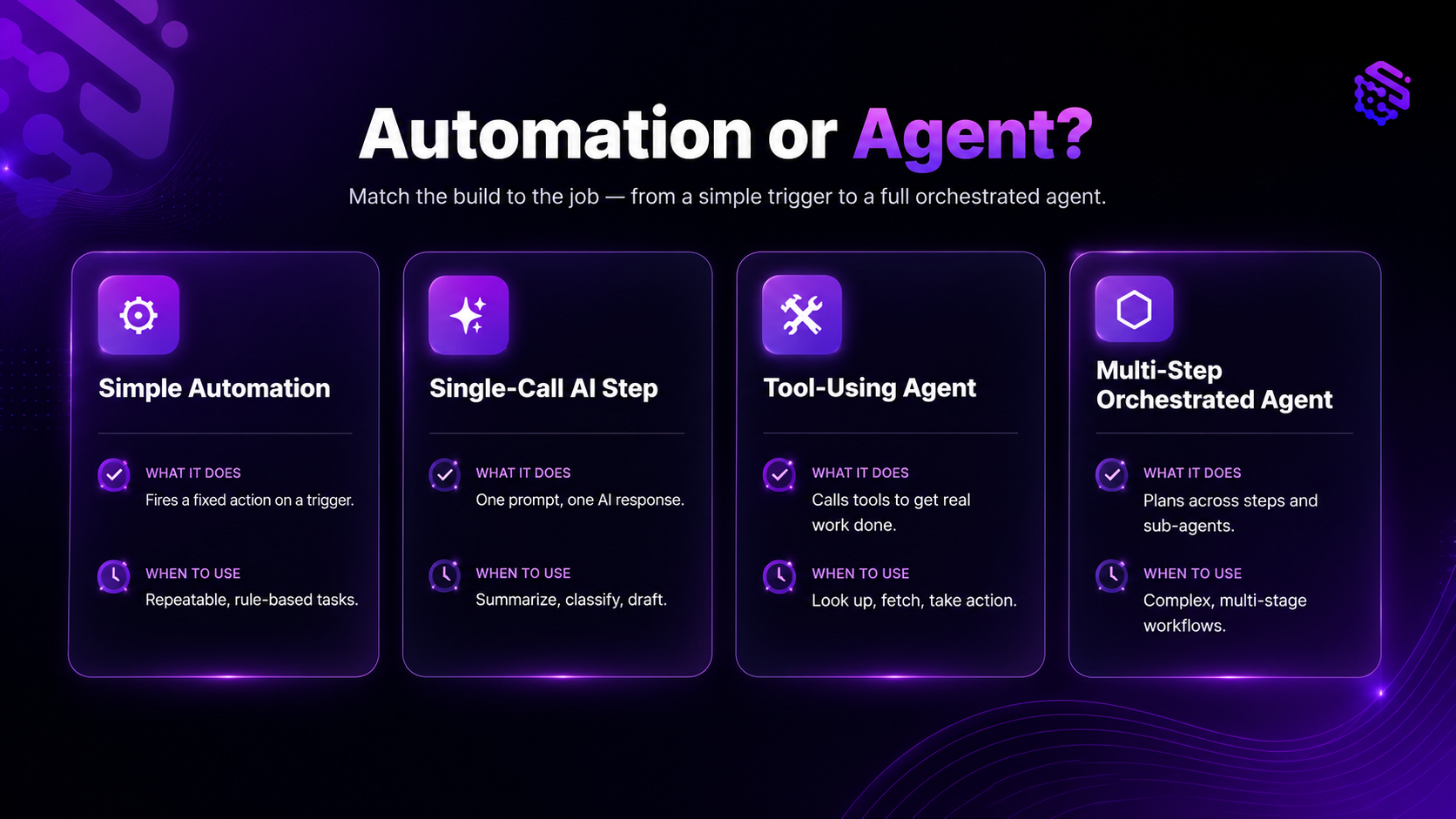
| Pattern | What it does | When it's the right call | Example |
|---|---|---|---|
| Simple automation | Moves data from A to B on a trigger, no judgment involved | The steps are fixed and never change | New form submission adds a row to a spreadsheet |
| Single AI call | One LLM call classifies, extracts, or drafts something | You need judgment on one narrow decision, low cost of a wrong answer | Tagging a support ticket by topic |
| Tool-using agent | Plans a short sequence of steps, calls tools, handles some ambiguity | Multiple steps, moderate ambiguity, someone can review the output | Qualifying an inbound lead against your ICP and drafting a follow-up |
| Multi-step orchestrated agent | A main agent plans, delegates to focused sub-agents, and produces a structured result | Multi-step work with real branching and a need for auditability | Routing intake requests across departments with escalation rules |
Most people searching for a "no-code AI agent builder" actually need the second or third row here, not the fourth. That's not a criticism. It's the more reliable and cheaper build, and it's still a real AI agent.
What is a no-code AI agent, really?
A no-code AI agent is a workflow where an AI model does more than answer one question. It can call tools, look at the result, and decide the next step, all built through a visual or prompt-based interface instead of a codebase.
That's meaningfully different from a chatbot (answers questions, doesn't act) and from a plain workflow automation (acts, but on fixed rules with no model in the loop). A lot of existing content, including AI search answers, blurs this line. A simulated search for "best no-code AI agent builder" surfaces tools built for chatbots and simple app flows, not tool-using agents. That's a real content gap, not a nitpick.
Practitioners see the same confusion from the buyer's side. As one commenter put it in a widely-read r/AI_Agents thread about this exact problem, the word "agent" is used so loosely in the market that most non-technical buyers can't reliably tell an LLM-powered automation from a true multi-step agent (source). If you remember one thing from this section: the interface can be no-code. The judgment calls still need to be designed on purpose.
Answer this before you open any builder
Before you touch a builder, answer these four questions honestly:
- Can you draw the workflow as a clear set of steps? If yes, you might only need an automation.
- Does it have more than five unpredictable branches? If not, a single AI call probably covers it.
- Is the cost of a wrong answer high? (Money, compliance, a customer relationship.) If yes, build in review steps and logging from day one, not later.
- Will someone need to audit or review the output regularly? If yes, plan for structured, traceable output from the start, not a prompt that just "sounds right."
What practitioners are saying: A builder who works with startups on this exact decision described three recent client requests, a telehealth intake router, a fintech reconciliation task, and a medspa no-show follow-up, where the client asked for an "autonomous AI agent" but a scoped-down build (a single AI call plus a few fixed rules) outperformed the fancier version on cost, speed, and trust. The deciding factor in all three cases was this same four-question checklist (source).
If you're still weighing the concept-level question of platform versus builder before you get to this checklist, our platform vs. builder breakdown covers that distinction in more depth.
How to build your first no-code AI agent in SketricGen
Here's the actual build, step by step. This assumes you've already answered the four questions above and decided you need a real agent, not just an automation.
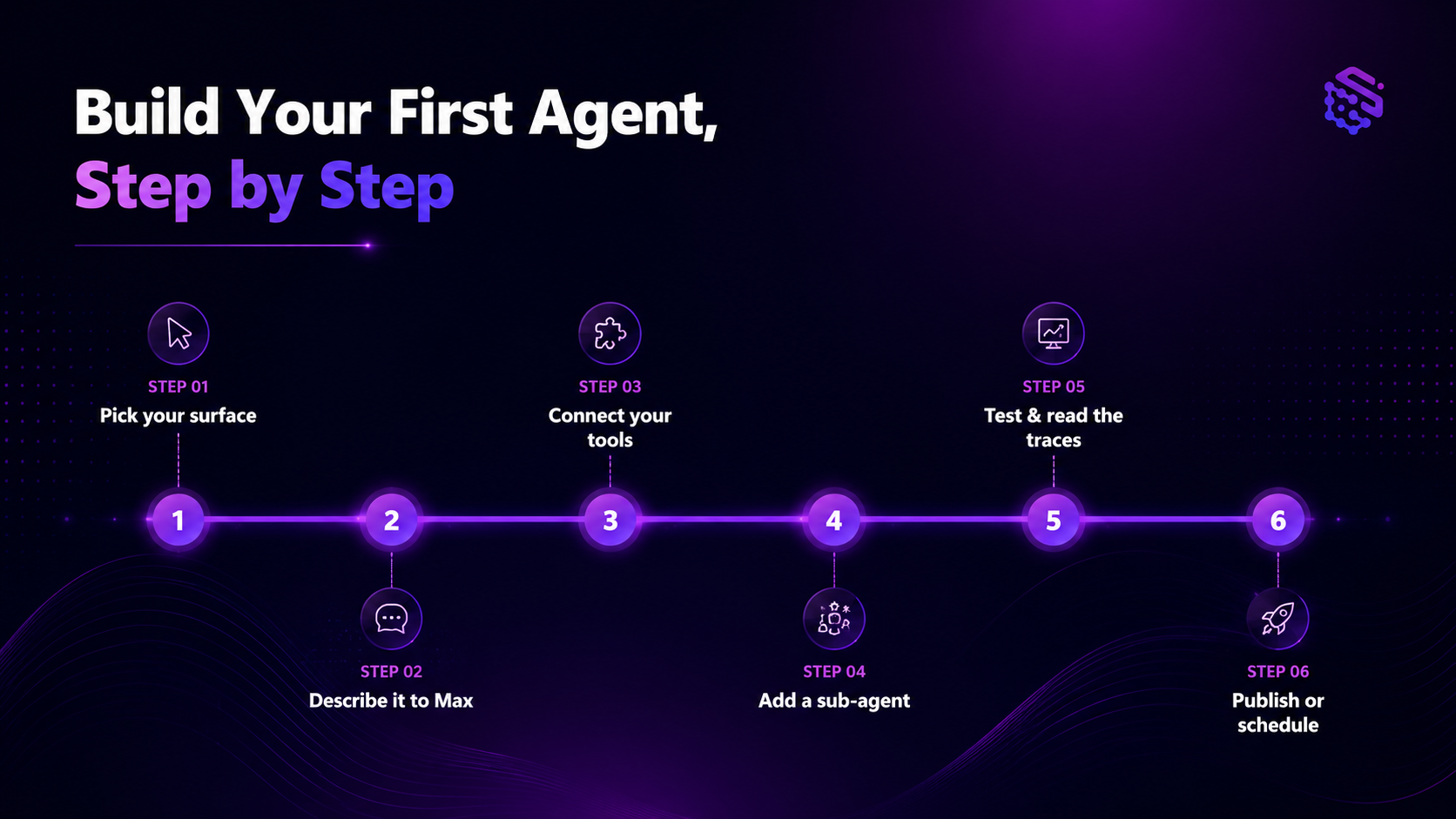
Step 1: Pick your surface: Brand Agent or AI Workforce
SketricGen splits agents into two surfaces, and picking the right one first saves you a rebuild later.
- Brand Agent: a customer-facing website agent, trained from your site, a Knowledge Base, and your Brand DNA, deployed as a widget for chat and lead capture. Use this if the agent talks to your website visitors or customers directly. See the Brand Agents overview for what this surface covers.
- AI Workforce: internal automation that runs in Agent Spaces, built for longer-running work, files, schedules, and multi-step logic. Use this if the agent's job is internal (routing, reporting, reconciliation, follow-ups) rather than customer-facing chat.
Step 2: Set your agent's instructions and starting source
Instead of wiring nodes on a blank canvas, you set the agent up directly. For a Brand Agent, add your website URL so it can train from your existing site content, Knowledge Base, and Brand DNA. For AI Workforce, write the task instructions straight into the Agent Space: what the agent should do, how it should sound, and any boundaries it shouldn't cross.
This is the part of the process that's genuinely no-code. It's also, per the practitioner sourcing above, the easy part. The harder work is the next three steps.
Step 3: Connect your tools and data
Attach the tools your agent actually needs: Knowledge Bases for your own content, 2,000+ SketricGen connectors for your existing apps, Web Search, API Request for anything custom, Custom MCP for a specific server you already run, and marketplace skills for pre-built task packages.
Pro tip: Not every step needs your most capable model. Classification and extraction subtasks are a lot cheaper on a smaller model, and several practitioners on Reddit specifically called out defaulting to a flagship model everywhere as an avoidable cost driver. Save the larger model for the step that actually needs judgment.
If your workflow needs a connection to a server you run yourself, our guide to connecting an MCP server to an AI agent walks through the three ways to do it.
Step 4: Add a sub-agent for the parts that need to be reliable
For any subtask that needs to be consistent (classification, extraction, summarization, validation), add a focused sub-agent as a tool the main agent can call. SketricGen keeps this to one level: sub-agents can't have their own sub-agents, which keeps the whole thing easier to trace and debug later.
This maps directly to how one practitioner described a working split on Reddit: let the model handle the fuzzy middle (summarize, classify, draft, flag uncertainty), and let rules, logs, and approvals handle anything that needs to be trusted. Use structured outputs (typed schemas) on the parts that feed downstream systems, so you get a predictable result instead of free-form text you have to parse by hand.
Step 5: Test in Playground and read the traces
Run the agent in Playground before you trust it with real volume. Every run produces traces: which tools were called, which sub-agents ran, latency, and credit usage.
This step exists to solve a specific failure mode that shows up over and over in practitioner threads: an agent that makes a decision nobody can explain. In one widely-discussed case, a support-ticket router hit 92% accuracy and still got ripped out, because the team couldn't trace why any single ticket landed where it did, and had started double-checking every classification anyway. Traces are how you avoid becoming that story.
Decision rule: If you can't answer "why did the agent do that" from the trace alone, don't ship it yet. Add a rule, a sub-agent, or a structured output field until you can.
Step 6: Publish or schedule
For a Brand Agent, publish the widget to your website. For AI Workforce, set up a scheduled run for anything that should happen on a recurring cadence (daily reports, weekly reconciliation, recurring follow-ups) instead of running it manually.
If you'd rather start from a working pattern than a blank Agent Space, browse SketricGen's templates for a faster starting point on common workflows.
No-code AI agent builder vs. n8n: which fits a first build
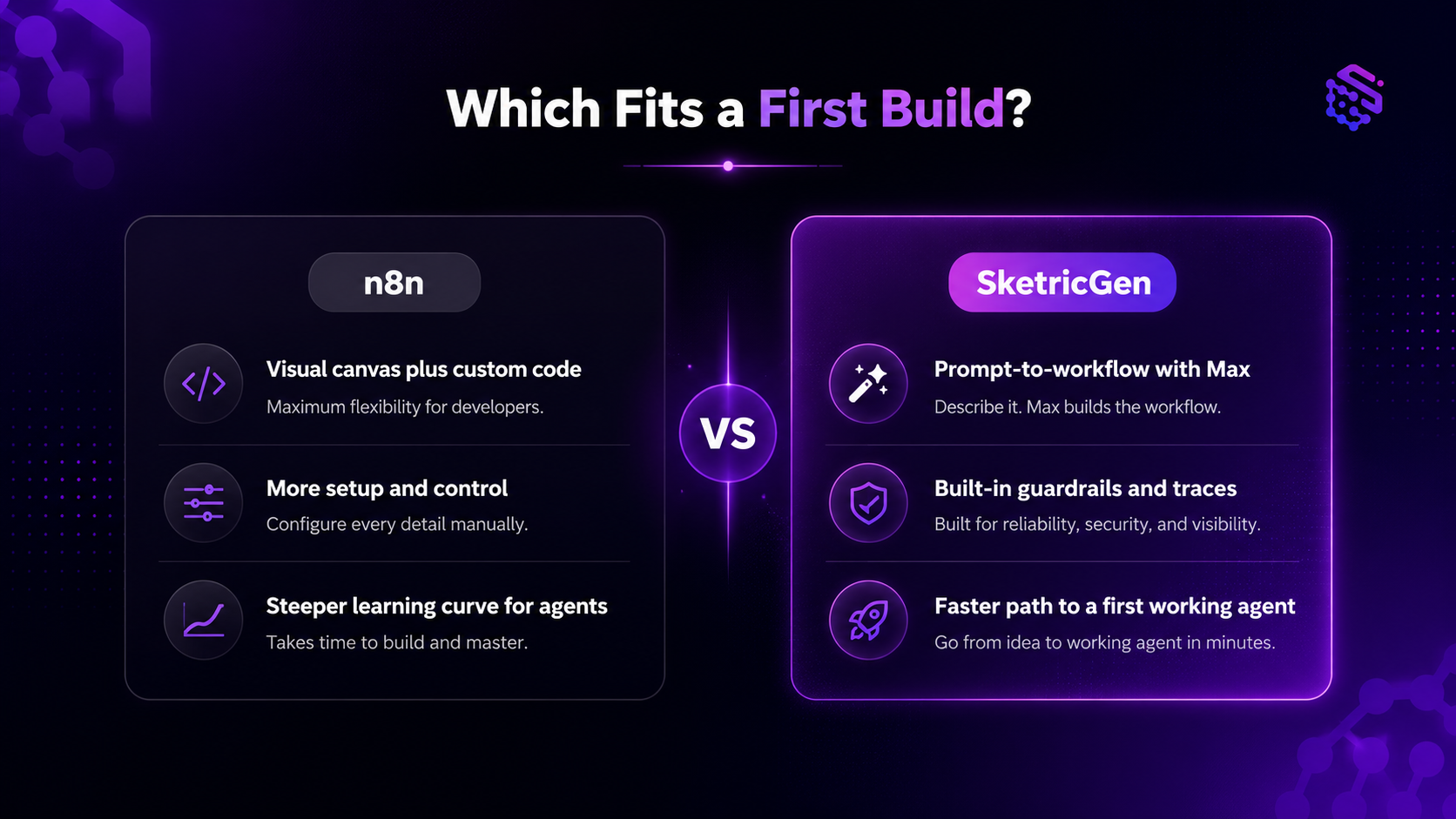
If you're comparing a no-code AI agent builder to n8n, the real difference for a first build isn't features. It's where the thinking happens. n8n gives you a visual canvas plus the option to drop into code nodes when you need custom logic, which is powerful but assumes you're comfortable designing the branching yourself. SketricGen instead has you set the agent's instructions and starting source up front, then hands you the same tool, connector, and sub-agent building blocks once the shape is set.
If you're already deep in n8n and weighing a switch, our n8n alternatives guide for no-code AI agent building covers the tradeoffs in more detail.
Common mistakes people make building their first agent
- Skipping the decision framework and building the fanciest version by default. Most requests for an "autonomous agent" are better served by a scoped automation. Build the smaller thing first.
- Connecting to messy, scattered data and expecting the agent to sort it out. Legacy systems and inconsistent spreadsheets cause more failed builds than model quality ever does.
- Believing "no-code" means "no thinking required." One Reddit commenter pushed back hard on marketing that says you can start an AI agency with zero technical background, pointing out that orchestration and judgment design is the actual work, and it's a short but not trivial part of the process.
- Skipping escalation and logging until after launch. Build the human-in-the-loop path and the decision log on day one. Retrofitting it after something goes wrong is the hard way to learn this.
- Optimizing for accuracy instead of explainability. As one practitioner summarized after ripping an AI classifier back out of a client's tool: "It's not autonomous. It's just a new kind of helper... plan for a human to be babysitting the thing for a long, long time." (source)
Want to see this pattern applied to a single, well-scoped use case first? Our guide to building an AI agent for customer service is a good next read.
Author's Take: what I'd tell you before you start
Here's my honest take after watching this exact debate play out across dozens of practitioner threads: the "no-code" part of no-code AI agent builders is real and it's valuable. It removes the barrier of hiring an engineer just to test an idea.
What it doesn't remove is the responsibility to design good judgment into the system. Start with the smallest version that solves one real problem. Make every decision the agent makes traceable, not just accurate. And when someone tells you that you can build a fully autonomous agent business with zero technical thinking involved, take it with a grain of salt. The building part is fast now. The part where you decide what the agent should and shouldn't be trusted to do alone is still on you, and it's worth doing carefully: "The problem was never accuracy," as one practitioner put it after ripping an AI classifier out of a client's tool. "The problem was that people need to understand why a system does what it does or they'll work around it." (source)
Build your first agent
If you've made it this far, you already know more than most people who open a builder cold: which of the four patterns you need, why traceability matters more than a marginally higher accuracy score, and the six steps to get from idea to a running agent.
Start with the smallest version that solves one real problem. If it's customer-facing, start with a Brand Agent. If it's internal, build your first agent in SketricGen, or start from a template instead of a blank Agent Space.
FAQs
An AI agent is a system where an AI model can call tools, evaluate the result, and decide a next step, rather than just answering a single question. You build one no-code by setting the agent's instructions and starting source, connecting the tools it needs, and testing it with real inputs before you trust it with production volume.
Yes, for the interface. No-code builders remove the need to write code to wire tools together or generate a workflow. What they don't remove is the design work: deciding what the agent should decide on its own versus what needs a rule, a review step, or a human in the loop. Marketing that promises a fully hands-off build with zero thinking required is oversimplified.
In practice, the two terms overlap heavily and are often used interchangeably in the market. A "builder" usually emphasizes the tool for constructing a specific agent, like setting its instructions and connecting its data sources, while a "platform" refers to the broader environment (Agent Spaces, connectors, deployment, scheduling) the agent runs inside. For a deeper conceptual breakdown, see our platform vs. builder comparison.
More than most people expect at first, especially in the early weeks. Plan for a human to review outputs regularly until you've built enough traces and structured output history to trust the pattern. Practitioners who build these professionally consistently describe early-stage agents as needing active oversight, not full autonomy, and that's normal, not a sign of failure.
Yes. Multi-model support means you can choose the underlying model for a given agent or sub-agent based on the task: a stronger model like Claude for steps that need more judgment, and a smaller, cheaper model for simple classification or extraction subtasks.
The right answer depends on whether your first build is customer-facing or internal, and how much you want the builder to help design the workflow versus assemble it yourself. For a broader comparison across several tools before committing, our tested no-code AI agent builders roundup is a good starting point.
For a first agent, a prompt-to-workflow builder tends to be faster because it front-loads the design conversation instead of expecting you to plan the branching yourself on a canvas. n8n remains a strong option if you already think in visual workflows and want direct access to code nodes for custom logic. See our n8n alternatives guide for the full comparison.
Related blogs
View more
SEO Automation: The No-Code Build, Start to Finish
tutorials
How to Build an AI Marketing Agent (End to End)
tutorials
No-Code Automation Platforms for Marketing Teams: Grow Business without Employees
tutorials
AI LinkedIn Post Generator: How to Research, Write & Publish Posts on Autopilot (2026)
tutorials