WhatsApp AI Chatbot for Customer Support: Why (and How) to Build One in 2026
Who this is for
Support leads and small business owners who run WhatsApp Business and are stuck answering the same "where's my order," "what are your hours," and "how do I return this" messages every day. If you want a no-code way to answer from your own knowledge base and hand off to a human when the bot can't help, this is your build.
Key Points
- A whatsapp ai chatbot built for support (not sales) answers from your own knowledge base and knows when to stop and escalate.
- SketricGen's WhatsApp AI Agent template uses two agents: one that answers from File Search, one that escalates to a human by email.
- Setup takes about 10-15 minutes; deployment to a live WhatsApp number takes longer because Meta has to verify your business.
- Meta's 2026 WhatsApp policy bans general-purpose chatbots but explicitly allows scoped support bots like this one.
- You can extend the base template with Slack, Notion, or any of SketricGen's 2,000+ connectors once the core bot is working.
- Works the same way for ecommerce stores, services businesses, and SaaS support: only the knowledge base content changes.
Most WhatsApp chatbot content is written for sales teams. This one isn't. It's built for the person answering support tickets at 9pm because the bot can't tell "where's my order" from "I want a refund." This walkthrough is built directly from SketricGen's live template and deployment docs, not a generic explainer. Below is the actual architecture behind SketricGen's WhatsApp AI Agent template, how to set it up, how to connect it to tools like Slack and Notion, and how to get it live on a real WhatsApp number.
The Real Problem With WhatsApp Support (It's Not Volume, It's Repetition)
Support teams don't drown because they get too many messages. They drown because most of those messages are the same handful of questions, over and over.
A recurring pattern in small ecommerce support discussions: a large share of tickets come down to order status, hours, and return policy, not novel problems. That's not a volume problem. It's a repetition problem, and repetition is exactly what a knowledge-base-grounded bot is good at absorbing.
There's also a speed expectation baked into the channel itself. WhatsApp messages see open rates around 95-98%, compared to roughly 20-25% for email, according to Searchlab's 2026 WhatsApp Business statistics roundup. Customers who message on WhatsApp expect a near-immediate reply, not a next-business-day one, which is exactly why the same five questions landing at 9pm feel so much heavier on WhatsApp than they would in an email queue.
That expectation gap is also where support teams burn out. Answering "where's my order" for the fortieth time in a shift isn't hard work, but it's draining work, and it's the kind of repetitive load that pushes experienced support staff toward other jobs. Automating the repetitive share of the queue isn't just a cost play; it's what keeps a human team available and fresh for the conversations that actually need a person.
| Question type | Typical share of WhatsApp support volume | Best handled by |
|---|---|---|
| Order status / tracking | High | Bot (File Search + order data) |
| Hours, location, policies | High | Bot (File Search) |
| Return / refund requests | Medium | Bot for policy, human for exceptions |
| Complaints, edge cases | Low volume, high stakes | Human (escalation) |
Decision rule: if a single question type accounts for more than 20% of your WhatsApp support volume, automate that one first. Don't try to automate everything on day one.
Why a Support Bot Is Different From a Sales Bot
Most WhatsApp AI content, including earlier posts from SketricGen, is written around sales: lead qualification, 24/7 sales assistants, booking calls. A support bot has a different job.
A sales bot's goal is to move a stranger toward a conversation. A support bot's goal is to resolve a known customer's problem correctly, or admit it can't and get them to someone who can. Optimizing for "sounds confident" is fine for sales. It's dangerous for support, where a wrong answer erodes trust in your brand, not just your bot.
That's the gap this post fills: a build built specifically for support, not sales, using SketricGen's underlying platform.

What the WhatsApp AI Agent Template Actually Does
The template is a two-agent system, not one monolithic bot.
| Agent | Job | Trigger | Output |
|---|---|---|---|
| Support Agent | Answers customer questions using your own content | Incoming WhatsApp message | Direct reply grounded in your File Search knowledge base |
| Escalation Agent | Hands off anything the Support Agent can't confidently answer | Support Agent flags low confidence or an explicit "talk to a human" request | Email to your team with subject line [Support] Customer query needs attention |
The Support Agent only knows what you give it (your FAQ, policies, product docs) through File Search. It isn't a general-purpose model improvising answers about your business. That's the point: it can't hallucinate a return policy it was never given.
Mistake I made (and see teams repeat): treating escalation as a nice-to-have added at the end. Design the escalation path first. Decide what "the bot doesn't know" looks like before you decide what "the bot knows" looks like.
Step-by-Step: How to Build It
This isn't abstract advice. Here's the actual sequence:
Before you start, have three things ready: your FAQ or policy content in a format you can upload (PDF, doc, or plain text), a Gmail account you're comfortable connecting for escalations, and a WhatsApp Business number (new or existing). None of these take long to gather, but having them ready before you open the template saves a stalled setup session.
- Open the template. Start from the WhatsApp AI Agent template in your SketricGen dashboard.

-
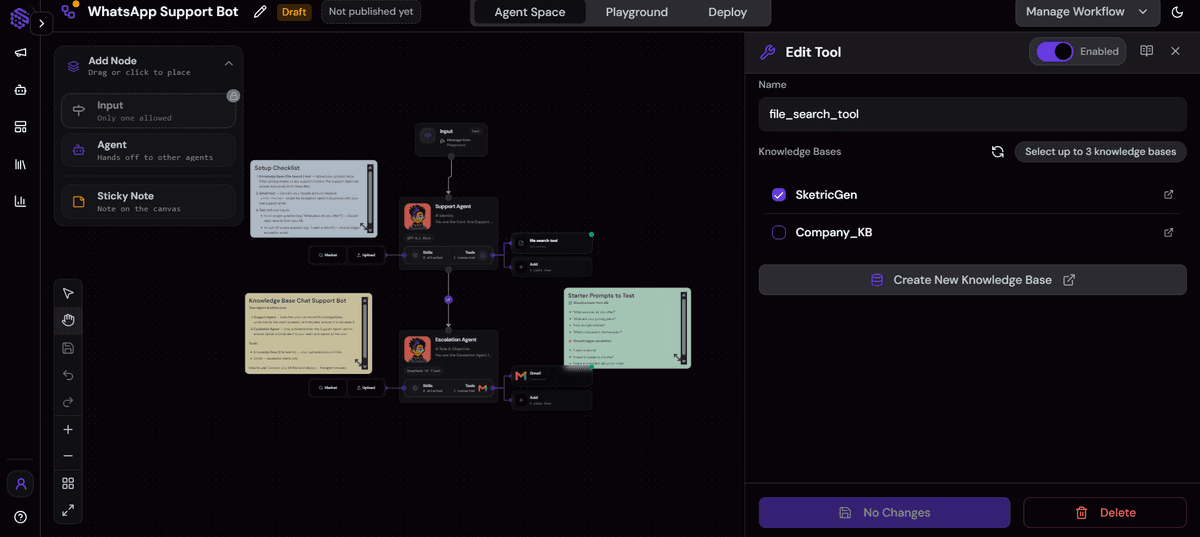
Connect your knowledge source. Upload your FAQ, policy docs, and product information to File Search. This becomes the Support Agent's only source of truth.
-
Configure the Escalation Agent. Connect Gmail, confirm the escalation subject line (
[Support] Customer query needs attention), and set the condition that triggers a handoff (low confidence, explicit request for a human, or a flagged topic like billing disputes).

- Extend with more tools if you need them. The core template ships with File Search and Gmail. If you want escalations routed to Slack instead of (or alongside) email, or want ticket records logged to Notion, add that connector: pick the app, connect the account, then select only the specific actions this agent should be allowed to call. SketricGen supports 2,000+ connectors through this same pattern, so Slack and Notion follow the identical flow. No separate build required.
- Test in the Playground before going live. Run real support questions through it. Confirm the escalation trigger actually fires before you connect a live phone number.

Decision rule: keep it Gmail-only until the bot has answered real questions correctly for at least a week. Add Slack or Notion once you trust the base answers, not before.
Deploying to a Real WhatsApp Number
Building the agent is the easy part. Getting it live on WhatsApp means going through Meta's business verification flow, since WhatsApp is Meta's platform, not SketricGen's.

| Path | Best for | Rough steps |
|---|---|---|
| Add New Number | Teams without an existing WhatsApp Business number | Connect via Playground, log in with Facebook, create/select a business portfolio, verify the phone number, submit for Meta approval |
| Existing Business App User | Teams that already have a WhatsApp Business API number | Connect the existing business account, confirm permissions, link the number to the agent |
Full instructions, including screenshots of each Meta screen, are in SketricGen's WhatsApp deployment guide. Budget extra time here: Meta's review isn't instant, and approval timing is outside SketricGen's control.
Why This Approach Still Works Under Meta's 2026 WhatsApp Rules
This is the part most "how to build a WhatsApp chatbot" content published before late 2025 misses.

Meta updated its WhatsApp Business Platform policy to bar general-purpose, open-domain AI chatbots: the kind that will chat about anything, not just your business. The rule applied to new WhatsApp Business accounts starting October 15, 2025, and extends to all accounts from January 15, 2026. Scoped bots for customer service, sales, bookings, notifications, and authentication remain explicitly allowed. Coverage of the change, including the specific dates and what counts as "general-purpose," is in respond.io's breakdown of Meta's WhatsApp chatbot policy.
The WhatsApp AI Agent template is scoped by design: it answers from your File Search content and escalates what it can't handle. It isn't built to hold open-ended conversations about anything. That's not a workaround for the new rule. It's the same design a well-built support bot should have had anyway.
Who This Works Well For
The two-agent pattern isn't specific to any one type of business. What changes from one deployment to the next is the content you load into File Search and where the escalation line sits.
| Business type | Common WhatsApp questions | Bot handles directly | Goes to escalation |
|---|---|---|---|
| Ecommerce store | Order status, shipping times, return policy | Yes, from order data and policy docs | Damaged items, disputes, refund exceptions |
| Services company (agency, clinic, salon, contractor) | Availability, pricing, booking process | Yes, from service menu and scheduling policy | Custom quotes, complaints, rescheduling conflicts |
| SaaS / software product | Plan differences, setup steps, common errors | Yes, from product docs and FAQ | Billing disputes, bugs, account-specific issues |
| Local / home services | Service areas, hours, callout pricing | Yes, from published pricing and coverage docs | On-site quotes, emergency requests |
Two honest caveats. If your business genuinely gets few repeat questions (highly custom work, one-off consulting), the repetition this bot is built to absorb may not exist in enough volume to be worth the setup. And if you're in a compliance-heavy industry (healthcare, financial services, legal), get your escalation rules and any required disclosures reviewed before going live, not after.
Common Mistakes to Avoid
- Skipping the knowledge base. A bot without File Search grounding will guess, and guessing about your return policy is worse than no bot at all.
- No real escalation path. If "talk to a human" doesn't actually reach a human quickly, customers stop trusting the bot within one bad experience.
- Turning it into a general assistant. Letting the bot answer off-topic questions risks both bad answers and Meta policy violations under the 2026 rules.
- Going live without testing. Test every likely question in the Playground before connecting a real number. Fixing a bad answer after launch costs more trust than it saves in time.
What Practitioners Are Saying
A recurring pattern across small business and ecommerce discussions: teams that abandoned earlier chatbot attempts point to the bot answering confidently when it shouldn't have, or having no clear path to a human, as the actual reason they lost trust in it. Not that the bot occasionally missed an answer.
Separately, in automation-focused communities, Meta's 2026 policy change is being discussed directly among people actively building WhatsApp bots, not as abstract news. That confirms this is a live, current concern for anyone shipping a WhatsApp agent in 2026.
Author take (Sam)
The trust problem was never really "can the bot answer." It's "does the bot know when to stop." A support bot that says "I'm not sure, let me get someone who can help" builds more trust over time than one that always sounds confident. That's why the Escalation Agent isn't an add-on in this template. It's half the product.
The teams that get the most out of this pattern are the ones that resist the urge to make the bot do everything on day one. Whether it's an ecommerce store fielding shipping questions or a services business fielding booking requests, the setup that works is narrow: pick the handful of questions you're tired of answering, load exactly that into File Search, and let everything else go to a human until you've watched the bot get the easy questions right for a while. Scope creep, not bad AI, is what turns a useful support bot into an untrustworthy one.
Next Steps
If your team is answering the same 20 questions on repeat, start with the WhatsApp AI Agent template. Connect your knowledge base, set the escalation path, test it, then deploy. If you're weighing cost before committing, check SketricGen's pricing first.
FAQs
Yes, if it's scoped. Meta's 2026 policy bans general-purpose, open-domain chatbots on WhatsApp Business, not bots built for a specific job like customer service, sales, bookings, notifications, or authentication. The WhatsApp AI Agent template is scoped to support by design, so it fits the allowed category.
A sales bot is built to qualify leads and move conversations toward a call or purchase. A support bot is built to resolve existing customers' questions accurately and hand off anything it can't answer. They use different content, different success metrics, and different escalation logic.
Yes. The core template uses File Search and Gmail, but you can add Slack, Notion, or other tools the same way: pick the app, connect the account, and select only the actions the agent should be able to call. SketricGen supports this pattern across its full connector library.
The template setup itself takes roughly 10-15 minutes once your knowledge base content is ready. Getting a real WhatsApp number live takes longer, since it depends on Meta's business verification and approval timing.
The Escalation Agent takes over. It sends an email with the subject line [Support] Customer query needs attention so your team can step in, instead of letting the bot guess or leave the customer stuck.
You need a WhatsApp Business presence connected through Meta's verification flow. Whether that's a brand-new number or an existing WhatsApp Business API number, both paths are supported. See the deployment guide for the exact steps for each.
Yes, both, though the questions differ. Ecommerce support leans on order status, shipping, and returns; services businesses (agencies, clinics, salons, contractors) lean on bookings, availability, and pricing. Either way, the setup is the same: load your own content into File Search and let the Escalation Agent catch what's left over.
Related blogs
View more
SEO Automation: The No-Code Build, Start to Finish
tutorials
How to Build an AI Marketing Agent (End to End)
tutorials
No-Code Automation Platforms for Marketing Teams: Grow Business without Employees
tutorials
AI LinkedIn Post Generator: How to Research, Write & Publish Posts on Autopilot (2026)
tutorials
Instagram Auto-Reply: How to Build an AI Agent That Actually Answers Your DMs
tutorials