AI LinkedIn Post Generator: How to Research, Write & Publish Posts on Autopilot (2026)
Most people try an AI LinkedIn post generator exactly once. Type a topic, get a draft back, read it, and realize it doesn't sound like you at all. So you rewrite the whole thing by hand anyway. The tool isn't broken. It's just missing three steps: research, a voice reference, and an edit pass. This piece breaks down what those three steps actually look like, and walks through the 6-agent template built to handle them automatically.
Who this is for
- Business owners who need a steady flow of LinkedIn posts but don't have an hour a day to write them.
- Marketing heads who want every post to sound on-brand without personally reviewing each one line by line.
- Social media managers juggling multiple client voices, where a tool that writes the same way for everyone becomes a liability fast.
Key Points
- LinkedIn now flags posts that read as AI-generated with a "Seems like AI slop" report button, launched July 30, 2026 by LinkedIn's own product team.
- The push isn't cosmetic: outside research cited in the rollout coverage found more than 40% of long-form LinkedIn posts are already fully AI-generated.
- Most AI LinkedIn post generators write exactly the pattern that button is built to catch: short, choppy, sameish sentences with no real research behind them.
- A LinkedIn post generator that actually works needs three things a single prompt can't provide: topic research, a voice reference, and an edit pass.
- SketricGen's AI LinkedIn Post Generator template runs six specialist agents so posts come out reading like the person who's supposed to have written them, not a template speaking on their behalf.
- Setup takes 10 to 20 minutes once. After that, a publish-ready post takes minutes instead of the 45+ that most people currently spend on research and drafting.
LinkedIn can now flag your posts as "AI slop." Here's why that matters
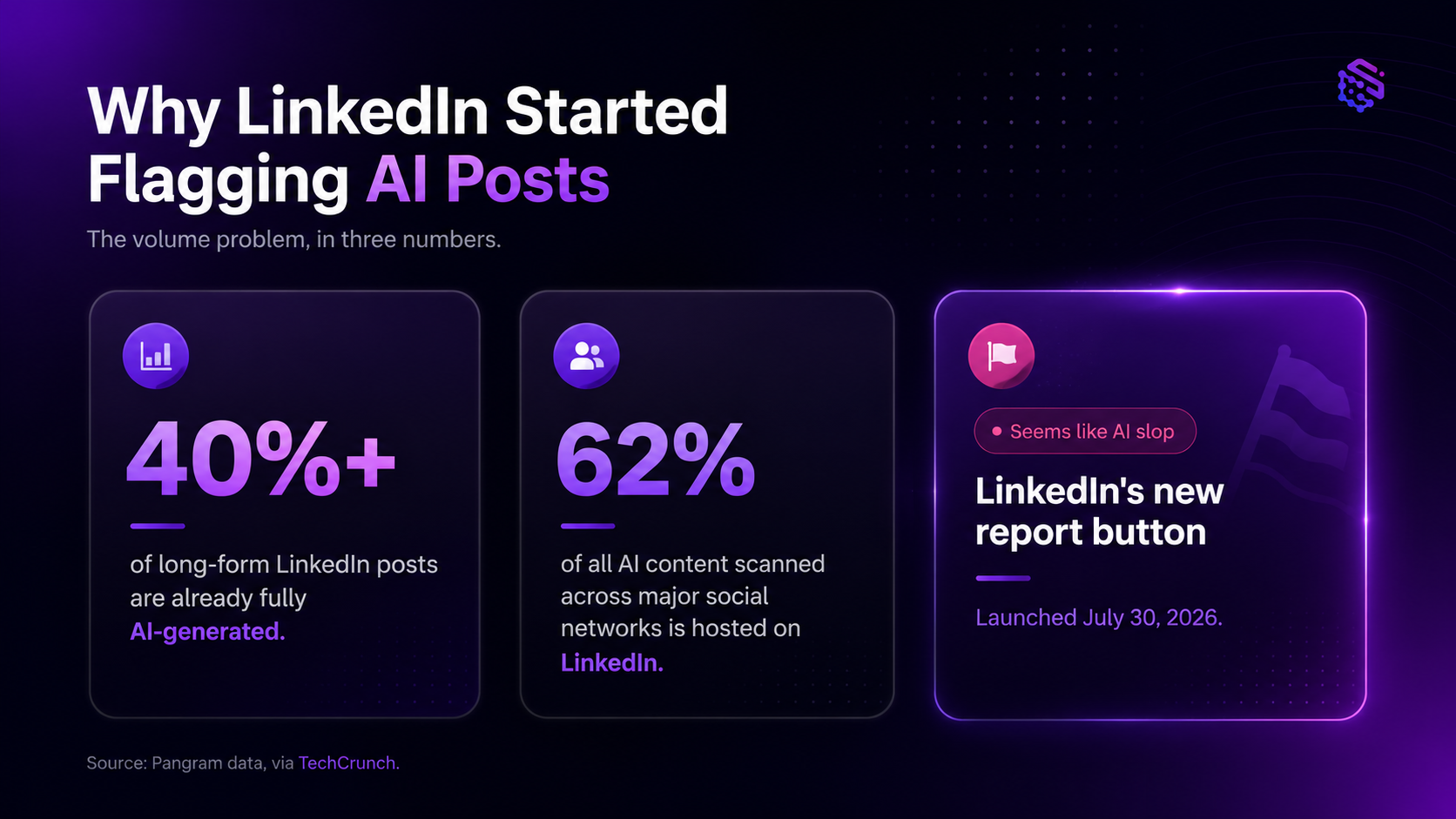
On July 30, 2026, LinkedIn's chief product officer, Hari Srinivasan, announced a "Seems like AI slop" report button, so anyone can flag content straight from a post's menu. TechCrunch covered the rollout: reports hide the post from the reporter's own feed and feed LinkedIn's detection systems, helping the platform spot similar content going forward.
The timing isn't random. Data from AI detection firm Pangram, cited in that same coverage, found that more than 40% of long-form LinkedIn posts are already fully AI-generated, and LinkedIn hosts roughly 62% of all AI content scanned across major social networks. LinkedIn also pulled its own "enhance your post" AI writing feature in the same move, replacing it with a plain proofreading tool, and started privately flagging accounts in their own dashboards when content reads as inauthentic.
The public reaction matched the scale of the problem. The announcement thread on r/technology pulled over 2,200 upvotes and spread to general-interest subreddits within days, which says something: this isn't a niche complaint anymore. AI-sounding content now carries a real, visible cost, and it's a platform-level one.
People who post regularly on LinkedIn already know the pattern by feel. One practitioner on r/linkedin described it bluntly: "No more sentences. That's are too short. And always the same." Short, punchy, repetitive fragments. Every post sounds like it came from the same template, because it did.
Why most AI LinkedIn post generators write exactly what gets flagged
Type one instruction into a generic AI tool and it does exactly what you asked: it writes a LinkedIn post, not your LinkedIn post. There's no research behind the claim you're making, no reference for how you actually talk, and no editing pass to catch the parts that sound off.
That's the gap. A single prompt can't hold three things at once: a real point worth making, your voice, and a clean edit pass. Most tools skip straight to output and call it done. Even mainstream advice backs this up as the actual fix: a Forbes piece on writing human-sounding LinkedIn posts with AI lands on the same point. Feed the model your actual voice and context instead of relying on a generic prompt.
Mistake I made: pasting one prompt into a generic AI tool, getting something that technically works, and publishing it as-is. It reads fine in isolation. Post five of them in a row and the sameness becomes obvious, to you and to your audience.
People have already found the manual workaround, and it's telling. On r/LinkedInTips, one thread lays out what it actually takes to get an AI draft to sound human: paste 3-4 of your past posts as voice samples, ban corporate phrases outright, and force short sentences in first person. It works. It also adds three manual steps most people won't remember every time they need a post.
What a LinkedIn post generator actually needs to do
Here's the honest comparison, side by side.
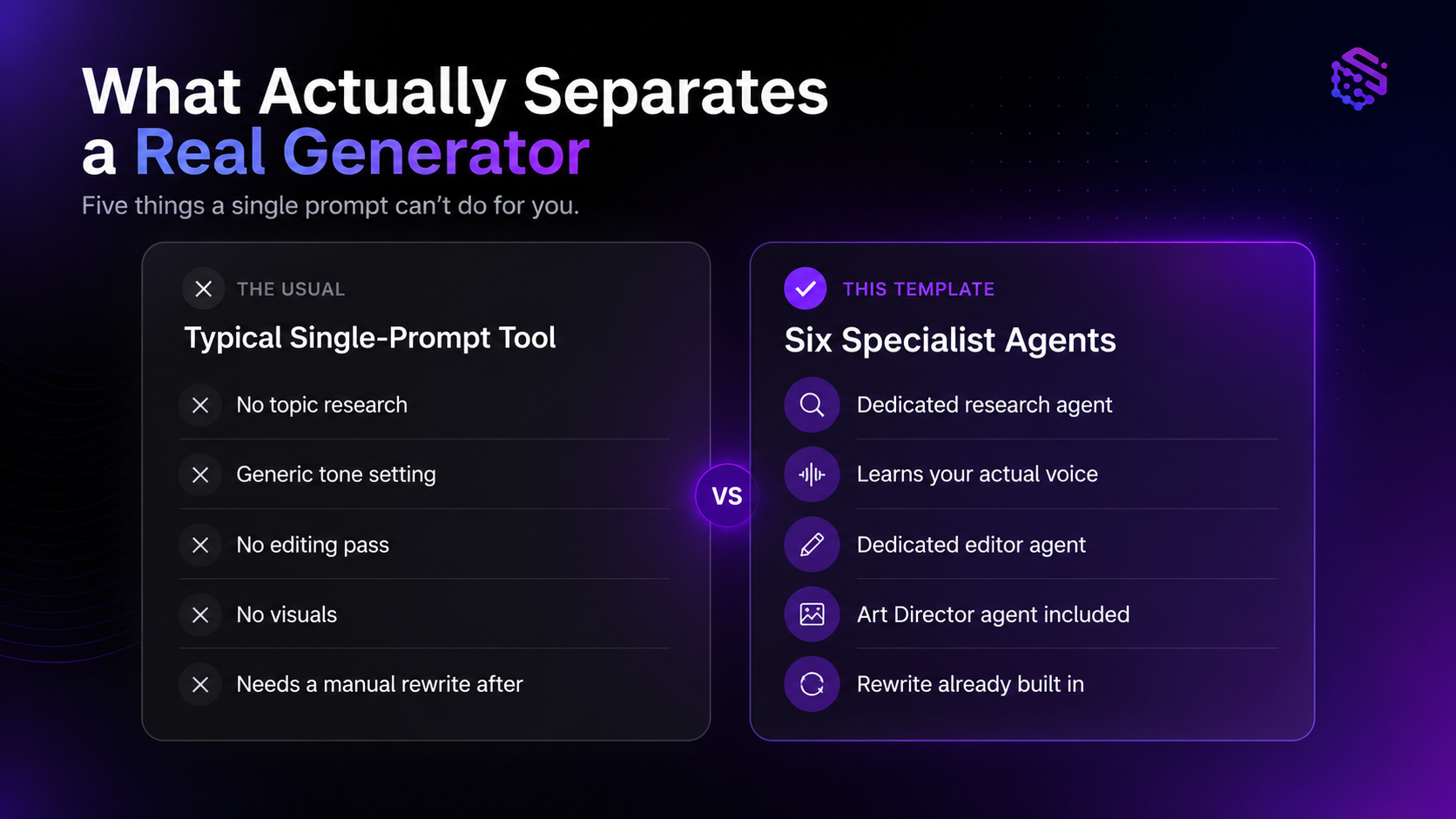
| Capability | Typical single-prompt tool | This template |
|---|---|---|
| Topic research | None. Writes from the prompt alone | Dedicated research agent pulls context before drafting |
| Voice matching | Generic tone setting ("professional," "casual") | Learns from your actual past posts, provided once at setup |
| Editing pass | None. First draft is the final draft | Dedicated editor agent checks tone, length, and clarity |
| Visual/graphic support | Usually none, or a separate tool | Art Director agent can produce accompanying visuals |
| Time to a publish-ready post | Minutes, but often needs a manual rewrite after | Minutes, with the rewrite already built into the workflow |
Inside the AI LinkedIn Post Generator template: how the 6-agent workflow works
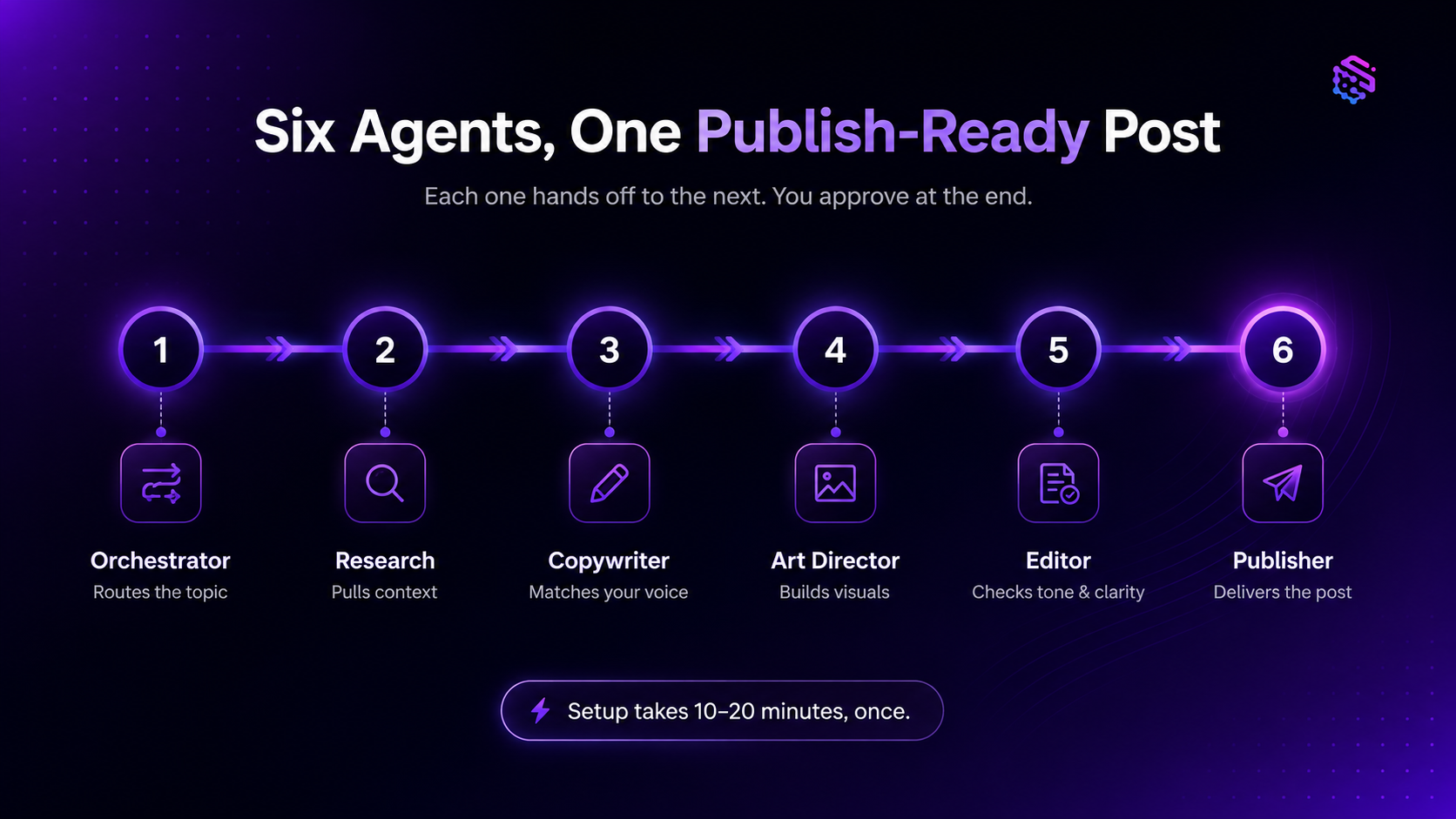
This is what a LinkedIn post generator built for actual publishing looks like under the hood, not just a chat box that returns text.
The template runs six agents that hand work off to each other:
- Orchestrator: takes your topic or idea and routes it to the right specialist.
- Research agent: pulls context and supporting points so the post has something real to say.
- Copywriter agent: drafts the post from your actual voice samples instead of a generic tone preset.
- Art Director agent: produces an accompanying image or graphic when the post calls for one.
- Editor agent: reviews tone, length, and clarity before anything goes out.
- Publisher agent: delivers the finished post to wherever you review and post it from.
Setup is a one-time, 10 to 20-minute interview covering what you post about, who you're writing for, and (the part that actually matters for the "sounds like you" problem) a handful of real posts you've written before, so the Copywriter agent has something to match against.
Pro tip: the setup step people skip is pasting in real post samples. Skip it and you get competent-but-generic output. Do it, and the difference between "sounds like AI" and "sounds like you" mostly disappears.
Builders on r/SideProject have independently landed on the same conclusion: a single-prompt generator isn't enough. Getting output that reads as human takes a multi-step process. A bigger prompt won't get you there.
What you actually get with this template
Setting up an agent workflow only makes sense if it earns back more than the setup cost. Here's what that actually looks like in practice.
- Publish-ready posts, not first drafts. The Editor agent runs before you ever see the output, so what lands in front of you is ready to post instead of something you still need to rewrite.
- A voice that holds up over time. Because the Copywriter agent works from your actual past posts, tone stays consistent whether you're posting once a week or once a day, instead of drifting the way manual prompting tends to.
- The Research agent pulls context before drafting, so every post has an actual point, not a generic observation dressed up as insight.
- Need a graphic to go with the post? The Art Director agent produces one in the same run, so you're not switching to a separate design tool for something this simple.
- This template is a starting point, not a fixed script. SketricGen's Agent Builder, Max, lets you adjust agents, instructions, or connected apps later without rebuilding the workflow from scratch.
Common mistakes people make with AI LinkedIn post generators
- Skipping the voice-sample step is the single biggest factor in whether a post sounds like you or like a template.
- Publishing the first draft with no edit pass. Even a good draft benefits from one more read before it goes live.
- Chasing virality instead of consistency. One big post won't move your pipeline. A steady weekly presence will.
- A post backed by real research reads completely differently than a generic observation dressed up as a point.
- Keyword-stuffing captions for search. LinkedIn posts aren't ranking pages. Write for the person scrolling. The algorithm isn't your audience.
What practitioners are saying
The pattern-matching problem isn't theoretical. The r/linkedin thread cited earlier shows how easily people already spot AI writing by ear, and the r/LinkedInTips workaround (voice samples, banned words, short sentences) is the manual version of exactly what a multi-agent workflow automates.
On the automation side, the r/SideProject discussion is worth reading in full if you're evaluating tools. Builders who've tried to solve "make AI LinkedIn posts sound human" independently converge on the same answer: research, a voice reference, and an edit pass. No prompt, however clever, replaces that.
Author's Take
Pasting your last three LinkedIn posts into ChatGPT and asking it to match your tone works, once. It's what the r/LinkedInTips thread recommends, and it's genuinely good advice for a single post.
It doesn't hold up as a weekly habit. By week three you're re-explaining your voice, re-pasting the same examples, and doing the editing pass yourself anyway. At that point you're not saving time. You're doing the same manual work with extra steps.
What actually compounds is consistency, not any individual post's performance. The r/Entrepreneur thread on six months of daily posting backs this up: 236 upvotes on a post that's essentially "I showed up and posted every day, and that's what worked." Not one viral hit. A repeatable process that doesn't take an hour each time is what makes daily posting realistic in the first place.
Is an AI LinkedIn post generator worth it for lead generation?
For business owners and marketing heads, the honest answer is that it supports lead generation. It doesn't replace it. A LinkedIn post generator keeps your presence consistent and on-brand, which is what earns you visibility with the people who'd eventually become leads. If lead capture is the actual goal, that still needs its own dedicated workflow.
If lead capture itself is the bottleneck rather than content output, that's worth solving separately with a dedicated tool, such as a website lead capture chatbot that catches visitor interest directly instead of routing everything through content alone.
Next steps
If the research-and-drafting bottleneck is what's keeping you from posting consistently, a better prompt won't fix that. A workflow that handles the research, matches your voice, and edits before you ever see the draft will. That's what the AI LinkedIn Post Generator template is built to do. Setup takes 10 to 20 minutes, and it stays adjustable through Max, SketricGen's Agent Builder, if your workflow needs change later.
If blog content is also on your plate, the SEO-Optimized Blog Writer template runs the same research-to-publish approach for long-form posts.
FAQs
Because most AI tools default to safe, neutral, formal language when they don't have a voice reference to work from. Without real examples of how you actually write, the model fills the gap with generic professional phrasing, which is exactly the pattern both Reddit and Quora users describe as "sounding like a press release." Giving the tool real past posts to match against is what fixes it.
Give the tool real examples of your own past posts, avoid corporate buzzwords outright, and keep sentences short and in first person, per the workaround shared on r/LinkedInTips. A workflow that builds voice-matching and an edit pass into the process automatically does this every time instead of relying on you to remember it.
LinkedIn's report button depends on other users flagging content. There's no automated scanner doing this for you, so detection isn't guaranteed. That said, the posts practitioners describe as getting flagged share the same traits: short, repetitive, generic sentences with no specific point. A post grounded in real research and your own voice is far less likely to read that way in the first place.
Most of the time cost in LinkedIn content isn't the posting, it's the research and drafting beforehand, which is exactly what practitioners in an r/Entrepreneur discussion pointed to as the biggest time sink. A workflow that automates research, drafting, and editing removes that bottleneck rather than just speeding up typing.
A post generator focuses on creating the content itself: research, drafting, voice-matching, editing. A LinkedIn automation tool typically focuses on scheduling, bulk actions, or engagement automation. They solve different problems, and conflating them is a common source of frustration when a tool doesn't do what its name implies.
Indirectly, yes. Consistent, on-brand posting builds the visibility that leads eventually come from, but the generator itself isn't a lead-capture mechanism. If capturing interest directly is the goal, pair it with a dedicated tool built for that, rather than expecting content alone to close the loop.
Related blogs
View more
SEO Automation: The No-Code Build, Start to Finish
tutorials
How to Build an AI Marketing Agent (End to End)
tutorials
No-Code Automation Platforms for Marketing Teams: Grow Business without Employees
tutorials
Instagram Auto-Reply: How to Build an AI Agent That Actually Answers Your DMs
tutorials