AI Workflow Automation for Startups: Automate Your First 10 Business Processes
Startup teams do not fail because they lack ideas. They fail because founders spend 20+ hours a week on work that should take zero human effort.
Copying data between spreadsheets. Chasing invoice payments. Answering the same support question for the 50th time.
The business process automation market is projected to hit $19.6 billion by 2026. Automation tools are cutting labor costs by up to 40%. And with no-code AI workflow builders, you don't need a developer or a six-figure budget to start.
This guide covers the 10 business processes that drain startup time the most. Each one includes what to automate, estimated savings, and setup difficulty. No code required.
Who this is for
- Non-technical founders who want to stop doing ops work manually but don't have an engineering team to build automations
- Ops leads at lean teams (2-20 people) looking for the highest-ROI processes to automate first
- Solopreneurs scaling past the point where spreadsheets and manual follow-ups can keep up
Key Points
- Automate repetitive work first.
- Keep trust-critical steps human.
- Use an AI workflow automation platform as your control layer.
- Add AI agents for startups where context and judgment improve outcomes.
- Track ROI weekly with simple metrics.
At a Glance
| Sr. | Process | What It Replaces | Hours Saved/Week | Difficulty | Setup Time |
|---|---|---|---|---|---|
| 1 | Lead Capture + Qualification | Manual lead sorting from forms, email, social | 5-8 hrs | Easy | 20 min |
| 2 | Customer Support Triage | Repetitive FAQ answers eating support time | 6-10 hrs | Easy | 20 min |
| 3 | Invoice + Payment Follow-ups | Chasing late payments, missing reminders | 2-3 hrs | Easy | 20 min |
| 4 | Employee/Contractor Onboarding | Sending docs and granting access one by one | 3-5 hrs/hire | Medium | 1 hr |
| 5 | Weekly Reporting + Dashboards | Pulling data from 5 tools into a spreadsheet | 3-4 hrs | Medium | 1 hr |
| 6 | Customer Feedback Analysis | Scattered reviews, NPS, support tickets | 4-6 hrs | Medium | 30 min |
| 7 | Content Creation + Repurposing | Writing social posts and emails from scratch | 5-8 hrs | Easy | 30 min |
| 8 | Appointment Scheduling + CRM | Back-and-forth emails, manual CRM logging | 2-3 hrs | Easy | 15 min |
| 9 | Meeting Notes + Follow-up Actions | Lost action items, no one writes notes | 2-4 hrs | Easy | 15 min |
| 10 | Social Media Monitoring + Response | Missing brand mentions, slow DM responses | 3-5 hrs | Medium | 45 min |
Total potential savings: 35-60+ hours per week. That's the equivalent of 1-2 full-time hires.
Why AI Workflow Automation Hits Different for Startups
Traditional automation tools use rigid "if this, then that" rules. New row in spreadsheet? Send an email. Form submitted? Add to CRM. That works for simple triggers.
Startups need more than triggers. They need systems that:
- Read context. An AI agent knows the difference between a hot lead asking about pricing and a student doing research.
- Handle ambiguity. Support questions don't always match keyword rules. AI interprets intent.
- Coordinate across steps. A multi-agent workflow qualifies a lead, checks inventory, drafts a response, and updates the CRM in one pass.
AI workflow automation platforms flip the model. Instead of wiring rigid triggers, you describe the outcome in plain English. The AI builds and runs the workflow.
Text-to-workflow and prompt-to-workflow tools have made this accessible to founders who never wrote a line of code. That's a fundamental shift from where automation was 12 months ago.
Pro tip: Don't automate a broken process. Map it out first, fix the logic, then automate. As one automation consultant put it: "When you try to automate inefficient workflows, you're putting a high-speed engine on a broken-down vehicle." (Source)
The startup automation scoring model
Do not automate randomly.
Score each process from 1 to 5 on:
- Frequency
- Manual effort
- Risk if wrong
- Revenue or retention impact
Use this formula:
- Priority score = (Frequency + Effort + Revenue impact) - Risk
Interpret quickly:
- 9-12 = automate now
- 6-8 = pilot this month
- 0-5 = defer
Why this works:
- You avoid "cool demo" traps.
- You prioritize business process automation with AI where it moves the needle.
Automate your first 10 business processes with AI
1. Lead Capture and Qualification
 Template: Personalised Lead Outreach
The problem: Leads arrive from your website form, LinkedIn DMs, email, and social. Someone manually reads each one, guesses qualification, and routes them. Hot leads wait. Cold leads get the same attention.
The AI fix:
- AI agent reads every inbound lead
- Scores them against your ICP criteria (company size, budget signals, intent keywords)
- Routes high-intent leads to sales instantly
- Adds lower-priority leads to a nurture sequence
Estimated savings: 5-8 hours/week Setup: Easy. 20 minutes with a lead qualification template.
Founders on Reddit consistently cite lead handling as one of their biggest time sinks. The manual sorting alone is hours. The missed follow-up is where revenue leaks.
2. Customer Support Triage
 Template: Intelligent Customer Support
The problem: Your team answers the same 10-15 questions every day. "Where's my order?" "How do I reset my password?" "What's your pricing?" Each response takes 5 minutes. Multiply by 30 tickets and that's 2.5 hours gone.
The AI fix:
- Deploy an AI support agent on your website, WhatsApp, or Slack
- It answers routine questions using your knowledge base
- Escalates complex or sensitive issues to a human with full context attached
Estimated savings: 6-10 hours/week Setup: Easy. 20 minutes.
One business on r/smallbusiness reported a 40% reduction in support tickets after deploying an AI chatbot for routine inquiries. That's real bandwidth returned to your team.
3. Invoice and Payment Follow-ups
The problem: You send invoices. Some clients pay on time. Most don't. You manually track who's overdue, write reminder emails, and update your spreadsheet. Tedious. Easy to forget.
The AI fix:
- AI workflow monitors invoice status from your billing tool
- Sends polite reminders at day 7, 14, and 30
- Flags seriously overdue accounts for personal follow-up
- Updates your tracking sheet or CRM in real time
Estimated savings: 2-3 hours/week Setup: Easy. 20 minutes.
4. Employee and Contractor Onboarding
 Template: Internal Team Support
The problem: Every new hire means a manual checklist. Offer letter. Tax forms. Tool access. Handbook. Email setup. Steps get skipped. People wait days for access.
The AI fix:
- Trigger an onboarding workflow when a new hire is added
- Auto-send welcome email with documents and links
- Create accounts in relevant tools (Slack, project management, email)
- Schedule check-in meetings at day 7 and 30
- Track completion status
Estimated savings: 3-5 hours per new hire Setup: Medium. About 1 hour.
Research shows that automating onboarding saves companies 10-20% in time and costs. For startups hiring 2-3 people a quarter, that adds up.
Decision rule: If your onboarding process has more than 5 manual steps, it's worth automating. More than 10? You're already behind.
5. Weekly Reporting and Dashboards
The problem: Every Monday, someone pulls numbers from Google Analytics, your CRM, payment processor, and project management tool. Paste into spreadsheet. Format. Send around. 3-4 hours. Same process every week.
The AI fix:
- AI agent connects to your data sources via integrations
- Pulls metrics on schedule (daily, weekly, monthly)
- Generates a formatted summary with highlights and anomalies
- Delivers to Slack, email, or a shared dashboard
Estimated savings: 3-4 hours/week Setup: Medium. About 1 hour.
"Spreadsheet chaos creates a disconnect between teams, tools, and data," according to WorkDash. It becomes a bottleneck limiting visibility, scalability, and profitability. Automated reporting fixes this at the source.
6. Customer Feedback Analysis
The problem: Feedback is scattered. App store reviews, NPS surveys, support tickets, social comments. Nobody has time to read all of it, let alone spot trends.
The AI fix:
- AI collects feedback from multiple channels
- Tags sentiment (positive, negative, neutral) and topics
- Surfaces recurring themes and urgent issues
- Generates a weekly digest with actionable insights
Estimated savings: 4-6 hours/week Setup: Medium. 30 minutes.
Small business owners on Reddit describe this type of AI tool as "like having a junior marketing analyst who never sleeps." It surfaces patterns you'd miss when you're heads-down building product.
7. Content Creation and Repurposing
The problem: Your startup needs blog posts, social updates, email newsletters, and product descriptions. Writing each piece from scratch takes hours. Consistency drops. Output slows.
The AI fix:
- AI drafts content from briefs or bullet points
- Repurposes long-form content (blog to LinkedIn post to email to tweet thread)
- Maintains brand voice and formatting guidelines
- Generates variations for A/B testing
Estimated savings: 5-8 hours/week Setup: Easy. 30 minutes.
Founders using AI content tools report that it speeds up content production by about 70%. The AI handles the first draft. Your team adds the human layer.
8. Appointment Scheduling and CRM Updates
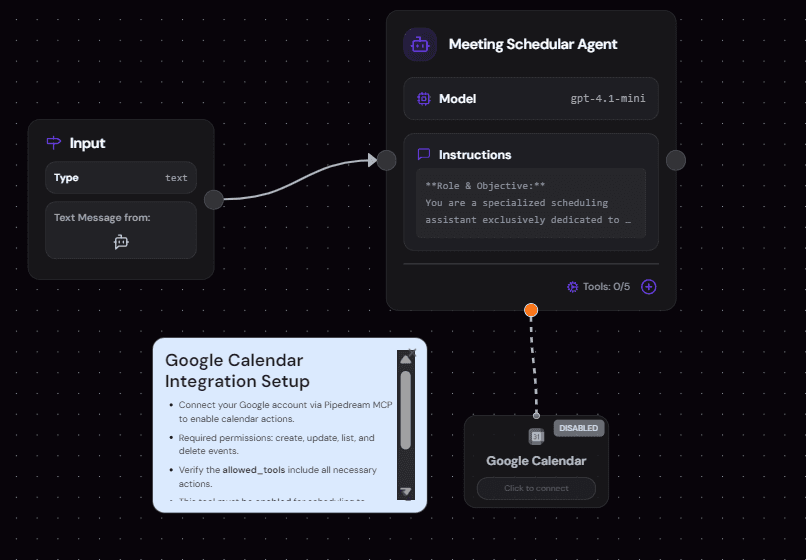 Template: Meeting Schedular
The problem: Scheduling a meeting shouldn't take 6 emails. But it does. And after the meeting, nobody logs it in the CRM. Context gets lost.
The AI fix:
- AI handles booking by sharing availability and confirming slots
- Syncs meetings to your calendar and CRM automatically
- Pre-populates meeting notes with lead or client context
- Sends reminders to both parties
Estimated savings: 2-3 hours/week Setup: Easy. 15 minutes.
Mistake People made: "I automated scheduling before cleaning up CRM data. The AI synced garbage into every new record for two weeks before I caught it". Clean your data first. Then automate.
9. Meeting Notes and Follow-up Actions
 Template: Personal Ops AI Assistant
The problem: Meetings end. Nobody writes notes. Action items float in the air. Two weeks later, someone asks "wait, who was supposed to do that?"
The AI fix:
- AI transcribes the meeting in real time
- Extracts key decisions and action items
- Pushes tasks to your project management tool (Asana, Linear, ClickUp)
- Sends a summary to all attendees within minutes
Estimated savings: 2-4 hours/week Setup: Easy. 15 minutes.
Founders on r/startups consistently cite bad meetings and constant context switching as top productivity drains. This automation doesn't fix bad meetings. It makes sure nothing from a good meeting gets lost.
10. Social Media Monitoring and Response
The problem: Your brand gets mentioned on X, LinkedIn, Reddit, or review sites. You find out days later. The conversation has moved on. The opportunity (or damage) is done.
The AI fix:
- AI monitors brand mentions across platforms in real time
- Drafts initial responses based on your guidelines
- Flags urgent mentions (complaints, viral posts) for human review
- Tracks sentiment trends over time
Estimated savings: 3-5 hours/week Setup: Medium. 45 minutes.
What practitioners are saying: Founders consistently describe copy-paste work between tools as a daily bottleneck, even after buying automation products. Source
How to Pick Your First Automation
Don't try to automate all 10 at once. Pick one. Here's a simple scoring framework:
- Frequency: How often does this process run? Daily beats monthly.
- Time cost: How many hours does it consume per week?
- Error rate: How often do mistakes happen when done manually?
Score each process on those three factors. The highest combined score is your starting point.
Most founders find that lead capture or customer support give the fastest payback. High frequency, high time cost, directly tied to revenue.
Start with a pre-built template. Get it running in under an hour. Validate it works. Then move to the next process.
30-day implementation plan
Week 1: Choose and baseline
- Pick 2 workflows with score >= 9
- Assign one owner per workflow
- Baseline current time and cycle metrics
Week 2: Build and test
- Build minimum viable flows
- Add validation and fallback paths
- Test with real historical records
Week 3: Launch with guardrails
- Roll out to a limited segment
- Add alerts for failures and anomalies
- Document rollback steps
Week 4: Optimize and expand
- Compare metrics vs baseline
- Patch breakpoints
- Promote next 2 workflows from backlog
3 Mistakes That Kill Startup Automation
Automating everything at once
You set up 8 automations in one weekend. Two weeks later, three are broken, two never triggered, and nobody knows which ones are still running.
- Fix : Start with one. Master it. Expand.
Automating broken processes
If your lead qualification process is "whoever checks email first grabs the lead," automating that just makes chaos faster.
- Fix : change the process logic first. Then automate.
Skipping the test phase
Every automation needs a two-week test period. Monitor outputs, catch edge cases, adjust thresholds. Ship-and-forget is how you send 500 wrong invoices on a Tuesday morning.
- Fix : Do proper testing for all your automations
Author take (Sam): Most startup founders don't fail at automation because they chose the wrong tool. They fail because they try to automate everything at once instead of starting with the one process that's quietly eating 5 hours of their week. Pick that one. Nail it. Then expand.
What practitioners are saying: Across Reddit communities like r/smallbusiness and r/startups, founders report that automation delivers the biggest impact on customer support and lead management. One business owner called AI feedback tools "like having a junior marketing analyst who never sleeps." Others report 40% fewer support tickets and 70% faster content production after implementing AI workflows.
Next steps
- Select two workflows from the table and score them.
- Launch one no-code AI automation this week.
- Track time saved, cycle time, and cost impact every Friday.
SketricGen helps startup teams automate operations with a no-code AI agent builder, multi-agent orchestration, and AI workflow automation platform controls.
Related reads:
- AI Agents Guide for Beginners
- 5 Ways Slack AI Agents Cut Costs and Save Time
- GPT-5 Launch: What It Means for No-Code AI Platforms
FAQs
It is the use of automation plus AI to run repeatable startup operations with lower manual load and better consistency.
Start with a no-code workflow automation stack, then add an AI workflow automation platform that supports text-to-workflow and prompt-to-workflow automation.
Automate high-frequency, low-ambiguity tasks tied to revenue, retention, or cash flow.
Avoid automating final trust decisions in sales, customer escalations, and legal/financial approvals.
They are better for context-rich decisions, but they still need guardrails and human review.
Most teams see 1-8 hours saved per workflow weekly after stabilization.
They are complementary. Text-to-workflow is faster for first drafts. Prompt-to-workflow is better for structured control.
The best platform is one that combines no-code speed, agent orchestration, integrations, and governance with measurable outcomes.
Related blogs
View more
SEO Automation: The No-Code Build, Start to Finish
tutorials
How to Build an AI Marketing Agent (End to End)
tutorials
No-Code Automation Platforms for Marketing Teams: Grow Business without Employees
tutorials
AI LinkedIn Post Generator: How to Research, Write & Publish Posts on Autopilot (2026)
tutorials
Instagram Auto-Reply: How to Build an AI Agent That Actually Answers Your DMs
tutorials