
Website Lead Capture
This website lead capture chatbot turns your website URL into a chat widget that answers from your own content and calls a lead capture form the moment a visitor shows real interest. It works out of the box, with no CRM or calendar connection required. Connect any app from SketricGen's library of 2000+ apps if you want extra automation. This template acts as a starting point: open the agent and use Use AI to help draft or refine its instructions. Adding new agents or connecting new tools is done manually.
- What it does: Turns your website into a chat widget that answers visitor questions from your own site content, then proactively shows a lead capture form the moment a visitor shows real buying interest.
- Best for: Small business and solopreneur site owners, agencies deploying for clients, and any team without a person watching chat 24/7.
- Apps used: The only required input is your website URL (or uploaded files). Connect more apps from our library of 2000+ if you want extra automation.
- Setup time: About 2 minutes to connect a URL and go live with a working widget.
Last verified from workflow config in July 26. Includes common failure modes and fixes.
Problem this solves
- Before: Visitors land on your site, ask a question in a chat widget (or leave without asking), and nobody notices they were ready to buy until it's too late, if at all.
- After: The agent answers from your actual site content, tracks buying-interest signals across the conversation, and calls a lead capture form itself once a real threshold is met, no manual chat-monitoring required.
- Before: Generic chatbots answer with confident-sounding guesses when they don't actually know something.
- After: This agent says a question could not be reliably verified rather than inventing pricing, availability, or policy answers.
How do you build a lead generation chatbot yourself?
At a category level, a lead generation chatbot for a website needs four pieces working together:
- A chat trigger on your site or widget that fires on an inbound visitor message.
- A knowledge source built from your site content (a crawl, a set of uploaded docs, or both) that the agent can search before answering.
- A reasoning agent with instructions that define its role, what it can and can't claim, and exactly when it should treat a visitor as a lead.
- A lead-capture mechanism (a form, a CRM push, or both) that fires based on real interest signals in the conversation, not just page-behavior triggers like time-on-page or scroll depth.
Building this yourself with Claude Code, Codex, or a custom stack is realistic if you already have engineering time to spend. You'll write the crawler or KB ingestion, define your own interest-threshold logic, wire a form or CRM integration, and maintain all of it as your site and offerings change. That's a real path, not a shortcut.
Using this template skips the building and wiring. You connect a URL, the crawl and KB come from that, the interest-threshold rule and lead form are already defined, and you're live in the setup time listed in the Answer Box above, not a multi-week build.
Setup guide
From the SketricGen template library, pick this website lead capture chatbot template to start a new Brand Agent. This sets up the trigger, the single reasoning agent, and its three built-in tools (knowledge base search, lead capture form, verified navigation) already wired together, so you're not building any of that from scratch.
Click on 'Use this Template' and Create Website Lead Capture for your business
Step 1: Enter your website URL (or upload files)
This is the step that makes the agent sound like your business instead of a generic bot, so it's worth doing properly.
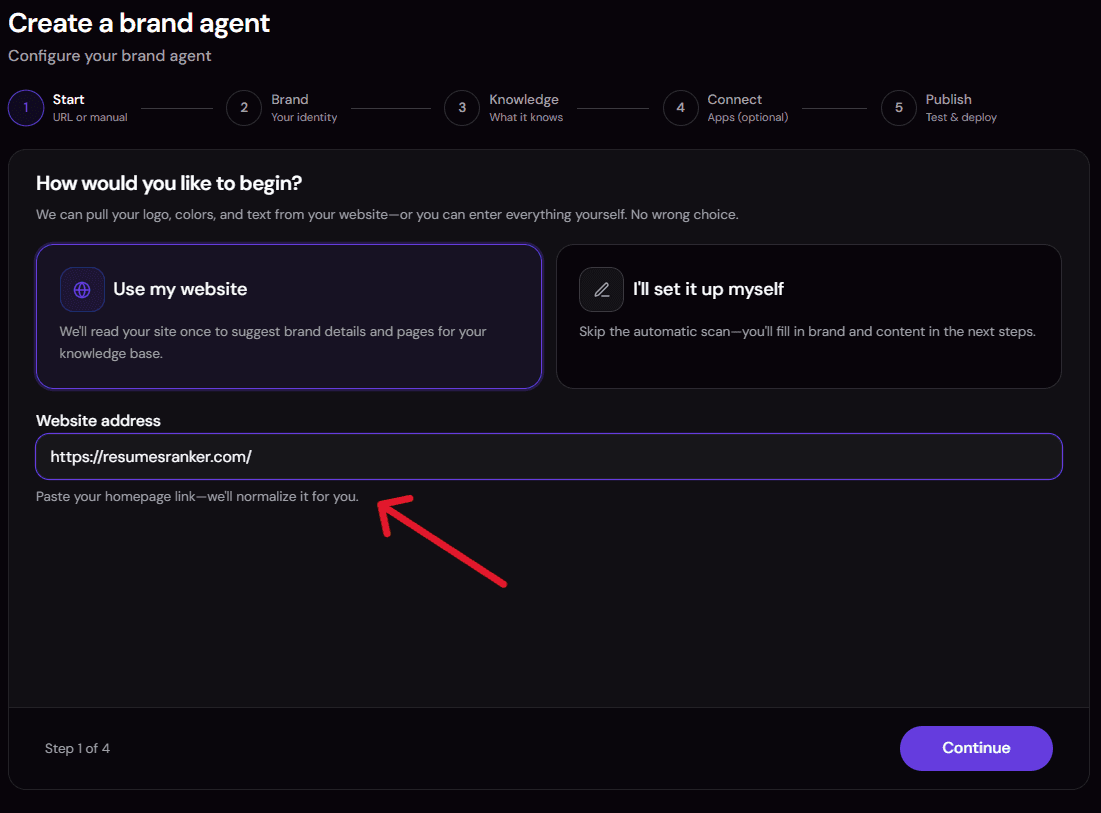
- Paste your website URL. The platform crawls your website pages (pricing, blogs, FAQ, about, docs) and extracts a brand snapshot: your logo, colours, tone of voice, offerings, and positioning. Everything it reads gets indexed into a searchable knowledge base that the agent uses to answer questions.
- Scrape more pages for deeper coverage. Add more URLs from your site (blog posts, product pages, policy pages, help docs) so the agent has more real content to draw from.

- Add file sources of your own. No public site to scrape, or private content that isn't published anywhere (internal pricing sheets, policy PDFs, a Q&A doc your support team already uses)? Upload it directly. Files you add are indexed the same way as scraped pages and carry equal weight in the knowledge base.
Step 2: Review the generated instructions & Connectors
 The Agent comes already connected with Lead Capture and Site Navigation ability.
- Lead Capture — Give a customized form to your probable leads, so you can reach out to them aptly.
- Site Navigation — Directly route user to the page, such as when asked about pricing, take them to pricing page.
 Open the generated agent instructions and confirm the assistant name, brand name, and the auto-extracted Brand Snapshot actually match your business before going live.
This is also where you can adjust the interest thresholds or tone if the defaults don't fit, since the instructions are fully editable, not fixed.
Step 3: Connect any additional apps you want (optional)

This template runs live with no required third-party connection: the knowledge base, lead capture form, and navigation tools are all built in. If you want to push captured leads into a CRM, notify a Slack channel, or wire in any other action, connect it here from SketricGen's library of 2000+ apps. If you skip this step, the template still works end to end with just the built-in tools.
Step 4: Test the widget
Send the widget a few real visitor questions, including at least one pricing or demo-style question, to confirm the lead form appears at the right moment and that navigation only fires on pages the knowledge base actually returns. Try a question you know isn't covered by your site content too, to confirm the agent says so instead of guessing.


Step 5: Deploy the widget

Once testing looks right, deploy the widget to your site. You can keep adjusting the instructions, thresholds, or connected apps after deployment; nothing here is locked once it's live.
Common issues:
- The knowledge base doesn't find a page it should know about. Re-crawl the site or add the specific page/file directly, then re-test the question.
- The lead form doesn't appear on what looks like a clear signal. Rephrase the test message to match one of the defined triggers (a direct pricing/demo/quote question, or two substantive follow-up questions in one conversation) rather than a single broad question.
- Navigation refuses to go to a page you know exists. This is expected: the agent only navigates to a fully qualified URL it found in the knowledge base. Add or re-crawl that page so it's actually indexed.
- The agent's tone doesn't match your brand. Open the agent and use Use AI to help adjust the instructions or Brand Snapshot directly, since this template is a starting point, not a fixed script.
Customization knobs
- Interest thresholds and tone: open the agent and use Use AI to help adjust the interest thresholds, response length, or assistant tone.
- Tools: connect additional apps from our library of 2000+ apps (like a CRM push) manually.
- Navigation triggers: change what triggers navigation directly in the instructions.
Who it's for
- Small business and solopreneur site owners with no dedicated sales team. You have a website and visitors asking questions in chat, but nobody watching it around the clock. The KB is built straight from your URL, so there's no separate content-writing step. The agent shows the lead form itself, instead of waiting for a human to notice interest.
- Marketers and agencies deploying chatbots for multiple client sites. You need a repeatable setup you can stand up per client without custom engineering each time. You also want a documented, mandatory (not optional) rule for when the form appears, one you can point to when explaining behavior to a client.
- No-code builders and AI agent evaluators comparing chatbot platforms. You want to see the actual architecture (a single agent, three tools, no hidden handoffs) before committing. You also want to know it's editable, not a fixed form.
- Support or ops teams that want an honest, KB-grounded answering widget that also captures interest. You don't want the assistant hiding information behind a lead form. You also don't want it guessing when it can't find something in the knowledge base.
What the agent does
This template can:
- Answer visitor questions about your brand, products or services, pricing, and policies using content from your own site.
- Search a dedicated knowledge base built from your website (or uploaded files) before answering any new factual question.
- Recommend only the options your content actually supports, never inventing a comparison or a recommendation.
- Proactively call a lead capture form once a visitor shows real interest, without waiting to be asked and without a permission question.
- Track interest signals: one strong signal (pricing, demo, quote, implementation timing) or two moderate signals (substantive follow-up questions showing active evaluation).
- Navigate a visitor to a specific page on your site, but only using a fully qualified URL it actually found in the knowledge base, never a guessed or shortened one.
- Say plainly when it doesn't have a verified answer, instead of guessing.
- Keep the lead form to one call per conversation unless the visitor explicitly asks to reopen it.
- Continue helping normally if the visitor cancels or declines the form, without showing it again unless asked.
- Match your brand's tone and identify itself honestly as a virtual assistant if asked.
How it works
- Visitor sends a message in your website's chat widget. This is the trigger that starts the conversation.
- The agent checks whether it already has an answer from earlier in the conversation. If not, it searches your knowledge base for the relevant content.
- It answers directly using what the knowledge base and your Brand Snapshot (identity, tone, offerings) support, without inventing details either source doesn't cover.
- It checks the conversation against the interest thresholds after answering: one strong signal (pricing, demo, quote, purchase timing) or two moderate signals (substantive feature/fit/comparison questions).
- If a threshold is met, it calls the lead capture form in the same turn, passing a short summary of the visitor's stated goal and the signal that triggered it, no invented details.
- If the visitor asks to see a specific page, the agent searches the knowledge base for a verified, fully qualified URL and navigates only if one is found.
- The conversation continues with the agent answering further questions, without repeating the form unless the visitor explicitly asks to reopen it.
Requirements
- A website URL (or a set of uploaded files) for the platform to crawl and build the Brand Snapshot and knowledge base from. This is the only required input.
- No third-party accounts required to get started. The knowledge base, lead capture form, and navigation tools are built in and ready to go. Connect a CRM, calendar, or any other app from SketricGen's library of 2000+ apps later if you want more automation.
- A brand name and assistant name to personalize the widget and its instructions (set during Brand Agent setup, not edited in the workflow itself).
- Lead form field definitions and delivery/storage behavior are configured by the Brand Agent product setup, not by editing this workflow directly.
Apps used
| App | What it's used for | Typical permission scope |
|---|---|---|
| Brand knowledge base (file_search) | Searches a dedicated vector store built from your crawled website or uploaded files for detailed facts and exact URLs. | Read-only search over your own crawled site content. Built automatically during Brand Agent setup. |
| Lead capture form (custom_tool) | Proactively shows visitors an optional structured form once the interest threshold is met. Frontend-mediated, pauses for the visitor to complete or cancel it. | No third-party connection. Runs inside the chat widget itself. |
| Client navigation (custom_tool) | Navigates the visitor to a verified URL found in the knowledge base, never a guessed one. | No third-party connection. Runs inside the chat widget itself. |
No external app connection is required to get this template running, since the three tools above are built in. Connect any app from SketricGen's library of 2000+ apps later, for example to push captured leads into a CRM, if you want more automation.
Use cases
Small business pricing and FAQ answering A visitor asks about pricing and how your service compares to a competitor. The agent answers from your knowledge base, then calls the lead form once the pricing question counts as a strong interest signal. Best for: solo or small-team sites without a sales rep watching chat.
Agency multi-client deployment An agency stands up one instance of this template per client site, each pointed at a different URL and knowledge base, using the same mandatory threshold rule across all of them. Best for: agencies that need a repeatable, explainable setup for multiple clients.
Architecture evaluation A builder wants to see exactly how a proactive lead-capture agent is structured (trigger, agent, three tools, no hidden handoffs) before adopting it for their own stack. Best for: technical evaluators comparing no-code agent platforms.
Honest support widget with lead awareness A support-focused team wants a widget that answers questions accurately and admits when it doesn't know something, while still catching genuine buying interest when it shows up. Best for: teams that care more about accurate answering than aggressive lead chasing.
Example prompts/outputs
Example 1: Grounded factual question Visitor: "What does this company help businesses do?" Agent: searches the knowledge base, then answers directly using what it finds there, without adding anything the KB doesn't support.
Example 2: Pricing-page navigation Visitor: "Can you show me your pricing page?" Agent: searches the knowledge base for a verified pricing URL. If one exists, it navigates there. If not, it says it could not find a verified pricing page rather than guessing at one.
Example 3: Same-turn lead capture Visitor (a 10-person agency, in one message): asks about plan fit, cost, and how fast implementation would be. Agent: searches the knowledge base, answers the question directly, then calls the lead capture form in the same turn with a short context summary, no permission question asked first.
These are conversational examples. This template has no structured JSON output schema; results are chat replies plus two possible tool-call side effects (lead form shown, page navigation triggered).
Why you need this template
- Skips the build-it-yourself work. No crawler, no KB ingestion pipeline, no custom interest-threshold logic to write and maintain yourself.
- Catches interest based on conversation content, not just page behavior. Most generic lead-gen chatbot approaches trigger off time-on-page or repeat visits. This one reads what the visitor is actually asking.
- Won't hide answers behind a form. The agent answers the visitor's question first, every time, then offers the form, instead of gating information behind lead capture.
- Nothing to authorize to go live. Add a CRM, calendar, or any other app from our library of 2000+ apps later if you want more automation.
- Stays honest when it doesn't know something. Says a fact could not be reliably verified rather than guessing at pricing, availability, or policy details.
FAQs
It's a starting point, not a fixed script. Open the agent and use Use AI to help draft or refine its instructions; adding new agents or connecting new tools is done manually.
- Interest thresholds, tone, and response length: adjustable through the instructions.
- Additional apps: connect more from our library of 2000+ apps, like a CRM push, that aren't included by default.
A lead generation chatbot is a website widget that answers visitor questions and identifies when someone is showing real buying interest, then captures their details through a form or similar mechanism.
- Grounded answers: this template answers from your own site content, not generic web knowledge.
- Conversation-driven capture: it calls the lead form based on what the visitor says, not on page-behavior signals like time-on-page.
It checks the conversation against two thresholds: one strong signal (a pricing, demo, quote, or implementation-timing question) or two moderate signals (substantive follow-up questions showing active evaluation).
- What doesn't count: a single greeting or broad question.
- What happens once met: the form is called in the same turn, no permission question asked.
Yes. The threshold rule (one strong signal or two moderate signals) ships already defined in the template's instructions. You don't have to configure trigger logic yourself.
- Automatic knowledge base: you supply the website URL; the crawl and knowledge base come from that automatically.
- Threshold changes: open the agent and use Use AI to help adjust the instructions.
Check current plan and pricing details on the SketricGen pricing page rather than assuming a specific tier here, since this document doesn't carry current pricing.
Yes, see the Example prompts/outputs section above, which shows a grounded question, a verified-URL navigation request, and a same-turn lead capture call.
Yes. You provide your own website URL (or files), and the platform builds your Brand Snapshot and knowledge base from that, so the answers and navigation are specific to your site.
No code is required to set this template up. You provide a URL, review the generated instructions, test it, and deploy the widget.
Related templates
- AI Receptionist Agent Template: same Brand Agent setup flow (URL and knowledge base), built for booking meetings on a calendar instead of capturing leads.
- Web Lead Extractor Agent Template: also lead-focused, but sources leads by scraping external sites rather than capturing them from your own website visitors.
- WhatsApp Support Bot Agent Template: same concierge idea (answer from a knowledge base, stay honest about limits), deployed on WhatsApp instead of a website widget.
Related templates
View more
WhatsApp AI Agent
Answers WhatsApp support questions from your brand knowledge base, and never invents a policy.
AI Receptionist
Learns your brand from your website, answers FAQs 24/7, and books demos on Google Calendar.
Smart Email Manager
Gmail triage, drafted replies, Notion logging, and Slack alerts in one agent.

Lead Generator
Describe your ICP, get an evidence-scored B2B lead list written to Google Sheets after you approve it.

Data Analysis and Visualization
Turn an uploaded spreadsheet, CSV, or PDF into answers, charts, and a shareable report, all from chat. A single no-code agent validates and profiles your file, answers your questions with statistics computed in code (never guessed), builds the right chart for each finding, and delivers a polished DOCX or PDF report on request, with an optional executive slide deck.

Meta Ads Performance Manager
Diagnose campaign, audience, placement, and creative performance and turn the evidence into measurable, approval-controlled Meta Ads improvements.