
Lead Generator
Most "lead generator" tools hand you a spreadsheet of names and let you figure out who's actually worth calling. This template does the opposite: it asks for your product and ICP in plain language, runs one cost-capped Apify search, scores every result against real evidence (not assumptions), and only writes to Google Sheets once you've approved the shortlist. This template acts as a starting point: open any agent and use Use AI to help draft or update its instructions. Adding new agents or connecting new tools is done manually in the canvas.
What it does: Turns a plain-language ICP into a capped, evidence-scored B2B lead list, delivered to Google Sheets only after you approve it. Best for: Agencies, B2B founders, freelance consultants, and SDRs who need a real outbound list, not a raw contact dump. Apps used: Apify, Google Sheets. Setup time: About 10 minutes.
Last verified from workflow config August 2026. Includes common failure modes and fixes.
Problem this solves
Most DIY B2B lead generation setups fail in the same three places:
- Before: Uncapped scraper runs quietly rack up charges because nobody set a spend ceiling. After: every run has a hard
maxTotalChargeUsdcap and a per-conversation lock so a rerun can't double-charge. - Before: A list of 500 contacts with no reason to call any of them first. After: each lead carries a scored fit and why-now trigger with a source URL and date, not a guess.
- Before: The same person gets contacted twice because nobody checked the sheet first. After: the agent reads existing rows and a contacted ledger before writing anything.
- Before: A generic ICP returns a pile of consumer or local-business "leads" that were never reachable in the first place. After: the agent says up front when your audience doesn't fit a B2B database, before it spends anything.
How do you build a B2B lead generation agent yourself?
Strip away the branding and every B2B lead generation tool does the same five jobs: capture an ICP, source candidates from a database or scraper, dedupe and score them, enrich the top few with real evidence, and hand off the approved list to a CRM or sheet. Whether that's Apollo, Clay, or a template like this one, only who owns each step changes.
Building it yourself typically means putting together:
- A scraping layer: an Apify actor, a Playwright/Scrapy script, or a paid database API, plus proxy and rate-limit handling if you're scraping directly.
- A scoring layer: code (often a Claude Code or Codex-generated script) that normalizes raw rows, removes duplicates, and ranks candidates against your own fit criteria.
- An enrichment layer: bounded website and LinkedIn lookups for your top candidates only, because enriching everything burns budget fast.
- A handoff layer: writing the approved batch into a CRM or sheet without creating duplicates on repeat runs.
The real cost of the DIY path shows up after launch, not before it: teams building this from scratch report scrapers that "fetched thousands of items even though strict limits were configured," with platforms that kept charging for runs nobody meant to start. That's the exact failure mode this template's spend cap and per-conversation run lock exist to close.
If you'd rather not maintain that pipeline yourself, this template pre-wires the same five layers into one agent, with Apify handling sourcing and enrichment and Google Sheets as the handoff. The setup guide below covers the roughly 10-minute version. If your leads are local businesses rather than B2B contacts at companies, the Web Lead Extractor template covers that route instead.
Setup guide
Just as you click on 'Use this template', you are taken to the Agent Space, where tools and skills are already connected. Give the skils a couple of seconds to auto-install and then all that's left is to connect your account to the tools(Google Sheets).
Setup steps for the template and the starter prompts to get the template running are attached within the agents space for your ease.
the Agent Space Looks like this:

Step 1: Add the template and connect Apify and Google Sheets
Open the template and go to the Apps tab on the two tool nodes: one for Apify, one for Google Sheets. Connect your own account to each and complete any permission prompts Apify shows for enabling its allowlisted lead-sourcing actor.
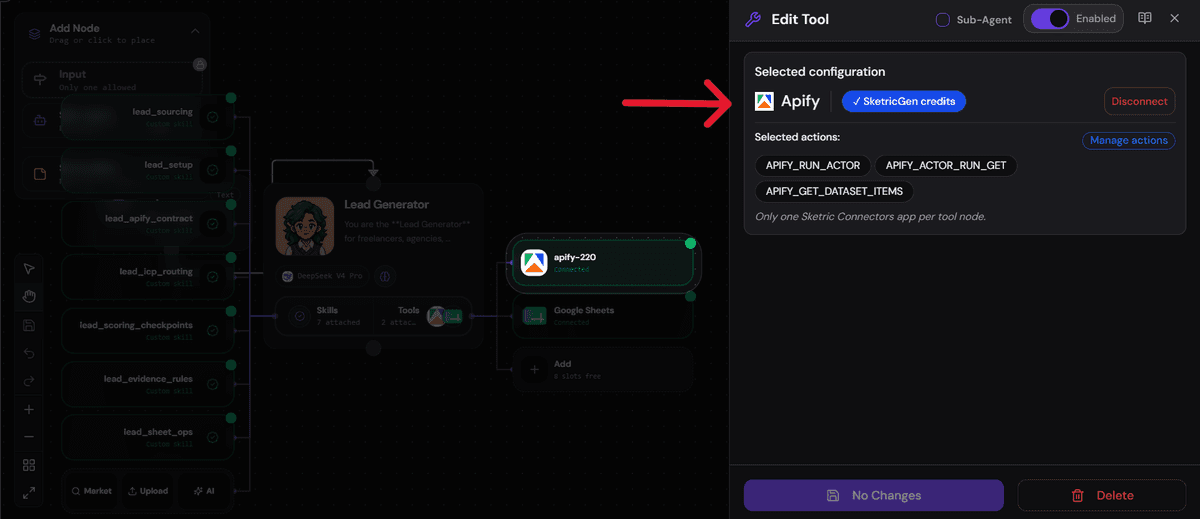 Both tools ship disconnected by default, so nothing will run until you authorize them. If you don't wish to connect your account to Apify, Apify can use SketricGen credits to run.
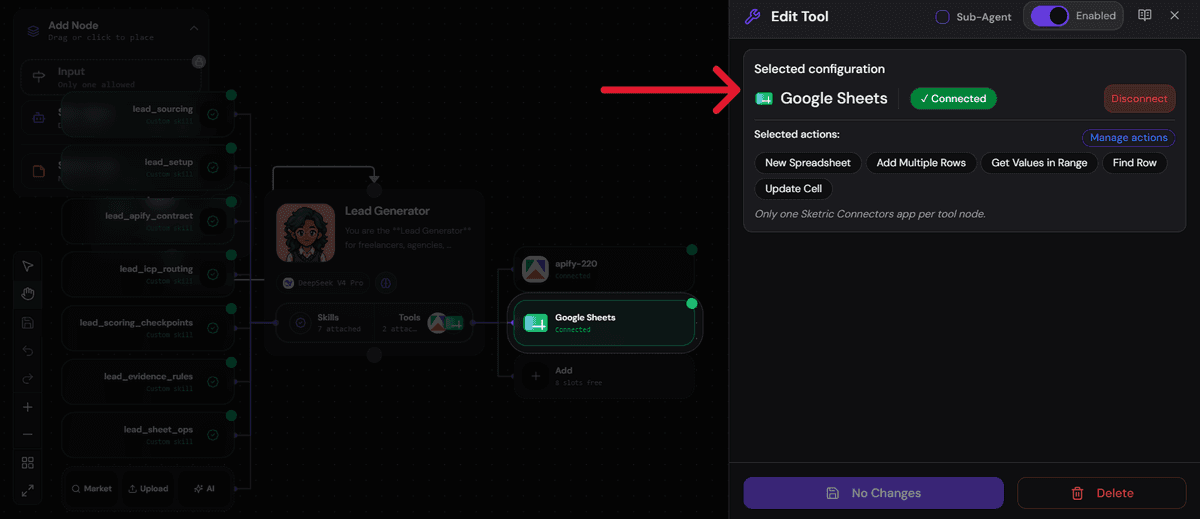
When you click on Connect Google Sheet a window opens through which you can connect your Google Account using OAuth.
Step 2: Give the agent your product context
Send any first message. The agent
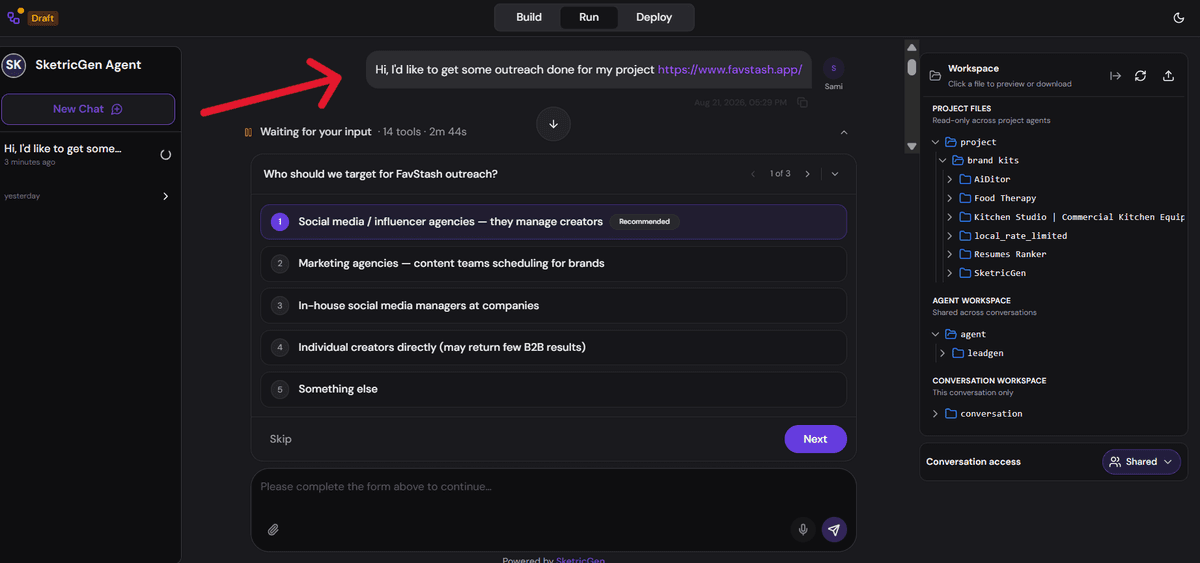
- checks your project files for a product website or description
- crawls the official site once if that context is thin
- drafts an editable Business & Audience Profile: primary customer, economic buyer, pains, use cases
- a proposed ICP (titles, seniority, industries, company size, geography, exclusions).
If your project holds more than one client or brand folder, it asks which one this list is for before doing anything else.
Step 3: Confirm the ICP, lead cap, and enrichment depth
Review the drafted profile and edit anything that's wrong. On first use, the agent batches two open decisions into a single question: your per-run lead cap (it shows a recommended default) and enrichment depth (how many top candidates get deep research, default five). Nothing paid starts until you confirm the profile or naturally ask for a count, like "give me 100 leads," which also sets the cap.

Step 4: Run a capped search and review the scored shortlist
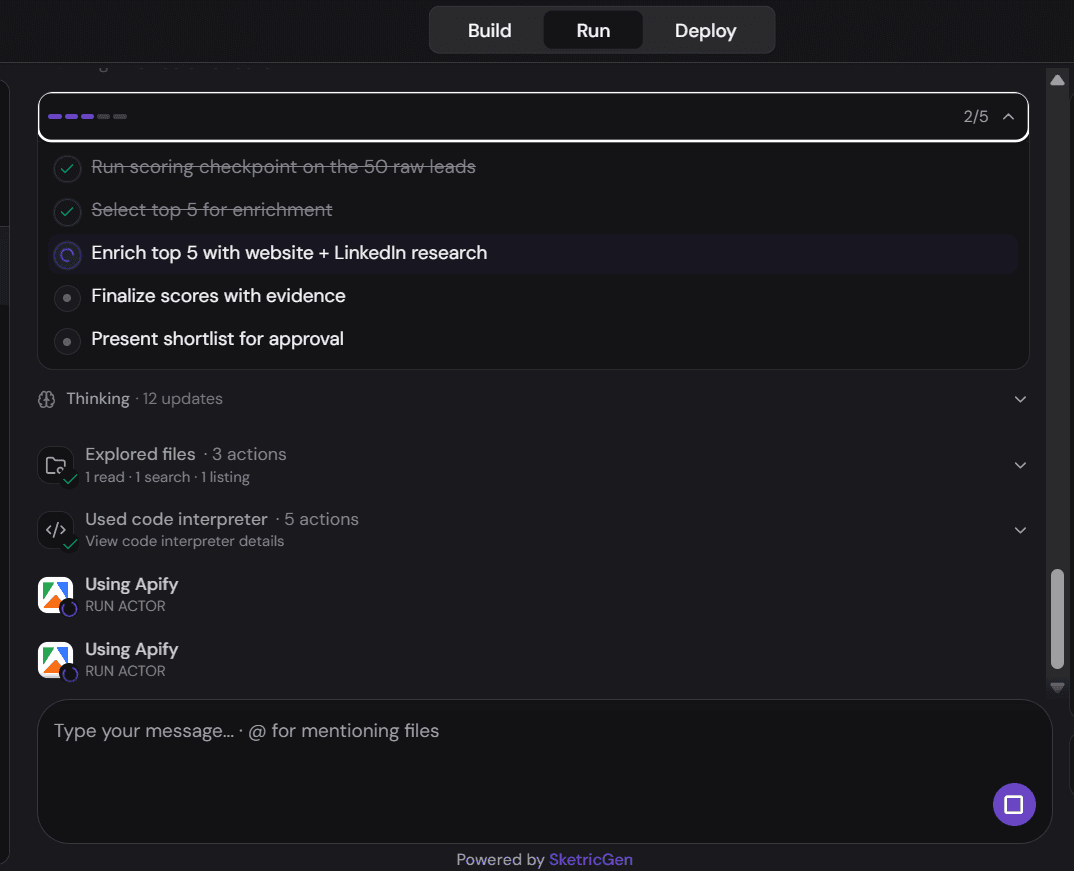
Once confirmed, the agent runs one cost-capped Apify search, checkpoints the raw results immediately, then deeply researches only the top candidates. You'll see up to five fully enriched rows in chat (fit score, contactability, tier, why-fit, why-now, readiness) plus a compact list of the rest, with counts for how many were found, enriched, and still provisional.

The reuslting Google sheet includes all they key details for your leads and you can then start on actual acquistion through cold outreach pipelines or through direct connect.
Customization knobs: per-run lead cap, enrichment depth (top 3 or top 5, website-only or website plus LinkedIn), ICP fields (titles, seniority, industries, size, geography, exclusions), and destination spreadsheet. Open the agent and use Use AI to help refine its instructions if you want to change tone or add extra qualifying questions. Adding new agents or tools is still a manual canvas step.
Step 5: Approve and deploy
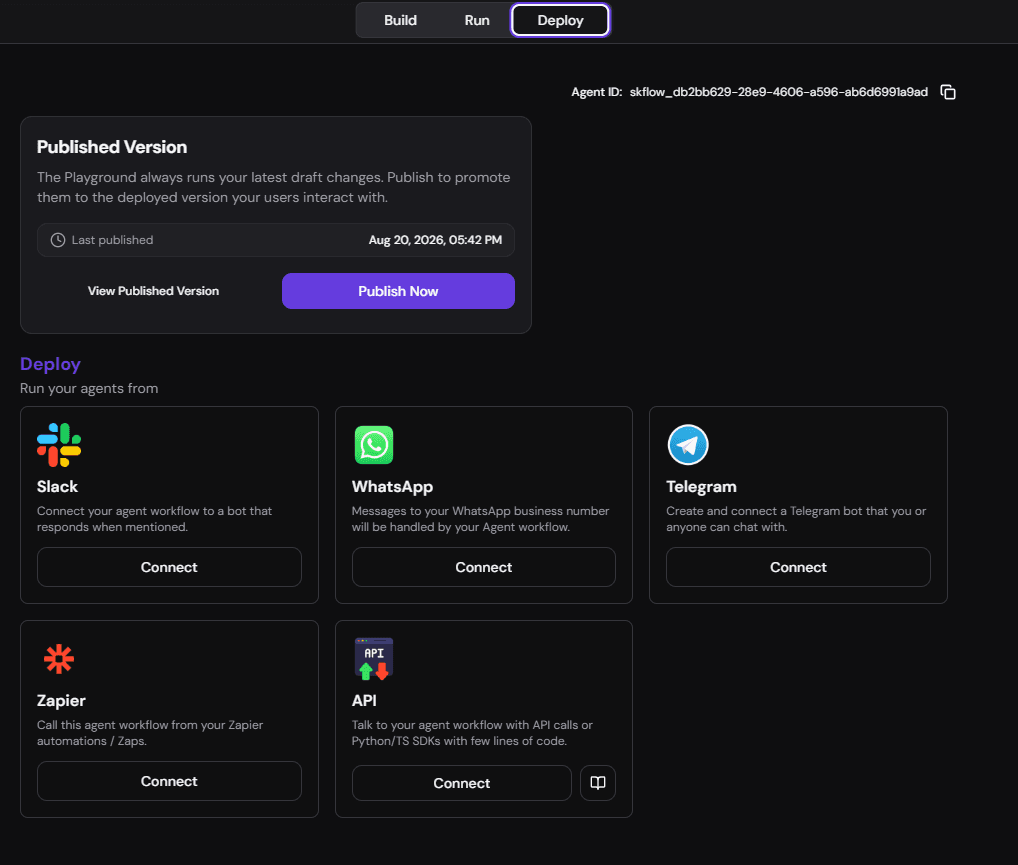
Test it by asking "who have we already contacted, skip them" on a repeat run to confirm suppression is working before you rely on it daily. Deploy it simply in the agent space by pushing publish now, or connect it to other apps simply using OAuth or username + password connect (depending on each app). You can also set-up schedule runs so that the template runs once a week or so on.
Common issues and fixes
- Apify or Google Sheets shows as disconnected mid-run. Reconnect the account from the Apps tab; the agent won't start a paid search on a disconnected tool.
- The ICP is too broad and returns weak matches. The agent will say so and offer the nearest reachable audience before spending, rather than return junk. Narrow titles, industries, or geography and try again.
- A second search request in the same conversation gets skipped. This is the one-paid-run-per-conversation lock working as intended; it reuses the first run's results unless you explicitly ask for a new search.
- Consumer, creator, or local-storefront ICPs come back thin. The connected source is a database of people at companies, not a local-business directory. The agent flags this rather than fake a fit.
- You don't want to connect your own Apify account. SketricGen credits can run the actor instead; connect your own account later if you want runs billed to your own Apify usage.
Who it's for
- Lead generation and marketing agencies running repeated, capped prospecting across multiple clients. The profile is stored per client, so nothing bleeds between accounts.
- B2B and SaaS founders building their first outbound pipeline who want a cost ceiling before they hand it to an LLM.
- Freelancers and independent consultants scoping a client's ICP without paying for a full database seat.
- SDRs who need a fast, scored shortlist instead of a raw export to work through manually.
Not a fit: consumers, creators, students, and local storefronts. The connected source is a B2B people-at-companies database, and the agent will tell you plainly rather than return low-quality matches.
What the agent does
This template can:
- Discover your product from project files first, crawling your site only once if context is thin.
- Draft an editable Business & Audience Profile covering buyer, pains, use cases, and a proposed ICP.
- Route your audience to the right B2B source type, or say plainly when your audience isn't a fit.
- Run one cost-capped Apify search with a hard spend ceiling and a per-conversation lock against double-charging.
- Checkpoint raw results immediately after the paid run, before any enrichment starts.
- Deduplicate and score every candidate by persona and seniority before spending anything further.
- Enrich only the top few with bounded website and LinkedIn research, never the full batch.
- Separate fit from contactability so a clean email never masks a weak match.
- Ask for explicit approval before writing anything, showing counts found, enriched, and provisional.
- Suppress prior contacts automatically on every future run.
How it works
- You send a message describing your product, or just say "give me 100 leads" if the profile is already confirmed.
- The agent builds or confirms your Business & Audience Profile, routing your audience to a reachable B2B source.
- It confirms the lead cap and enrichment depth the first time, then remembers your answer.
- It runs one capped Apify search, polls it, and reads only that run's own results.
- It normalizes, dedupes, and scores every candidate, saving a checkpoint before enrichment starts.
- It deeply researches only the top candidates, scoring fit and contactability as two separate numbers.
- It shows you the shortlist and waits for approval before writing anything to Google Sheets.
Requirements
You'll need an Apify account with the template's allowlisted lead-sourcing actor enabled, and a Google Sheets account to receive the approved list. You'll also need to give the agent your product context, either through project files or a live website URL, so it can draft an accurate ICP.
No CRM or outreach-sending app is wired in by default. The Sheet is the handoff point, not an inbox. If you want to route approved leads further, SketricGen's library of 2,000+ connectable apps covers CRMs and outreach tools as an optional add-on, and a template like Structured Output is a useful reference if you want to adapt the evidence/scoring JSON contract into your own downstream pipeline.
Apps used
| App | What it's used for | Typical permission scope |
|---|---|---|
| Apify | Runs the allowlisted lead-sourcing actor, plus bounded website and LinkedIn research for enrichment | Start actor runs, poll run status, read that run's own dataset |
| Google Sheets | Creates the lead sheet, reads existing rows to suppress duplicates, writes the approved batch, updates individual cells | Create spreadsheet, read a range, add multiple rows, find a row, update a cell |
Use cases
Agency running parallel client searches Confirm a separate profile per client, then run capped searches for each without mixing data between accounts. Best for: agencies managing multiple B2B clients at once.
SaaS founder building a first outbound list Describe your product once, confirm the drafted ICP, and get a scored shortlist instead of a raw contact export. Best for: early-stage B2B/SaaS teams without a dedicated SDR yet.
Freelance consultant scoping a client's ICP Use the drafted Business & Audience Profile as a deliverable on its own, then run the search once the client signs off. Best for: independent consultants pitching or kicking off outbound work.
SDR getting a fast, scored shortlist Skip the raw database export and start from a shortlist that already separates fit from contactability. Best for: sales reps who need a working list this week, not a training project.
Once a shortlisted lead turns into a scheduled call, pairing this with a template like Pre-Meeting Prep briefs you on the contact beforehand.
Example prompts and outputs
Prompt: "Give me 100 leads." Output: A shortlist showing up to five fully enriched rows in chat (Name, Title, Company, Size, Fit, Contactable, Tier, Why Fit, Why Now, Evidence, Readiness), plus the rest listed compactly, with a note on how many were found, enriched, and still provisional. Ends with an approval choice: approve all, approve specific rows, or adjust the ICP.
Prompt: "Who have we already contacted? Skip them." Output: The agent checks the contacted ledger and destination sheet first, then excludes anyone already present from the next run's results with no manual list-cleaning required.
Why you need this template
- Spend safety by default: a hard cost ceiling and a one-paid-run-per-conversation lock mean an interrupted turn can't double-charge you.
- Evidence over guesswork: every why-fit and why-now claim is checked against a name-swap test and a real source URL, not assumed.
- Nothing writes without your approval: the Sheet only gets touched after you sign off on the shortlist.
- No repeat outreach: a contacted ledger and a read-before-write check stop the same person from being contacted twice.
FAQs
No, it's a starting point, not a locked automation. Open the agent node and use Use AI to help draft or refine its instructions if you want to change tone, add qualifying questions, or adjust how it scores leads.
- Adding new agents or connecting additional apps is a manual step in the canvas, not something the AI assist does for you.
- The ICP, lead cap, and enrichment depth are meant to be edited on every run.
A lead database sells you access to contact records you filter yourself. This template is an agent that takes your plain-language ICP, runs one capped search against a B2B source, then scores and enriches the results with evidence before showing you anything.
- You don't manage filters or exports. You describe your audience in a sentence.
- The output includes a fit score, a contactability flag, and a why-now trigger, not just a contact record.
Describe your product and audience in plain language, confirm the drafted profile, then ask for a count like "give me 50 leads." The agent handles sourcing, scoring, and enrichment before showing you anything.
- You can also start by asking it to "review my project and build the audience profile" first.
- Editing the ICP (titles, industries, size, geography) any time re-scopes the next search.
Every run has a hard spend ceiling set before the search starts, and only one paid run is allowed per conversation unless you explicitly approve another. This directly answers a common complaint with uncapped scrapers, where limits get configured but aren't actually respected.
- A checkpoint of the raw results is saved immediately after the paid run, so an interrupted turn never triggers a second charge.
- The agent never exposes provider names, actor IDs, or raw billing detail in chat.
Not always, and it says so rather than guessing. Contactability is scored separately from fit, so a lead can be a strong match with a missing email rather than getting silently dropped.
- A lead missing an email is marked
needs_email, not rejected. The fit still stands. - The agent never invents an email, title, or company fact that wasn't actually found.
No. Before writing anything, it reads the destination sheet plus a contacted ledger and excludes anyone already present, then appends every newly approved lead to that ledger in the same turn.
- Ask "who have we already contacted, skip them" any time to confirm this before a new run.
- Suppression works across sessions, not just within one conversation.
The template only sources publicly available business contact data through an allowlisted actor, the same category of data B2B lead databases sell. It doesn't scrape personal social profiles or private data, and every run stays within the actor's own allowed scope.
- Your own outreach practices and local data-protection rules still apply once you have the list.
- The agent never fabricates a source or date for any claim it makes about a lead.
Not well, and the agent will tell you before it spends anything. The connected source is a database of people at companies, so consumer, creator, student, and local-storefront audiences are generally thin or unsupported.
- If your audience doesn't fit, the agent offers the nearest reachable B2B audience instead of returning weak matches.
- For local-business leads specifically, the Web Lead Extractor template is built for that use case instead.
Related templates
View more
WhatsApp AI Agent
Answers WhatsApp support questions from your brand knowledge base, and never invents a policy.

AI Receptionist
Learns your brand from your website, answers FAQs 24/7, and books demos on Google Calendar.

Smart Email Manager
Gmail triage, drafted replies, Notion logging, and Slack alerts in one agent.

SEO Optimized Blog Writer
Research your brand, search intent, SERPs, and competitors through a ten-stage editorial workflow to create original, source-backed articles built to rank.

Data Analysis and Visualization
Turn an uploaded spreadsheet, CSV, or PDF into answers, charts, and a shareable report, all from chat. A single no-code agent validates and profiles your file, answers your questions with statistics computed in code (never guessed), builds the right chart for each finding, and delivers a polished DOCX or PDF report on request, with an optional executive slide deck.

Product Analytics & Reporting Analyst
Answer product and website questions with reproducible GA4 and Microsoft Clarity analysis, clear charts, caveats, and next experiments.