Smart Email Manager
An AI email management agent that reads your unread Gmail, classifies each message as urgent, needs-reply, FYI, or spam/promo, drafts context-aware replies for the ones that need a response, labels and archives the rest, and keeps a record in Notion with a Slack alert for anything urgent. It learns your rules the first time you run it and remembers them across sessions. This template acts as a starting point: open any agent and use Use AI to help draft or update its instructions—adding new agents or connecting new tools is done manually in the canvas.
- What it does: Triages unread Gmail by urgency, drafts replies for the ones that need them, labels and archives the rest, logs important emails to Notion, and pings Slack on anything urgent.
- Best for: Solo operators, small ops/support teams, and no-code builders who want an editable AI agent, not a black-box inbox client.
- Apps used: Gmail, Notion, Slack.
- Setup time: About 10 minutes: three app connections plus one triage run to set your rules.
Last verified from workflow config on 2026-07-28. Includes common failure modes and fixes.
Problem this solves
- Before: You re-read the same senders every day to figure out what's actually urgent, forget which emails still need a reply, and have no shared record of what mattered when a teammate asks.
- After: You send one message ("Triage my inbox") and get unread mail sorted into urgent / needs-reply / FYI / spam-promo, drafts ready to approve for anything that needs a response, the rest labeled and archived, an important-email log in Notion, and a Slack ping for anything urgent, with nothing deleted.
- Before: Every new assistant or automation you try makes you re-explain your preferences (who's a VIP, what to always archive, your signature).
- After: The agent writes those rules to a durable file the first time you run it, and updates them anytime you say so in plain language, so you never re-explain from scratch.
How do you build an AI email management agent yourself?
At a category level, an email triage agent needs four pieces working together:
- A trigger — something that starts a run: a chat command, a button, or a schedule.
- An inbox connector — read unread mail, open a thread for context, create labels, archive, draft or send.
- A classification layer — rules plus judgment that decide urgent vs. FYI vs. spam.
- Optional logging/alerting connectors — a database for a searchable record, a chat channel for urgent pings.
Building this yourself with Claude Code, Codex, or a custom script against the Gmail API is a real, workable path. Plenty of builders do exactly this (see the active r/AI_Agents discussions on DIY inbox agents). But you own the classification prompt, the Gmail label-creation logic (Gmail doesn't ship an "Urgent" label by default, so your code has to create it), matching your Notion database's exact column names, wiring the Slack post, and hosting something that can run reliably on demand. That's ongoing maintenance, not a one-time build.
The Smart Email Manager template pre-wires all four pieces: trigger, Gmail connector, classification (backed by an installable ops__email_triage_rubric skill, not just a one-off prompt), and Notion/Slack logging. You connect three apps and run one triage message instead of building the pipeline from scratch. If you'd rather capture and log data from web sources into a database instead of an inbox, the Web Lead Extractor template follows the same trigger-plus-logging pattern for a different input.
Setup guide
Step 1: Clone the Smart Email Manager template

Pick the template from the gallery and clone it into your own project. This gives you the pre-built Smart Email Manager agent, its three unconnected tool nodes (Gmail, Notion, Slack), and the attached ops__email_triage_rubric skill.
The Skill auto-loads in a few seconds, the apps are to be attached. Nothing runs until you connect the apps in the next step. (On clicking Use this template, follow from setp-2 onwards)
Step 2: Connect Gmail, Notion, and Slack
 All three tool nodes ship unconnected by default.
- Connect Gmail, Slack, and Notion by clicking Connect and completing OAuth for each, under your project's connections panel.
If you plan to log important emails, note the exact column names in your target Notion database (Date, Sender, Subject, Category, Status, GmailLink), since the agent's NOTION_INSERT_ROW_DATABASE call needs an exact name match.
Step 3: Run the first triage and set your rules
Send "Triage my inbox."
The first run creates a durable rules file (/agent/email-triage/rules.md) with defaults
- (Signature
Best,\n<YOUR NAME>, Approval mode with nothing auto-sent, Gmail's INBOX label, a 20-email batch) - Asks you to fill in your real signature
- Any VIP senders or domains
- Whether you want auto-send for specific categories
- Your Notion database and Slack channel if you want logging and alerts.
You can change any of this later just by saying so ("Auto-send replies to order confirmations," "Archive anything from noreply@ automatically").
Step 4: Test with a normal run and an edge case

Try an in-scope prompt like "Triage the last 10 unread and draft replies for urgent ones," then test an edge case: an inbox with nothing unread should return "Inbox clear - nothing to triage" and stop.
And a rule-only prompt like "Always treat emails from my boss as urgent" should update your rules file without triaging anything. This confirms the agent tells triage runs and rule updates apart correctly.
Step 5: Deploy for ongoing use
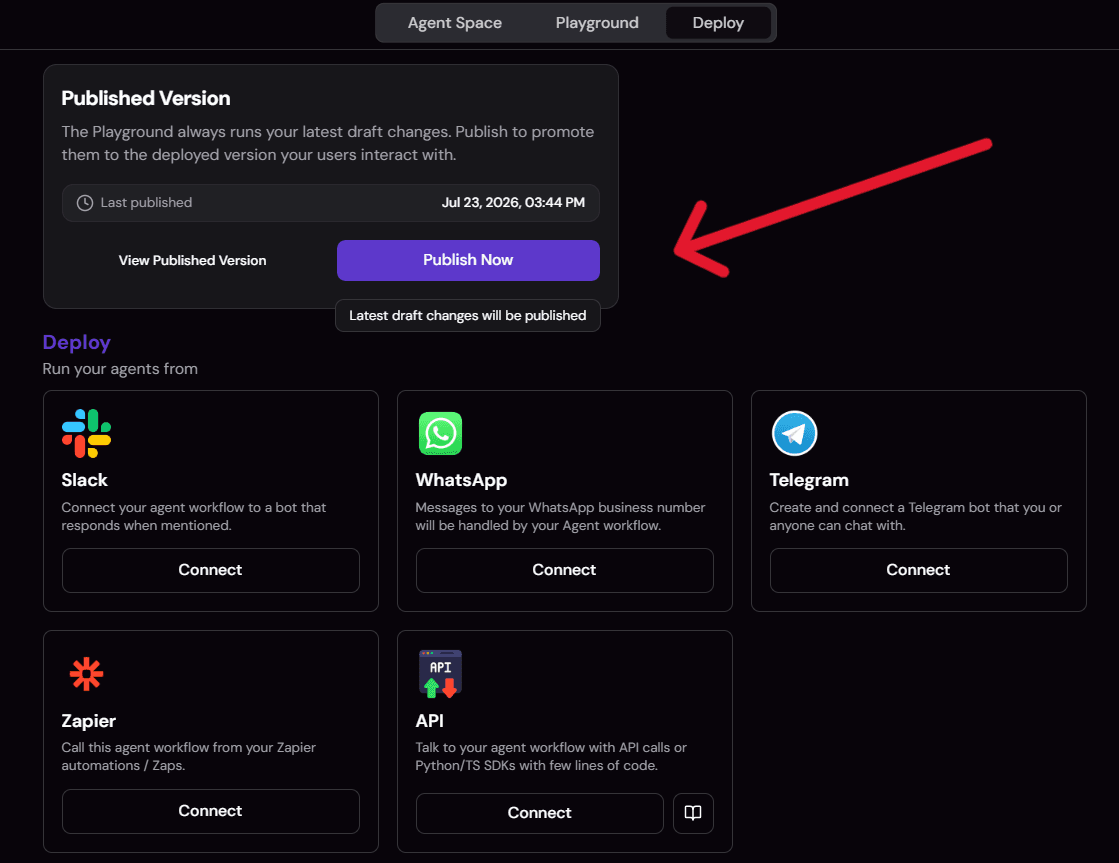
Run it from chat whenever your inbox needs attention. There's no scheduled trigger in this template. It's a chat-triggered agent, not an always-on cron job, so plan to send the triage prompt yourself (or wire your own scheduler if you want that later) rather than expecting it to run automatically every morning.
Common issues and fixes
- Notion insert fails with a 400 error. The
propertiesnames sent by the agent don't match your database's actual column names, so ask it toNOTION_QUERY_DATABASEfirst, or tell it the exact column names directly. - Labels don't appear as expected. Gmail only ships system labels by default; the agent creates
Urgent/To-Reply/FYI/Promothe first time it needs each one. This is expected on the very first run, not a bug. - Nothing gets auto-sent. By default MODE is approval, so the agent only drafts. Auto-send has to be explicitly turned on for specific categories in your rules.
- Slack or Notion steps are silently skipped. These are opt-in; if you haven't configured a channel or database in your rules file, the agent skips those two actions and still completes triage, drafting, labeling, and archiving.
Customization knobs
- Signature and VIP senders/domains: Adjust who counts as a VIP and what signature the agent appends to drafts.
- Always-archive senders: Set senders that should be labeled and archived automatically.
- Draft-vs-auto-send mode: Choose which categories, if any, qualify for auto-send.
- Batch scope: Change the
gmail_labelscope andmax_emailsbatch size. - Logging targets: Update the Notion database id and Slack channel, or any custom rule you describe in plain language.
Who it's for
-
No-code and AI agent builders wiring up their own inbox automation want something they can actually inspect and edit, not a closed inbox client. This template's rules live in a plain, user-readable and editable file (
/agent/email-triage/rules.md) that persists across conversations, and its classification logic is backed by an installable skill rather than a hidden prompt. -
Solo operators, founders, and consultants buried in inbox volume want triage plus drafted replies, not a hired assistant. The agent drafts context-aware replies for urgent/needs-reply mail, matches your saved signature and tone, and never auto-sends unless you've explicitly turned that on, so you keep final approval by default. If you haven't set a signature or VIP list yet, the first run still works with sensible defaults and simply asks you to fill them in.
-
Small ops and support teams want triage decisions visible to more than one inbox. Every urgent or needs-reply email gets a row in a shared Notion database (Date, Sender, Subject, Category, Status, GmailLink), and urgent items also ping a configured Slack channel, giving a searchable, shared record instead of one person's inbox being the only source of truth. If no Notion database or Slack channel is configured, those two actions are simply skipped and the rest still runs.
-
General AI email management researchers comparing tools broadly should know this is a configurable agent for Gmail specifically, not a cross-provider inbox client. If you're on Outlook or another provider, this template doesn't cover that today.
What the agent does
This template can:
- Read unread Gmail on request, scoped to a configurable label and batch size (default: INBOX, 20 emails).
- Classify each message as urgent, needs-reply, FYI, or spam/promo using your saved rules first (VIP senders, always-archive senders), then judgment.
- Draft context-aware replies for urgent/needs-reply mail, matching the sender's tone and appending your signature, never inventing facts; it leaves a
[placeholder]instead. - Label and archive everything else, creating Gmail labels on first use since Gmail doesn't ship them by default.
- Log important emails (urgent + needs-reply) to a Notion database with sender, subject, category, status, and a Gmail link.
- Alert a Slack channel on urgent items only (sender and subject, never the email body).
- Remember your preferences across sessions in a durable rules file, and update them anytime you describe a change in plain language.
- Auto-send replies, but only when you've explicitly enabled it for a category and the draft is confident with no leftover placeholder.
- Never delete a message: archiving only removes the inbox label, and it's reversible.
- Summarize each run in a compact final message (counts per class, urgent items first) and save a dated copy for the record.
How it works
- Read your rules. The agent checks its durable rules file first; if it doesn't exist yet, it creates one with defaults and asks you to customize it.
- Fetch unread mail. Pulls unread messages from your configured Gmail label, up to your batch size. If nothing is unread, it stops with "Inbox clear - nothing to triage."
- Classify. Your saved rules apply first (VIP sender maps to urgent, always-archive sender maps to FYI), then judgment sorts the rest into urgent / needs-reply / FYI / spam-promo, opening a thread only when it needs more context.
- Act per category. Drafts replies for urgent/needs-reply, labels and archives FYI and spam/promo, logs urgent + needs-reply to Notion, and pings Slack for urgent items only.
- Auto-send if enabled. Only fires for a confident urgent/needs-reply draft, in a category you've explicitly opted into auto-send, and never if a
[placeholder]remains. - Report back. A concise summary (counts per class, urgent items marked "draft ready," a compact table of the rest), plus a saved copy of that summary for your records.
Since this is a single-agent template with no handoff to a second agent, there's no escalation logic to configure. The whole flow above runs inside the one Smart Email Manager agent.
Requirements
- Gmail account, connected via OAuth: required to read, label, archive, draft, and (optionally) send mail.
- Slack account, connected via OAuth: optional, only needed if you want urgent-item alerts.
- Notion account and a target database, connected via OAuth: optional, only needed if you want a logged record of important emails; its column names need to match what the agent writes.
No calendar, CRM, or ticketing connection is required for this template to run as designed. If you later want to route important emails into a CRM or ticketing system, SketricGen's library of 2,000+ apps covers that as an optional add-on rather than something you're locked out of.
Apps used
| App | What it's used for | Typical permission scope |
|---|---|---|
| Gmail | Fetch unread mail, open threads for context, create/apply labels, archive, create drafts, send (only in auto-send mode) | gmail-find-email, gmail-list-thread-messages, gmail-create-draft, gmail-send-email, gmail-list-labels, gmail-create-label, gmail-add-label-to-email, gmail-remove-label-from-email, gmail-archive-email |
| Notion | Log important (urgent/needs-reply) emails to a database row | NOTION_FETCH_DATA, NOTION_QUERY_DATABASE, NOTION_INSERT_ROW_DATABASE |
| Slack | Post a one-line alert (sender + subject) for urgent emails to a configured channel | slack_v2-list-channels, slack_v2-send-message-to-channel |
Use cases
Build an inbox agent you can actually edit For no-code builders who want to see and change the classification logic, not just install a black-box app. Best for: teams already building or customizing their own AI Workforce agents.
Draft-first inbox triage For solo operators and consultants who want replies drafted for review, with everything else labeled and archived automatically. Best for: anyone who wants to keep final approval on what gets sent.
Shared triage log For small ops or support teams who want a Notion record of every important email plus a Slack heads-up, instead of relying on one inbox. Best for: teams where more than one person needs visibility into what came in.
Gmail-only agent alternative to inbox clients For people evaluating AI email tools broadly who want an agent-based, editable alternative to a closed inbox client, with the caveat that Gmail is the only provider this template supports today. Best for: Gmail users specifically comparing agent platforms against client-style AI email tools.
Example prompts/outputs
- Example: Triage prompt
"Triage the last 10 unread and draft replies for urgent ones."

Example agent summary (illustrative, not a literal transcript):
Triaged 10 unread: 2 urgent (drafts ready), 3 needs-reply (drafts ready), 4 FYI (labeled + archived), 1 spam/promo (labeled + archived). Urgent: Alex Chen: "Contract needs signature today" (draft ready), Priya Nair: "Server outage, need response" (draft ready). Logged 5 to Notion. Slack alert sent for 2 urgent items.
- Example: Rule-setting prompt
"Store important emails in my Email Tracker Notion DB."

Example agent confirmation:
Got it. I'll log urgent and needs-reply emails to your Email Tracker database going forward. I confirmed the column names match (Date, Sender, Subject, Category, Status, GmailLink).
Why you need this template
- Consistent rules, every run. The same VIP list, always-archive senders, and classification taxonomy apply whether it's your first triage or your hundredth, instead of re-deciding what's urgent each time.
- Shared visibility, not one inbox as the record. A Notion log and Slack alert mean the rest of the team can see what's urgent without needing your inbox.
- You stay in control of what actually sends. Draft-first by default, auto-send opt-in per category, so nothing goes out you haven't approved unless you've explicitly said so.
- Nothing gets deleted. Archiving only removes the inbox label, and it's reversible, so there's no risk of losing a message you needed.
- Set up once, adjust anytime in plain language. No re-onboarding every time your preferences change.
FAQs
It's a starting point, not a locked workflow. Open the Smart Email Manager agent and use Use AI to help draft or update its instructions—adding new agents or connecting new tools is done manually in the canvas.
Email triage here means classifying each unread message into urgent, needs-reply, FYI, or spam/promo, then acting on that classification (drafting a reply, labeling, archiving, logging, or alerting) rather than just sorting messages into folders.
- Urgent and needs-reply get a drafted reply.
- FYI and spam/promo get labeled and archived, no draft.
By default it only drafts. Nothing sends until you approve it in Gmail. Auto-send is an opt-in setting per category (e.g. "auto-send order confirmations"), and even then it only fires on a confident draft with no leftover placeholder text.
Since there's no rules file yet, the agent creates one with sensible defaults (approval mode, standard signature placeholder, INBOX label, 20-email batch) and asks you to fill in your real signature, VIP senders, and whether you want Notion logging or Slack alerts. It won't repeat this setup on later runs.
Yes. Describe the change in plain language ("always treat emails from my boss as urgent," "change my signature to X") and the agent updates its rules file and confirms the change, without running a triage in that same message.
Not currently. The Gmail connection is built specifically for Gmail. If you need Outlook support, that would require a different tool connection than this template ships with today.
Notion gives you a searchable, shared log of important emails (sender, subject, category, status, a link back to Gmail); Slack gives the team a real-time heads-up on anything urgent. Both are optional; if you don't connect them, triage still runs, it just skips the logging and alerting steps.
Leave them unconfigured. The agent still triages, drafts, labels, and archives; it simply skips logging to Notion and alerting Slack if those aren't set up in your rules.
You trigger it. This template starts from a chat message (e.g. "Triage my inbox"), not a schedule. There's no built-in cron trigger in this version, so plan to send the prompt yourself when you want a triage run.
No. It only acts on messages a tool actually returns, and if a reply draft is missing a fact it doesn't know, it leaves a [placeholder] rather than inventing details.
Related templates
View more
Personal Ops AI Assistant
Chief of Staff router plus 4 specialists for calendar, Notion, Slack/Gmail, and meeting prep.

Data Analysis and Visualization
Turn an uploaded spreadsheet, CSV, or PDF into answers, charts, and a shareable report, all from chat. A single no-code agent validates and profiles your file, answers your questions with statistics computed in code (never guessed), builds the right chart for each finding, and delivers a polished DOCX or PDF report on request, with an optional executive slide deck.
WhatsApp AI Agent
Answers WhatsApp support questions from your brand knowledge base, and never invents a policy.
AI Receptionist
Learns your brand from your website, answers FAQs 24/7, and books demos on Google Calendar.

Instagram DM Automation
Auto-replies to Instagram DMs from your brand's own knowledge base.

Meta Ads Performance Manager
Diagnose campaign, audience, placement, and creative performance and turn the evidence into measurable, approval-controlled Meta Ads improvements.