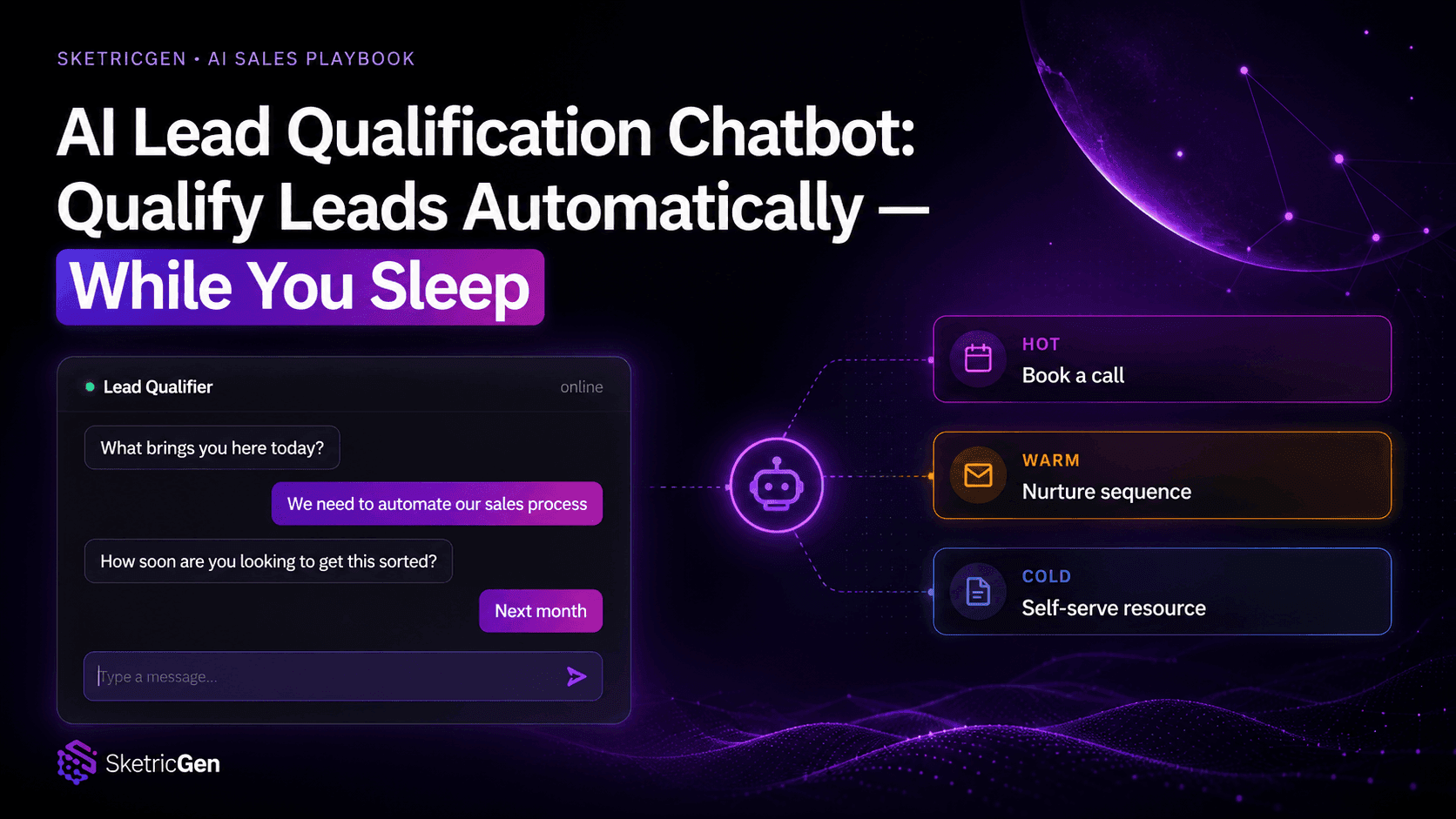
How to Use AI Appointment Booking for Demos on Website
Built and tested with SketricGen Brand Agents. The calendar-in-chat workflow described here is a live feature, not a concept.
Who This Is For
- B2B founders and growth leads who run traffic to a website but get too few demos booked
- Sales ops managers dealing with demo no-show rates above 20%
- Anyone who has watched a prospect click "Book a Demo" and never heard from them again
Key Points
- 83% of interested buyers never complete a demo booking — the friction happens at the redirect, not at the pitch.
- Demo no-show rates in B2B can hit 50%. The fix is not more reminder emails. It is reducing the time between intent and the actual booking.
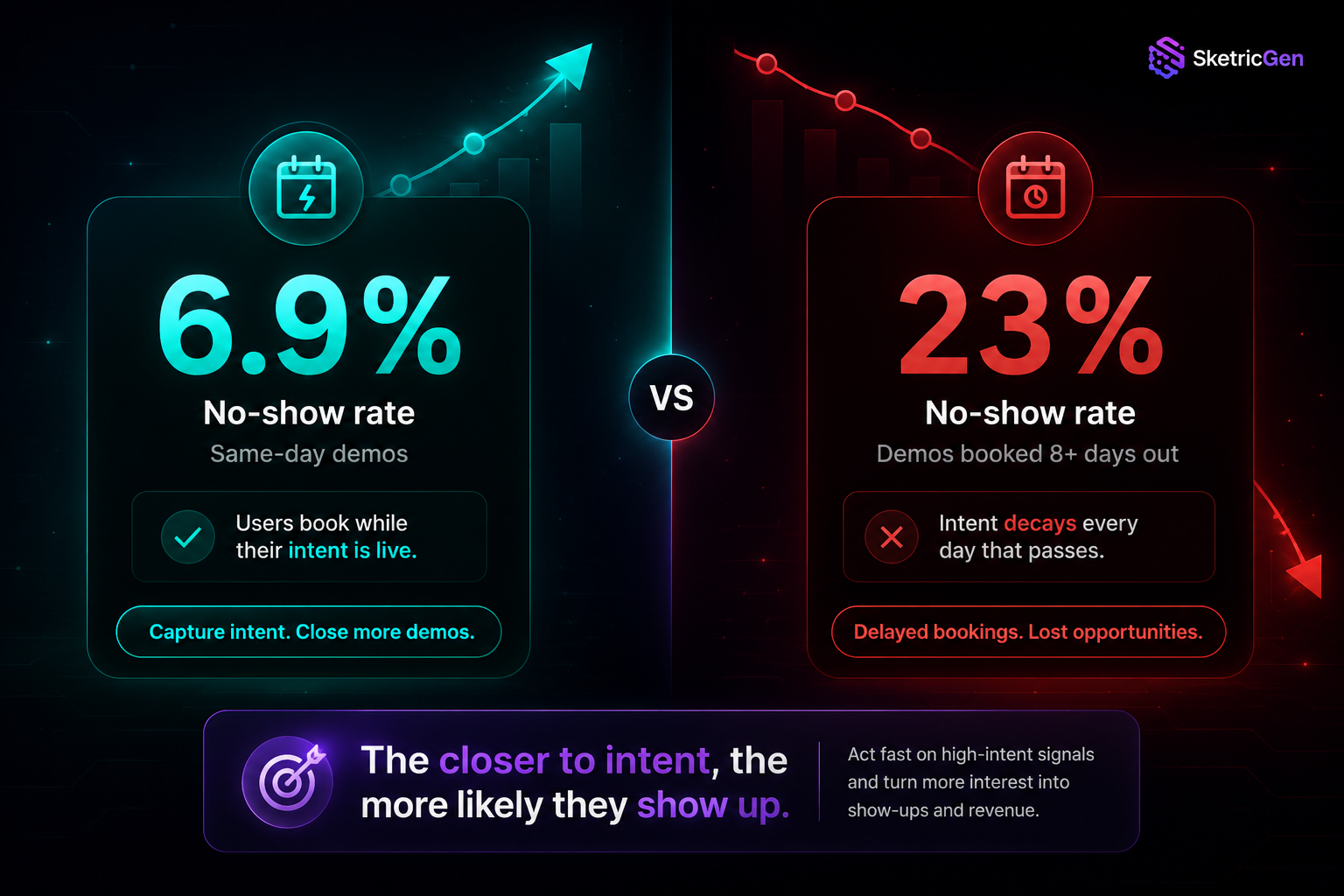
- Same-day demos have a 6.9% no-show rate. Demos booked eight or more days out: 23%.
- AI appointment booking works by qualifying the visitor conversationally, then surfacing the calendar inside the same chat window — no redirect, no new tab, no drop-off.
- SketricGen Brand Agents connect your calendar directly inside the agent chat. The visitor picks a time without ever leaving your site.
The Real Problem: Your Demos Are Dying at the Button
Most teams think their demo pipeline problem is a traffic problem.
It is not.
They run ads. They get clicks. They even get people to the "Book a Demo" page. Then nothing. The pipeline stays thin. The sales team is half-idle. And the consensus is: "we need more traffic."
But here is what is actually happening.
83% of interested buyers never complete a demo booking. Not because they were not interested. Because they hit friction after they clicked the button. A form loaded on a new page. They had to re-enter details. The calendar took a moment too long. They got distracted. They told themselves they would come back.
They did not come back.
50% of users drop off when a form redirects to a new page. That is not a small leak. That is half your pipeline walking out the door at the exact moment they were most ready to book.
This is not a Calendly problem. It is a context-switch problem. The moment you send someone to a new tab to complete an action, you break the intent loop. And in B2B, a broken intent loop means a lost demo.
Why Most "Book a Demo" Flows Fail
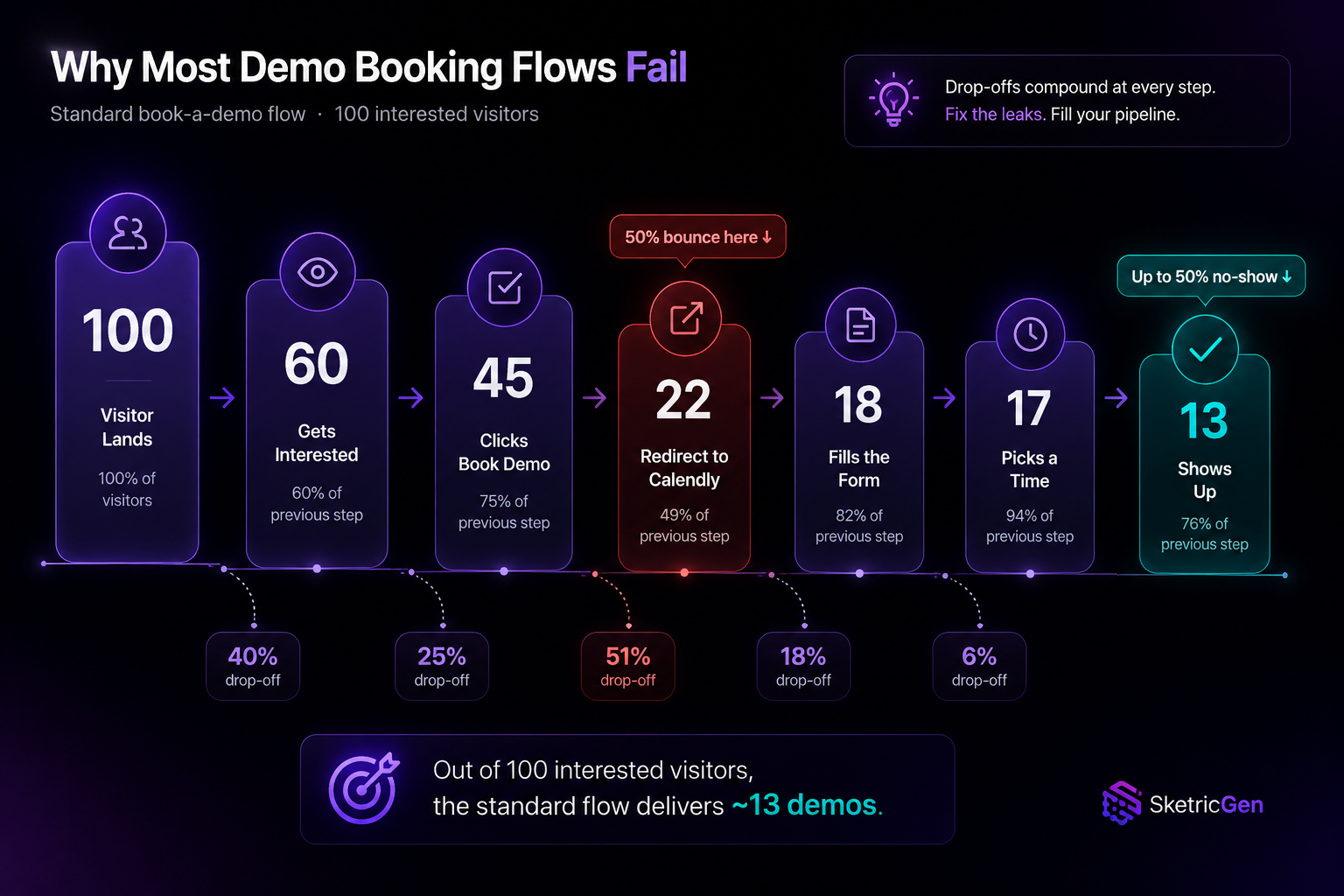
The standard demo booking flow looks like this:
- Visitor lands on your site
- Reads enough to get interested
- Clicks "Book a Demo"
- Gets redirected to Calendly
- Fills out a form
- Picks a time
- Receives a calendar invite
That is seven steps. Each one is a drop-off point.
Here is what actually happens at scale:
| Step | What Should Happen | What Actually Happens |
|---|---|---|
| Clicks "Book a Demo" | Goes straight to scheduling | 50% drop off at the redirect |
| Fills the form | Submits full details | Many skip or abandon mid-form |
| Picks a time | Books instantly | "I'll come back to this" — they don't |
| Gets the invite | Shows up to the call | Up to 50% no-show rate in B2B |
Even the visitors who do complete the booking are often picking a slot a week away. And demos booked more than eight days out have a 23% no-show rate, compared to 6.9% for same-day bookings.
The math is brutal. You send 100 interested visitors to a booking page. Around 17 complete it. Of those, three or four still do not show. You ran your whole funnel for 13 demos.
What AI Appointment Booking Actually Changes
AI appointment booking is not just a smarter calendar widget. When set up correctly, it eliminates the context switch entirely.
Instead of redirecting visitors to a separate page, the AI agent handles the entire sequence inside the chat window already open on your site:
- Visitor arrives — the agent greets them and starts a natural conversation
- Qualification happens — the agent collects lead details (name, company, use case, timeline) through conversation, not a static form
- Intent signals demo readiness — when the visitor asks about demos or the agent detects high intent, it surfaces the calendar directly inside the chat
- Visitor picks a time — no new tab, no redirect, no new page to load
- Booking is confirmed — confirmation appears in the same chat window, calendar invite goes to their inbox
The key shift: the calendar is not a destination. It is one step inside an ongoing conversation the visitor is already invested in.
This matters because of how intent works. When someone is actively on your product page, talking to your agent, and expressing interest — that is peak intent. Every second that passes after that moment costs you conversion rate. Keeping the booking in the same session captures the intent while it is live.
How SketricGen Brand Agents Handle Demo Booking
SketricGen Brand Agents are built for exactly this workflow. Here is what the setup looks like in practice.
Step 1: Connect Your Lead Capture
The agent is trained on your website content — product pages, pricing, FAQs. When a visitor opens the chat, it does not ask them to fill out a form. It starts a conversation.
As the chat develops, the agent collects the details you care about: name, email, company size, what the visitor is trying to solve. All through natural exchange, not a multi-field form.
This qualification step matters for no-show rates. Someone who answers three questions about their use case has shown real intent. Someone who blindly filled out a form and grabbed the next available slot has not. The agent filters these two groups apart before anyone sees the calendar.
Step 2: Connect Your Calendar
In SketricGen, you connect your calendar directly to the Brand Agent. Google Calendar, Outlook, Cal.com, and Calendly are all supported.
When the agent detects that a visitor is ready to book — either from explicit signals like "I'd like to see a demo" or from a qualification score threshold you set — it shows your live calendar availability inside the chat. The visitor picks a time. The booking is confirmed in the same window.
This is the part most teams miss. The calendar does not open in a new tab. It appears as a step inside the ongoing chat. The visitor never leaves your site. They never lose context. The intent loop stays closed.
Step 3: Everything Gets Captured Automatically
Once the booking is confirmed, SketricGen logs the lead details, creates or updates the record in your CRM (HubSpot, Salesforce, Airtable), and sends the calendar invite automatically.
The full conversation context travels with the lead. Your sales rep walks into the call already knowing what the prospect told the agent — what they are trying to solve, what tools they currently use, what timeline they are working toward. No "remind me what this was about" prep work.
The No-Show Problem: Two Things That Actually Fix It
Teams dealing with high no-show rates usually add more reminder emails. That helps a little. But it treats the symptom. The two root causes of B2B demo no-shows are timing and qualification — and both are solvable at the booking stage.
Timing: Book as close to the moment of intent as possible. A visitor who books a demo during an active session on your website is showing live intent. A visitor who books from a follow-up email three days later is operating from memory. The 6.9% vs. 23% no-show rate gap between same-day and week-later bookings is not a coincidence — it is what intent decay looks like in data form.
Qualification: Unscreened bookings produce two problems. You get "just browsing" attendees who waste the sales team's time. And you get no-shows from people who were never fully committed. When the agent asks three or four questions before surfacing the calendar, it creates natural filtering. People who answer those questions have already invested in the conversation. They have skin in the game.
These two levers together — in-session booking and lightweight qualification before the calendar appears — are what SketricGen customers point to as the driver behind a 35% improvement in lead-to-demo conversion. Not just more bookings. More bookings that show up ready to talk.
Where to Deploy This on Your Website
Not every page is equal for demo booking intent. Place the agent on the pages where visitors are already in evaluation mode:
| Page | Why It Works |
|---|---|
| Pricing page | High purchase intent — they are actively thinking about cost and value |
| Product / Features pages | Active evaluation — they are sizing up whether the product fits their use case |
| Homepage | Broad entry point — good for capturing visitors who become interested during the session |
| Blog posts | Informational intent converting to commercial — warm, educated audience |
| Paid landing pages | Controlled intent — visitor arrived with a specific reason and conversion goal |
The agent does not need to be aggressive. A soft greeting after 20–30 seconds on a high-intent page, with a clear offer to help or answer questions, outperforms a pop-up that blocks the page before the visitor has read a single line.
For a full walkthrough on configuring the lead capture and qualification logic, see the AI Lead Qualification Chatbot guide.
What Practitioners Are Saying
"We moved to same-day booking once a prospect hits a qualification threshold in the chat. Our show rate went from 58% to over 85% in the first month." — r/SaaS discussion on demo conversion rate optimization
"The problem isn't that people don't want demos. It's that we're asking them to do too much to get one. Every extra click is another chance to lose them." — r/Entrepreneur thread on B2B lead conversion
The pattern that shows up consistently across practitioner communities: teams that reduce friction at the booking step — not the awareness step, not the outreach step — see the biggest jump in both booking volume and meeting quality.
Setting This Up: No Code Required
If you have a SketricGen account, the full setup takes under 15 minutes:
- Go to Brand Agents and create a new agent
- Train it on your website URL — it pulls your content automatically
- Add your calendar connection (Google Calendar, Outlook, Cal.com, or Calendly)
- Set your qualification questions — three to four is enough
- Configure when the calendar appears: after a set number of messages, or when specific intent signals show up
- Embed the widget on your site with one script tag
The agent handles the rest: greet, qualify, book, confirm, log to CRM.
For a step-by-step setup guide, see AI Chatbot for Your Website: The Complete No-Code Guide. For building the full lead qualification flow, see How to Build an AI Sales Assistant for Lead Qualification.
Author Take -Sam
When we first connected the calendar to the Brand Agent, I expected a modest lift in bookings. What I did not expect was the quality jump. Every prospect who made it to the calendar had already had a real conversation with the agent — they told it what they were trying to solve, what their timeline was, what they had already tried. By the time they showed up on the call, half the discovery was done. The AI did not just fill my calendar. It made every meeting on that calendar worth having.
The Short Version
The demo pipeline problem is not a traffic problem. It is a friction-at-intent problem.
The fix is keeping qualification and booking inside a single session — no redirect, no new tab, no form on a fresh page. AI appointment booking solves this by embedding the calendar inside the conversation that is already happening on your site.
When visitors book during an active session with clear qualification signals already captured, two things happen consistently: fewer of them ghost, and the ones who show up are worth the call.
Set it up with SketricGen Brand Agents. The calendar connects in minutes. The results show up in your show rate.
FAQs
Not necessarily. SketricGen integrates with Calendly, so your existing calendar setup stays intact. The difference is the booking happens inside the agent chat on your website rather than on a separate Calendly page. You keep the calendar backend you already use. You remove the redirect that is costing you half your conversions.
The agent captures their details during the qualification conversation and logs them to your CRM automatically. It can send a follow-up, route to a human, or flag the lead for outreach — depending on how you configure it. Not every chat ends in a booking, but every qualified chat ends with the lead captured.
Three to four is the consistent sweet spot. Enough to filter intent and collect the context your sales rep needs, without adding enough friction to drop completion rates. The questions that matter most: what brought them here, what problem they are trying to solve, what the team looks like, and what the timeline is.
Yes. SketricGen Brand Agents support Google Calendar, Outlook, Cal.com, and Calendly. You can configure which calendar is shown based on rep ownership, territory, or the lead's qualification tier.
Lead details and the full conversation are logged to your CRM. The visitor gets a calendar invite by email. Your sales rep gets a notification with the full conversation context — what the prospect said, what questions they answered, what their use case is. No manual prep required.
Yes — and it is one of the highest-return placements. Paid traffic arrives with intent already established. An agent that qualifies and books within the same session captures that intent before it evaporates. For more on using AI agents in paid traffic funnels, see the AI Agent Lead Generation Playbook 2026.
Related blogs
View more
AI Agents for Small Business: What Actually Works at 1-20 People
use cases
Website Lead Capture: How to Turn Silent Visitors Into Leads With an AI Chatbot
use cases
Best AI Agent for Work Intake & Backlog Automation in PM Platforms (2026)
use cases
How to Reduce Customer Churn with AI: Stop Losing Customers
use cases