Best AI Agent for Work Intake & Backlog Automation in PM Platforms (2026)
Researched across Jira Rovo, Linear AI Triage, Asana AI Studio, and SketricGen. Based on 2026 SERP signals, community threads, and published benchmarks.
Who This Is For
- PMs who spend 2+ hours per sprint cleaning up tickets before planning even starts
- Engineering leads manually routing incoming requests across Slack, email, and Jira
- Ops and product teams looking for a no-code AI agent that works across their existing PM stack
Key Points
- Backlog refinement eats 5–10% of sprint capacity — AI agents can cut triage time by up to 45%
- PMs at Jira-heavy teams spend 2–3 hours per sprint on mechanical audits before a single planning decision gets made
- Native AI in Jira (Rovo), Linear (AI Triage), and Asana (AI Studio) handles each platform well — but each is locked to its own ecosystem
- If your requests arrive from Slack, email, Google Forms, and Jira simultaneously, you need a cross-platform agent layer, not a native plugin
- The biggest failure mode is not bad AI — it's automating intake faster than your team can review and act on what comes out
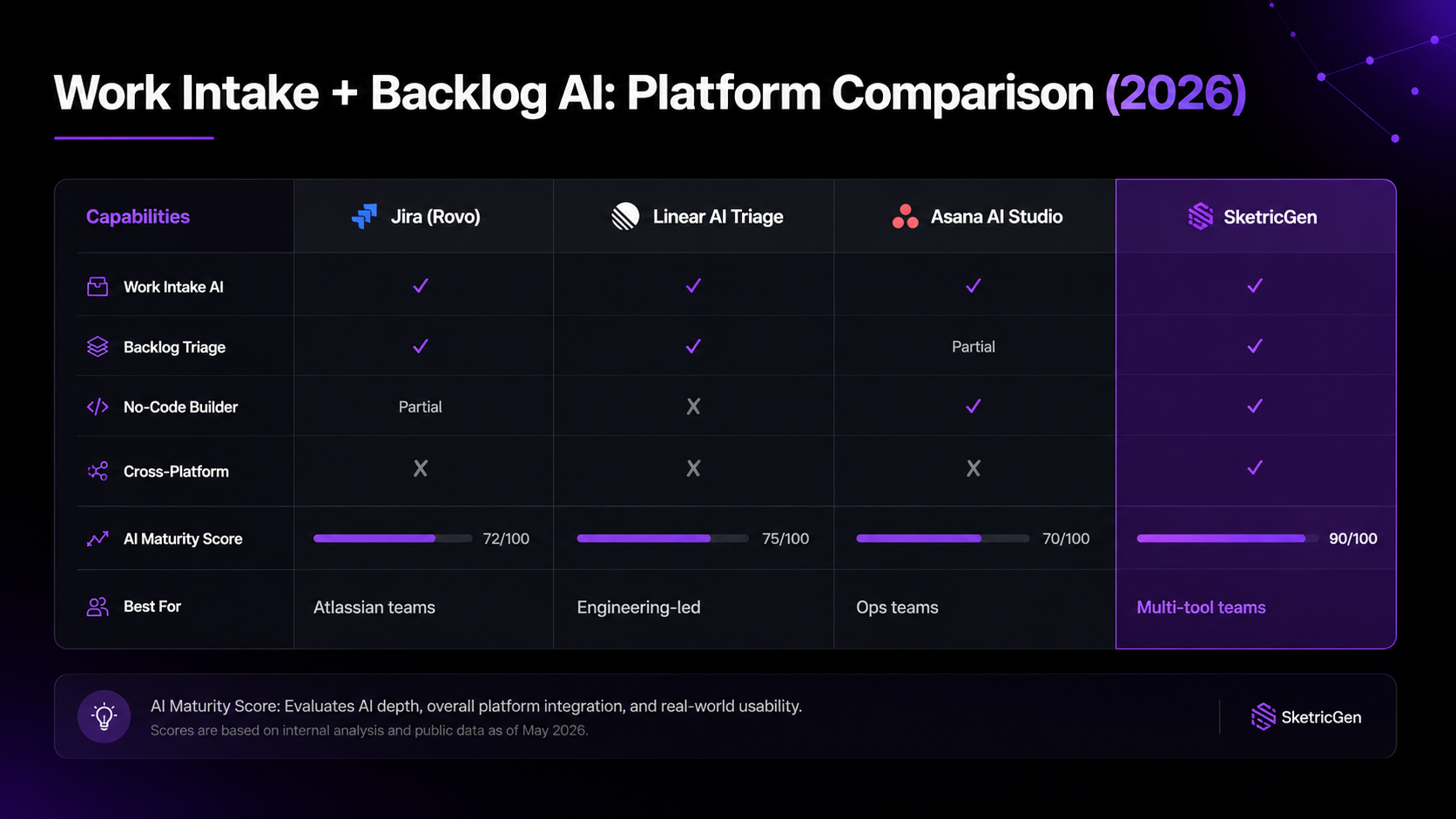
At a Glance: Work Intake and Backlog AI by Platform
| Tool | Work Intake AI | Backlog Triage | No-Code | Cross-Platform | AI Maturity Score | Best For |
|---|---|---|---|---|---|---|
| Jira (Rovo) | ✓ | ✓ | Partial | Atlassian only | 7.2/10 | Teams already deep in the Atlassian ecosystem |
| Linear (AI Triage) | ✓ | ✓ | No | Linear only | 7.5/10 | Engineering-led orgs that live in Linear |
| Asana (AI Studio) | ✓ | Partial | Yes | Asana only | 7.0/10 | Ops and cross-functional teams |
| Monday.com AI | ✓ | Partial | Yes | Monday only | 36/50 overall | Non-technical teams and client work |
| SketricGen | ✓ | ✓ | Yes | Any PM tool | Fully customizable | Teams that span multiple PM tools or want custom intake logic |
AI maturity scores sourced from Linear vs Jira vs Asana AI agent comparison (DEV.to) and AI PM Tool Rankings 2026 (AgileGenesis).
What "Work Intake and Backlog Automation" Actually Means
These two terms get used interchangeably. They are not the same thing.
Work intake is what happens the moment a request arrives — a Slack message, a support ticket, a form submission, or a Confluence comment. The agent captures it, classifies it, enriches it with context, and routes it to the right team or PM tool. It is the front door.
Backlog triage is what happens after — on an ongoing basis. The agent scans the existing backlog for stale tickets, duplicate issues, missing story points, priority drift, and items that should be archived. It is the maintenance crew.
Most built-in AI features cover one or the other. Very few cover both, and almost none handle the handoff between them cleanly. That gap is exactly where teams lose hours every sprint.
Why PM Teams Are Still Doing This Manually
The honest answer is that most PM tools only added AI recently. The pain is not new.
A 2026 analysis by Augment Code found that backlog refinement consumes 5–10% of sprint capacity in two-week sprints. That is before any planning actually happens. And according to a detailed breakdown by Gravity.fast on Jira backlog management, product managers at Jira-heavy teams spend 2–3 hours per sprint on purely mechanical audits — scanning for stale tickets, duplicates, and missing fields.
The five pain points that come up consistently:
- Backlog decay: A backlog that started clean turns into a pile of abandoned ideas, unresolved bugs, and tickets no one remembers creating
- Sprint planning becomes triage: Teams discover unclear work in real time, under deadline pressure, instead of having sprint-ready items queued up
- Duplicate tickets: The same request filed three different ways by three different people, none of them connected
- Missing fields: Story points not estimated, acceptance criteria blank, owner unassigned — the ticket exists but no one can act on it
- Priority drift: A P1 bug labeled six months ago that is now irrelevant, sitting at the top of every filter
All five of these are mechanical. They follow rules. Rules are exactly what agents are good at.
How AI Agents Handle Work Intake
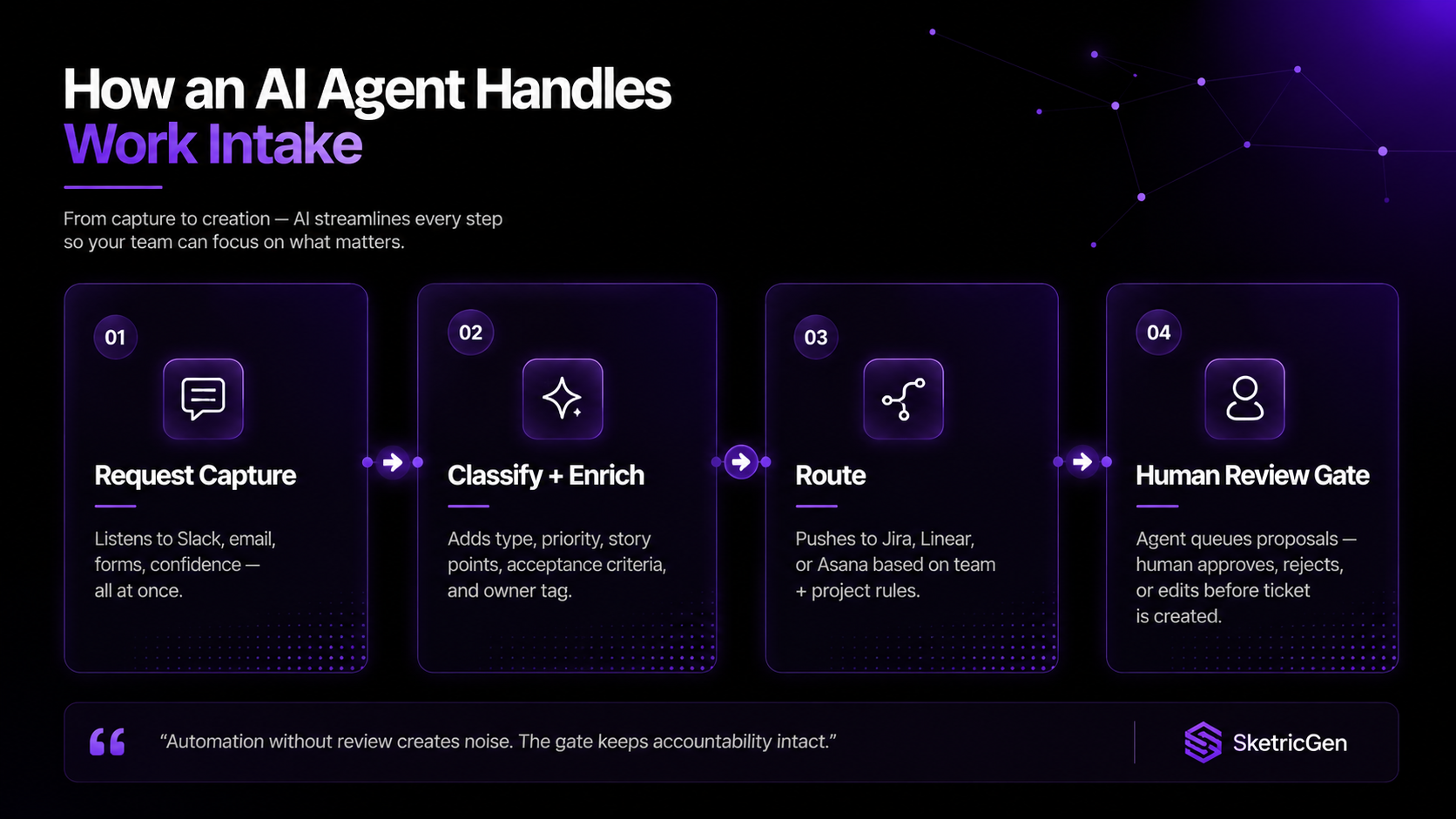
Work intake automation follows a four-step flow. Each step is where an agent does the work a PM or ops person used to do manually.
Step 1 — Request capture. The agent listens to the sources where work arrives: Slack channels, email inboxes, form submissions, Confluence pages, or direct API inputs. It picks up the signal and holds it for processing.
Step 2 — Classification and enrichment. The agent reads the request and applies labels: type (bug, feature, request, question), priority level, relevant team or project, and estimated complexity. It also fills in missing fields — adding acceptance criteria drafts, suggested story points, and tagging the right labels based on past patterns.
Step 3 — Routing. The enriched item gets pushed to the right destination. That might be a specific Jira project, a Linear team inbox, an Asana portfolio, or a Slack thread for a human to review. The routing rules are configurable — by team, by tag, by keyword, or by any logic you define.
Step 4 — Human review gate. The agent does not create tickets autonomously in a well-designed setup. It queues proposals for a human to approve, reject, or modify. This keeps accountability intact and prevents garbage from entering the backlog at scale.
Decision rule: If your work requests arrive from three or more sources simultaneously, a native plugin will not cover it. You need a cross-platform agent that listens to all of them and routes to whichever PM tool the team uses.
How AI Agents Handle Backlog Triage and Grooming
Backlog triage is where the time savings are most measurable. Research from Augment Code found that AI-assisted triage can reduce triage time by up to 45%. Teams using AI save between 30 minutes and 2+ hours per sprint on backlog cleanup alone.
A backlog grooming agent typically performs five functions:
- Stale ticket detection: Surfaces open issues untouched beyond a set threshold — 60 days for stories, 30 days for bugs, configurable per team
- Duplicate identification: Uses semantic analysis (not just keyword matching) to find overlapping work across the backlog, even when tickets are worded differently
- Missing field flagging: Shows all items without story points, acceptance criteria, or assigned owners — prioritized by backlog rank so the most critical gaps surface first
- Priority and label auditing: Detects mismatches between ticket content and its assigned label — a ticket using "critical" language tagged as P3, for example
- Sprint planning brief generation: Produces a pre-meeting summary with backlog health metrics, sprint-ready items, and unresolved blockers — ready before the meeting starts
The Gravity.fast Jira agent completes a full backlog scan in approximately 60 seconds. The manual equivalent takes 2–3 hours.
Pro tip: Start with one function, not all five. Stale ticket detection is the lowest-risk entry point — it surfaces problems without changing anything. Once your team trusts the output, add duplicate detection and missing field flagging incrementally.
The failure mode to watch for: acceleration whiplash.
Faster intake and triage means more tickets reach the review queue faster. If your downstream engineering review or QA process is not scaled to match, you create a new bottleneck downstream. The Augment Code guide on AI backlog grooming calls this out explicitly — grooming automation removes the mechanical scanning, but it does not replace the human judgment needed at refinement sessions. The decisions still need people.
Platform Breakdown: SketricGen Jira, Linear & Asana
Here is how the main platforms handle work intake and backlog automation in 2026:
SketricGen — Cross-Platform No-Code Agent Layer
SketricGen takes a different approach. Instead of being a PM tool with AI features added, it is an agent builder that connects to the PM tools your team already uses. You can build a work intake agent that listens to a Slack channel, classifies requests using an LLM, pushes structured tickets to Jira or Linear, and fires a Slack notification for human review — all without writing code.
This matters most when your intake sources are fragmented. If requests come from email, Slack, a customer form, and a Confluence page, no single native tool handles all four. A custom agent in SketricGen can.
The tradeoff is that SketricGen requires a setup investment. You define the intake logic, the routing rules, and the output format. The payoff is a workflow designed around your team's actual process, not shaped by the constraints of a specific PM tool. Explore ready-made SketricGen automation templates to get started faster, or check SketricGen pricing for current plans.
Jira — Rovo AI
Jira's Rovo AI, launched in late 2025, can search across Jira, Confluence, Google Drive, Slack, and other connected tools. It generates status updates, drafts release notes from completed issues, suggests workflow optimizations based on historical patterns, and flags stale or unresolved work.
Rovo works well if your team lives entirely in the Atlassian ecosystem. The limitation is that limitation — it does not handle intake from outside Atlassian tools natively. Pricing: part of Atlassian's enterprise plans.
Linear — AI Triage
Linear's AI Triage became generally available in mid-2025. It automatically analyzes incoming issues and assigns priority levels, labels, and team routing — removing the manual grooming sessions that used to consume hours each week. Of the three native tools, Linear scores highest on AI agent integration at 7.5 out of 10.
Linear's constraint is intentional minimalism — the product is opinionated and engineering-first. It does not have a no-code agent builder, and it does not natively handle intake from sources outside Linear. Linear pricing starts at $8/user/month (Pro plan).
Asana — AI Studio
Asana's AI Studio, launched in October 2024 and expanded significantly through 2025, is a no-code workflow builder that lets teams create AI agents using natural language. It connects to Dropbox, Box, Google Drive, and other external sources, which gives it broader intake coverage than Linear or Jira without custom development.
The tradeoff: Asana AI agents still operate within the Asana ecosystem as the destination. If your team uses Jira as the source of truth but Asana for intake, you need an additional connector layer. Asana pricing starts at $10.99/user/month (Starter).
Monday.com AI
Monday.com's AI features handle work request intake and partial backlog management, and the platform scores well with non-technical teams who prefer a visual, no-code interface. It scored 36 out of 50 on overall AI maturity in 2026 AI PM tool rankings. Monday pricing starts at $9/user/month (Basic). The limitation is the same as the others — it works inside Monday, not across tools.
What practitioners are saying: A January 2026 thread in r/AI_Agents — with 70+ responses — asked "Has anyone actually found a good AI agent for task management?" The discussion showed strong demand paired with real skepticism. Most comments described trying Zapier, native AI features, or ClickUp automations and hitting walls when work came from multiple sources. Cross-platform intake was the most common unmet need. A consulting agency that deployed 42 specialized agents on Dust's platform reported a 50% reduction in project timeline creation time and 92% team adoption within weeks — a signal that purpose-built agents outperform bolt-on AI features when workflows are well defined.
Author take — Sam
The question I get most often is whether to use native AI (Jira Rovo, Asana AI Studio) or build a custom agent. My answer: use native AI if 90%+ of your intake lives inside one PM tool already. If not — if requests come from Slack, email, and forms simultaneously, or if your team uses two PM tools side by side — build a custom agent that routes to whatever destination each request needs. The no-code builders like SketricGen exist precisely for this case. The mistake I see most often is teams trying to stretch a native AI plugin to cover intake sources it was never designed for, then concluding "AI doesn't work for this." It does. It just needs the right layer.
Next Steps
If your team is spending more than an hour per sprint on manual ticket cleanup, that is a workflow problem with a solved solution.
Start here:
- Explore ready-to-use automation workflows at SketricGen templates — including pre-meeting prep and workflow automation starting points
- Build a custom intake agent on SketricGen — no code required, connects to Slack, email, and your existing PM tools
- See current plans on the SketricGen pricing page
- Read the companion guide: Best AI Agents for Project Management in 2026 — covers the full tool landscape beyond intake and triage
The intake and backlog problem is not complex to solve. It is just tedious enough that most teams accept it. An agent does not mind tedious.
FAQs
There is no single answer — it depends on where your intake comes from and which PM tool your team uses as the destination. If you are entirely in Jira, Rovo handles most of it. If you are engineering-led and on Linear, AI Triage is the fastest option. If your requests come from multiple sources or you use more than one PM tool, a cross-platform agent builder like SketricGen gives you more control without locking you into one ecosystem.
Start by mapping where requests arrive: Slack, email, forms, Confluence, or direct messages. Then set up an agent that monitors those sources, classifies each request (type, priority, owner, project), and pushes a structured item to your PM tool for human review. The key is the review gate — do not let the agent create tickets autonomously until you have validated its classification accuracy over several sprints.
Yes. Asana AI Studio and Monday.com both offer no-code agent builders within their platforms. For cross-platform intake, SketricGen lets you build custom intake-to-triage workflows without code, connecting sources like Slack or email to destinations like Jira, Linear, or Asana.
Routing is driven by classification rules you define. The agent reads the request content, applies labels (type, team, project, priority), and maps those labels to a destination. For example: any request tagged "bug" from the "#support" Slack channel routes to the engineering backlog with a P2 priority draft. Rules can be keyword-based, ML-based, or a hybrid — most platforms support both.
Backlog grooming is ongoing maintenance — removing stale tickets, flagging duplicates, filling missing fields, and auditing priority labels. Sprint planning automation is point-in-time — generating a sprint brief, recommending which items to pull, and estimating capacity. Most AI tools do one well. Grooming runs continuously; sprint planning runs at the start of each cycle. You need both, and they should feed each other.
Not natively — each platform's built-in AI operates within its own ecosystem. To run automation across Jira and Linear at the same time, you need an external agent that connects to both via API. Tools like SketricGen or Zapier Agents can bridge multiple PM platforms, though the setup complexity increases with each additional tool in the chain.
No, and it should not. AI handles the mechanical scanning — finding stale tickets, duplicates, and missing fields. The grooming session still needs humans to make decisions about priority, dependencies, and strategic fit. What AI does is eliminate the first 45% of the meeting that used to be discovery. The remaining time is judgment, which is where PMs and engineers should be spending their effort.
Related blogs
View more
Website Lead Capture: How to Turn Silent Visitors Into Leads With an AI Chatbot
use cases
How to Reduce Customer Churn with AI: Stop Losing Customers
use cases
How to Use AI Appointment Booking for Demos on Website
use cases
AI Lead Qualification Chatbot: How to Qualify Leads Automatically (While You Sleep)
use cases