How to Reduce Customer Churn with AI: Stop Losing Customers
Built and tested using SketricGen's multi-agent workflow builder. This post covers the exact retention workflow we use with SMB teams.
This is for you if:
- You run a small business, SaaS product, or service firm with no dedicated customer success team.
- Customers go quiet and eventually disappear — and you only notice weeks later.
- You want automated follow-up and re-engagement without hiring another person.
Key Points
- Acquiring a new customer costs 5–7x more than retaining an existing one, yet 44% of businesses still prioritise acquisition over retention.
- AI does three specific retention jobs: detect churn signals early, trigger personalised follow-up, and recapture re-engaged leads via chatbot.
- Your chatbot can connect to your calendar and let customers book calls or demos directly — no email back-and-forth, no manual scheduling.
- SMBs that deploy AI for retention report 22% lower churn within six months.
- You can build and deploy this workflow in a day using SketricGen — no code, no enterprise contract.
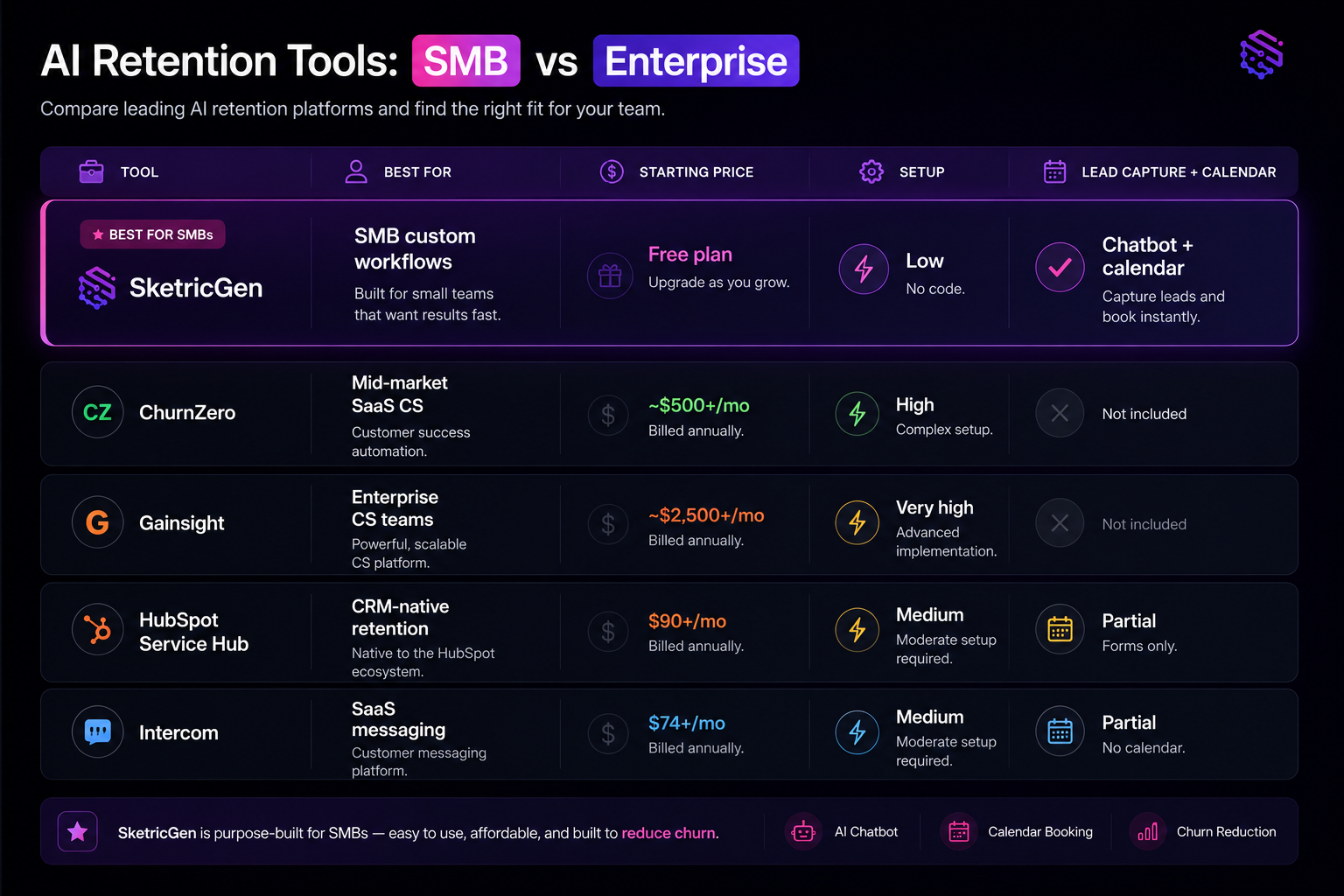
At a Glance: AI Retention Options for SMBs
| Tool | Best For | Starting Price | Setup | Lead Capture + Calendar Booking |
|---|---|---|---|---|
| SketricGen | SMBs building custom workflows | Free plan available | Low (no code) | Yes — chatbot + calendar |
| ChurnZero | Mid-market SaaS CS teams | ~$500+/mo | High | No |
| Gainsight | Enterprise customer success | ~$2,500+/mo | Very high | No |
| HubSpot Service Hub | CRM-native retention | $90+/mo | Medium | Partial (forms only) |
| Intercom | SaaS messaging + support | $74+/mo | Medium | Partial (no calendar) |
Why Most SMBs Lose Customers Silently
The most dangerous churn arrives without warning.
No angry email. No cancellation conversation. The customer stops responding, and one day they're gone.
This is the default for most small businesses. The data confirms it. SMB SaaS annual churn runs between 31–58%, far higher than enterprise. Most of it is invisible because there is no system watching for it.
A monthly newsletter is not a retention system. Checking in when you remember to is not a retention system. Real retention requires a trigger-based follow-up loop — one that fires when customer behaviour changes, not when you have time.
The compounding problem: acquiring a new customer costs 5–7x more than retaining an existing one, and 44% of businesses still prioritise acquisition over retention. Most SMBs are running a leaky bucket. They pour money into the top and ignore the holes at the bottom.
Decision rule: If your only retention touchpoint is a monthly newsletter or a periodic check-in, you have a churn problem. The question is only how big it has already gotten.
What AI Actually Does for Customer Retention
AI does not magically keep customers. It does three specific jobs:
- Signal detection — Monitors customer behaviour patterns and flags accounts that look at-risk before they cancel.
- Triggered messaging — Sends a relevant, personalised follow-up at the right moment, not a scheduled blast.
- Lead recapture and booking — When a customer re-engages, captures their details and opens your calendar for them to book a call.
None of these require a customer success manager. They require a workflow — and that is what AI agents handle.
The results are trackable. AI increases customer retention rates by 10–15%. SMBs deploying AI for retention report 22% lower churn within six months. For a business running at 40% annual churn, that is the difference between surviving and growing.
G2's 2026 Expert Survey on AI in Churn Reduction found the conversation has shifted from reacting to cancellations to preventing them altogether. The tools are no longer just for enterprise teams with dedicated CS operations.
What practitioners are saying:
On r/CustomerSuccess, a thread on AI churn prediction surfaced in 2025 with a recurring theme: the technology works, but most small teams do not know where to start building it. One practitioner noted they had sent the same newsletter for 18 months with flat results. When they switched to behaviour-triggered follow-ups, re-engagement improved immediately. The friction is not adoption — it is setup.
— Paraphrased from r/CustomerSuccess community thread, 2025
The 3-Stage AI Retention Workflow (Build This in a Day)
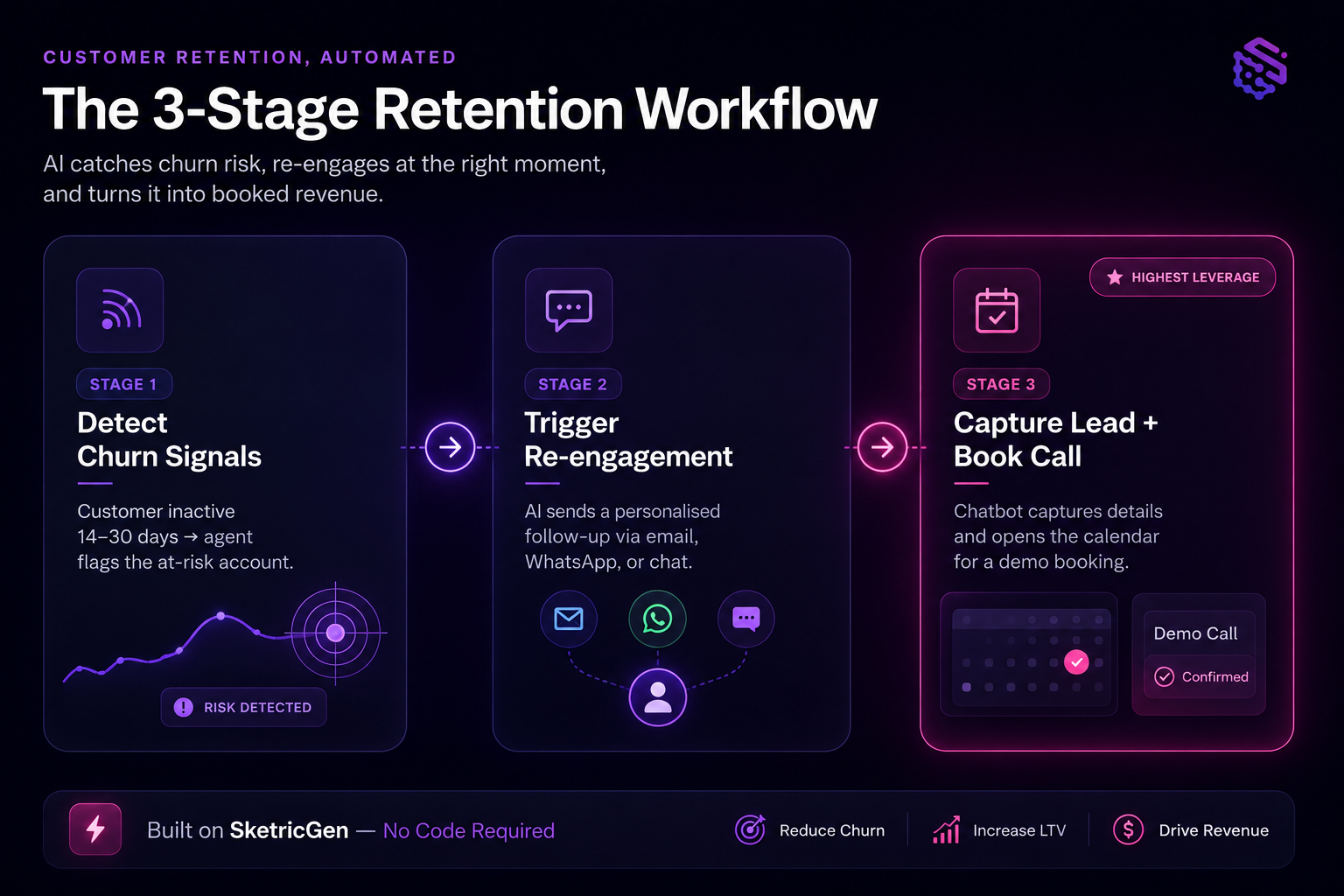
Three stages. Three agent roles. One connected loop that runs without you.
Stage 1 — Detect Churn Signals Early
Before you can retain a customer, you need to know they are at risk. The signals are almost always there — you are just not watching for them.
Common churn signals to monitor:
- No login or product activity for 14–30 days (adjust for your usage baseline)
- Missed renewal or unpaid invoice with no support request
- Drop in usage volume compared to their 90-day average
- No reply to the last two outbound messages
- Resolved support tickets with no follow-up engagement
A signal-detection agent monitors these patterns continuously. When a threshold is crossed, it flags the account and hands off to Stage 2. No spreadsheet. No manual checking.
Stage 2 — Trigger Automated Re-engagement
This is where most businesses get it wrong. They send a generic "We miss you!" email to their entire list.
That is batch marketing. It is not retention.
Effective AI re-engagement is contextual. The message references what the customer actually did — or stopped doing. A customer who has not logged in for 30 days gets a different message than one who downgraded their plan last week.
Your re-engagement agent can send messages across:
- Email — direct, personal, not newsletter-style
- WhatsApp — higher open rates for service businesses
- Website chat widget — if they return to your site on their own
The message has one job: open a conversation. Not sell. Not pitch an upgrade. Just create an opening.
Stage 3 — Capture Leads and Book Calls Automatically
This is the step most people miss — and the one that generates visible results fastest.
When a customer re-engages — clicks a link, replies to a message, returns to your site — they are warm. That is the moment to capture their intent and remove every barrier to booking a call.
Your SketricGen chatbot can:
- Capture lead information — name, email, what they need — directly inside the chat window.
- Connect to your calendar — show available slots and let the customer book a demo or call without any email back-and-forth.
- Route to the right person — based on what they said, hand off to sales or support automatically.
This is not a support tool sitting idle on your homepage. It is a re-engagement and lead capture engine running 24/7.
Businesses using AI appointment booking see no-show rates drop by 40% because the customer books on their own schedule. Less friction means more follow-through.
For a step-by-step setup guide, see how to automatically book demos from your website with a SketricGen chatbot. If you also want the chatbot to qualify and route inbound leads automatically, there is a dedicated walkthrough for that.
Workflow Summary
| Stage | Trigger | Agent Action | Output |
|---|---|---|---|
| 1 — Detect | Customer inactive 14–30 days | Signal agent flags at-risk account | Alert fired, Stage 2 triggered |
| 2 — Re-engage | Flag received | Re-engagement agent sends contextual message | Customer responds or revisits site |
| 3 — Capture + Book | Customer re-engages | Chatbot captures details, opens calendar | Lead logged, call booked automatically |
How to Build This with SketricGen (No Code Required)
No developer. No six-tool automation chain. Here is the actual setup:
Step 1 — Describe your workflow to Max
Open the SketricGen dashboard and describe what you need to Max (the AI workflow builder): "I want a workflow that monitors customer inactivity, sends a personalised follow-up, and lets re-engaged customers book a call." Max builds the agent structure in real time on the canvas.
Step 2 — Connect your tools
Link the apps you already use — your CRM, email provider, WhatsApp, or calendar. SketricGen connects to 2,000+ apps via its marketplace. Each connection requires authentication, which takes a few minutes per app.
Step 3 — Connect your calendar
Inside the chatbot settings, connect your calendar (Google Calendar, Outlook, or any calendar tool via the marketplace). When a customer says they want to talk, the chatbot shows real-time available slots and books directly. You get a notification. The customer gets a confirmation. No back-and-forth.
Step 4 — Deploy on your website or WhatsApp
Publish the workflow. SketricGen generates an embed snippet. Paste it on your site. Activate the WhatsApp channel if needed. Done.
You can also start from a pre-built pattern. Browse SketricGen's automation templates to skip configuration from scratch.
Pro tip: Start with Stage 3 — the chatbot with calendar booking. It is the fastest visible win. Customers visiting your site who have gone quiet can book a call slot in under 30 seconds. You will see calls appear in your calendar within hours of going live. Build Stages 1 and 2 once you understand your own churn signal baseline.
Common Failure Modes (and How to Avoid Them)
The workflow is straightforward to build. These are the places where it breaks in practice:
Re-engaging your entire customer list
AI re-engagement works because it is targeted. Sending to everyone trains customers to ignore you. Segment first — only trigger messages for accounts showing specific at-risk signals.
Setting the inactivity threshold too low
Flagging a customer after seven days in a business where monthly usage is the norm generates noise. Set thresholds based on your actual usage patterns, not a generic rule copied from a blog post.
No human fallback
AI handles the majority of conversations well. Some require judgment. Build a handoff condition so the agent escalates to you or a team member when the conversation needs a person.
Measuring email open rates
Open rates tell you almost nothing about retention. Track conversations-to-retained-customer conversion rate. That is the only metric that shows whether the workflow is actually keeping customers.
For a broader look at how small teams are handling automation without adding headcount, read about how SMBs are replacing new hires with AI agents.
What the Numbers Say
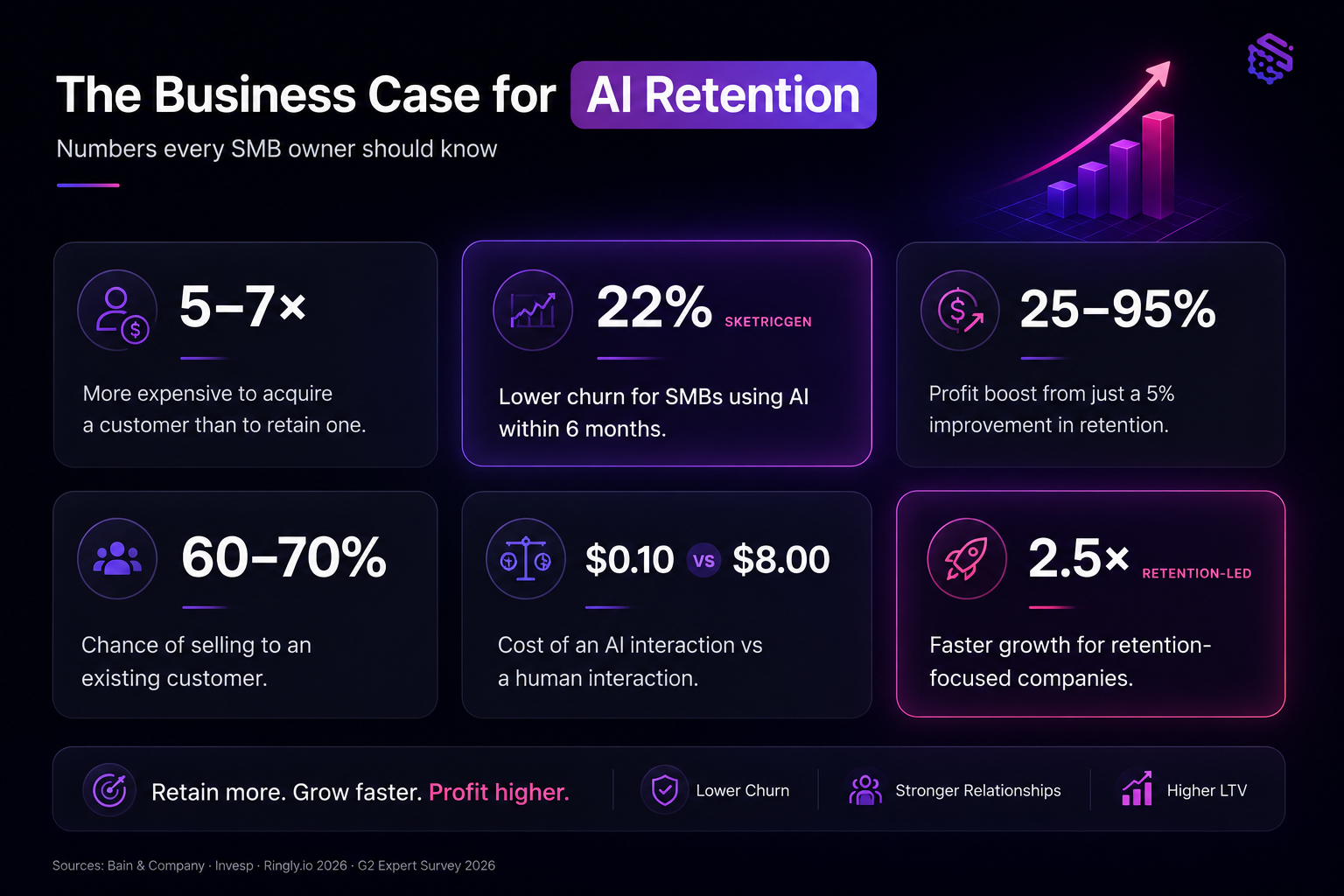
The business case for retention investment is one of the most durable in marketing. Most businesses just do not act on it.
| Metric | Figure | Source |
|---|---|---|
| Profit impact of 5% retention increase | +25–95% | Bain & Company / Invesp |
| Probability of selling to existing customer | 60–70% | Invesp |
| Probability of selling to new customer | 5–20% | Invesp |
| AI retention improvement (average) | 10–15% | Ringly.io 2026 |
| Churn reduction for SMBs using AI (6 months) | 22% lower | Ringly.io 2026 |
| Cost: AI interaction vs human interaction | $0.10 vs $8.00 | G2 Expert Survey 2026 |
| Growth rate: retention-focused vs average | 2.5x faster | Userpilot 2026 |
At $0.10 per AI-driven interaction versus $8.00 for a human touchpoint, you can run 80 automated retention conversations for the cost of one human call. For a small team without a CS hire, that is a structural advantage.
Author's take — Sam
Most SMB owners I speak with know they have a retention problem. What stops them is not the technology — it is the assumption that fixing it requires someone dedicated to the job.
It does not. Retention is a workflow. Once it is automated, it runs while you are doing everything else. The chatbot answers at midnight. The follow-up fires on day 30. The calendar fills without a single email thread.
The teams I have seen get the most leverage from this start with Stage 3 — the chatbot with calendar booking — because the results are immediate and visible. Then they layer in Stages 1 and 2 as they learn their own churn signals. Start small. Measure conversations-to-retained. Iterate.
The fix for losing customers you worked hard to acquire is not another acquisition campaign. It is a system that catches them before they leave.
Build your retention workflow for free
Go to SketricGen, describe your workflow to Max, and have your first retention agent running today. Connect your calendar to the chatbot and start capturing re-engaged leads automatically — no back-and-forth, no manual scheduling, no CS hire required.
See SketricGen's pricing plans if you want to compare what is included at each tier. And for a broader comparison of tools in this space, check out the best AI customer service tools for small businesses.
FAQs
Yes — with the right behavioural signals in place. AI monitors login frequency, usage volume, support patterns, and engagement drops. When a customer deviates from their own baseline, the agent flags them. This is not a perfect prediction — it is an early-warning system. Founders on r/SideProject have been building and testing this on early-stage products with relatively limited data and getting usable results. The key is defining what "at-risk" means for your specific product before you build the trigger.
Start with trigger-based sequences, not scheduled blasts. A follow-up that fires when a customer hits 21 days of inactivity will always outperform a monthly newsletter. Build the trigger first, then craft the message for that specific behavioural context. Tools like SketricGen let you configure this without writing a single line of code.
A chatbot is not just a support deflection tool. When connected to your calendar, it becomes a re-engagement and booking engine. A customer who returns to your site after 60 days of silence can start a conversation, get their question answered, and book a call — in the same session. That is a potentially churned customer re-won with zero manual effort.
No — and that is the core point. AI retention workflows exist specifically to fill the gap for teams that cannot afford a CS hire. You configure the agents once, set the triggers, and the workflow runs autonomously. The agent handles the conversation and escalates to a human only when it needs to. You stay in control without being in the loop for every interaction.
On SketricGen, a basic re-engagement workflow with chatbot and calendar booking takes a few hours to configure, test, and deploy. Starting from a pre-built template cuts that down further. The calendar integration adds roughly 15 minutes. Most teams are live the same day they start.
Churn prediction tells you who is likely to leave. Churn prevention does something about it. Most enterprise tools (ChurnZero, Gainsight) focus on prediction — health score dashboards and risk reports. For SMBs, prevention is what matters: an automated re-engagement message sent at the right moment, or a chatbot that captures a returning customer before they drift away again. Predicting without acting is just expensive reporting.
Related blogs
View more
AI Agents for Small Business: What Actually Works at 1-20 People
use cases
Website Lead Capture: How to Turn Silent Visitors Into Leads With an AI Chatbot
use cases
Best AI Agent for Work Intake & Backlog Automation in PM Platforms (2026)
use cases
How to Use AI Appointment Booking for Demos on Website
use cases