How to Build an AI Sales Assistant for Lead Qualification
Built with SketricGen templates, for real sales and agency workflows.
If your team gets plenty of leads but still misses good ones, the problem usually isn't demand. It's response time, routing, and context.
An AI sales assistant built for lead qualification fixes that by doing three things in one flow:
- It answers basic questions fast.
- It asks enough to judge fit.
- It routes qualified leads to the right next step.
That's why this matters for startups, small sales teams, and agencies. You don't need a huge SDR team to build a working AI sales workflow. You need a clear one.
Summary
- Sales reps spend up to 50% of their time chasing unqualified leads — an AI agent fixes the filter, not the funnel
- You're 21x more likely to convert a lead contacted within 5 minutes versus after an hour; most teams still average 4+ hours
- An AI sales assistant for lead qualification receives the lead, enriches it, asks qualifying questions, scores it against your ICP, routes hot leads to a human, and logs everything to your CRM
- You can build one without code in SketricGen's visual workflow builder, wiring a lead capture agent to a follow-up agent
- The build takes 10-15 minutes from a template; the real time investment is defining your ICP criteria upfront
Who this is for
- Startup founders handling sales themselves, without a dedicated SDR
- Marketing agency ops managers managing inbound leads across multiple client campaigns
- Small B2B sales teams (2-10 people) whose reps spend more time on triage than on actual selling
If you have a working lead source but can't separate serious buyers from tire-kickers fast enough, this guide shows you how to fix that.
At a glance
| Problem | What the AI should do | What a human should still do | Good starting point |
|---|---|---|---|
| Inbound website leads | Answer, qualify, and route in real time | Handle edge cases and high-stakes deals | AI Receptionist Template |
| WhatsApp leads | Keep the conversation moving and collect context | Step in when the buyer needs judgment | Turn WhatsApp into an AI Sales Assistant with SketricGen |
| Agency leads from campaigns | Ask a few qualification questions and pass clean context | Review account fit and budget exceptions | Build a lead capture agent |
| Strategy and routing rules | Store ICP, disqualifiers, and handoff logic | Define what counts as qualified | Build a strategy agent from the agent library |
Why lead qualification breaks down for small teams
Most small teams don't notice the problem until it's expensive.
A Forrester-cited analysis found that sales reps spend up to 50% of their time chasing unqualified leads. That's not a motivation problem. It's a filter problem.
Run the math for a 5-person team:
- Each rep spends 2-3 hours per day on lead triage
- Only about 20% of those leads are worth pursuing
- That's 12-15 hours of wasted labor daily, across the team
Speed compounds the problem. According to Setter AI's 2026 response time data, you're 21x more likely to convert a lead you contact within 5 minutes versus one you reach after an hour. Most teams still take 4+ hours. By the time a rep reviews the form, researches the company, and sends an email, the prospect has already booked a call elsewhere.
The third issue is inconsistency. Two reps applying different gut instincts to the same lead will reach different conclusions. Multiply that across 10 reps and 200 leads a week, and your "qualification process" is producing noise, not signal.
What an AI sales assistant for lead qualification actually does
An AI sales assistant for lead qualification is a multi-agent workflow that sits between your inbound lead source and your sales team. It's not a chatbot that answers FAQs. It makes decisions and takes action on each lead automatically.
What it does:
- Receives the lead from any channel: website form, WhatsApp, chat widget, or email
- Enriches the profile with company size, industry, role, and recent news (via Apollo or web search)
- Asks qualifying questions using your framework: BANT, CHAMP, or a custom ICP filter
- Scores the lead as hot, warm, or cold based on answers and enrichment data
- Routes accordingly: hot leads go to a rep with a context summary; warm leads enter a nurture sequence; cold leads get a polite disqualification message
- Logs everything to your CRM automatically, no manual data entry
What it doesn't replace:
Complex, high-value deals still need human judgment in discovery. The agent handles first-touch qualification at scale. Reps handle the conversation that closes the deal.
Decision rule: If your average deal size exceeds $20K, use the AI for inbound triage only; first-touch scoring and routing. Keep a human in the loop for any lead the agent scores as warm or above.The numbers that make the case
| Metric | Result | Source |
|---|---|---|
| Conversion lift (sub-5-min response) | 21x more likely to qualify | Setter AI, 2026 |
| Qualification accuracy (AI vs. manual) | 60% to 75-90% | Monday.com, Feb 2026 |
| Conversion rate boost | 25-35% | Landbase, 2026 |
| Revenue increase for AI-using sales teams | 3-15% | Conversantech, 2026 |
| Enterprise AI sales adoption target | 85% by end of 2025 | MagicBlocks, 2026 |
The accuracy jump from 60% to 75-90% is the one that matters most for lean teams. When you improve the signal-to-noise ratio on your lead pipeline, everything downstream gets better: demo show rates, close rates, rep morale.
How to build an AI sales assistant for lead qualification, step by step
This is how to make an AI sales assistant for lead qualification using SketricGen's no-code workflow builder. Start from a template and you can be live the same day.
Step 1: Define your ICP and qualification criteria
Before touching any tool, write down the 4-6 questions that, if answered correctly, tell you a lead is worth a rep's time. Examples:
- What's your company size?
- What's your monthly budget for this category of tool?
- What's your implementation timeline?
- What are you currently using to solve problem?
Generic BANT questions are a starting point, not the answer. The best qualification criteria come from your last 20 closed-won deals. Look at what those prospects had in common.
Pro tip: Your ICP quality determines your qualification accuracy. "Growing companies that want automation" produces garbage scoring. "B2B SaaS teams of 10-100, currently using Zapier, looking to replace it within 90 days" produces reliable routing decisions.Step 2: Build the lead capture and outreach agent
 Build your own lead capture and outreach agent
In SketricGen you build this as a two-agent handoff: a lead data agent that enriches the prospect record, and a follow-up agent that writes and sends the next touch. You can wire it yourself in the builder, or start from the website lead capture agent and extend it, so you are not assembling the scaffolding by hand.
Step 3: Add a qualification agent
Open SketricGen's AgentSpace canvas and insert a Qualification Agent between the enrichment and follow-up nodes. In the instructions, define your BANT questions and scoring thresholds:
- Hot: meets 3+ criteria
- Warm: meets 1-2 criteria
- Cold: meets 0 criteria
Use structured outputs to keep the handoff clean: the Qualification Agent should output a score, a brief reason, and a recommended next action.
You can build this in SketricGen in minutes rather than wiring a scoring service by hand.
Step 4: Add routing logic
Use SketricGen's orchestration and handoffs to branch the workflow:
- Hot lead: handoff to a Human Alert Agent that sends a Slack or email notification with the full lead summary
- Warm lead: handoff to a Nurture Agent that adds the lead to an email drip sequence
- Cold lead: handoff to a Disqualification Agent that sends a polite decline with a useful resource link
Step 5: Connect your channels and CRM
Using SketricGen's Tools & Integrations, connect:
- Apollo.io for lead enrichment (role, company size, firmographics)
- HubSpot, Salesforce, or Pipedrive for automatic CRM logging
- Gmail or Slack for rep notifications
- Your website widget or WhatsApp as the inbound trigger channel
SketricGen connects to 2000+ apps via its integration marketplace. No code required.
Step 6: Test in Playground, then deploy
Run 10-20 sample leads through SketricGen's Playground and check the traces. Did the agent ask the right questions? Did the scoring match your criteria? Did routing work correctly?

Once outputs look clean, deploy via embed on your website or via API for WhatsApp. For a full WhatsApp deployment walkthrough, see the SketricGen WhatsApp sales assistant guide.
A practical AI sales workflow for website, WhatsApp, and CRM
This is where the workflow becomes useful.
Website lead flow
A visitor lands on your site and asks about pricing, fit, or turnaround time.
The assistant should:
- Answer the question.
- Ask 2 to 4 qualification questions.
- Decide whether the lead is qualified.
- Push the lead and summary into the CRM.
- Offer a booking link or human handoff.
This is close to how Wonderchat's AI sales assistant workflow is positioned: qualify around the clock, use custom workflows, and pass high-intent leads into the CRM.
WhatsApp lead flow
If your audience already uses WhatsApp, you can move the same logic into chat.
This works well for:
- Local businesses.
- Service companies.
- Agencies that get leads from ads and referrals.
- Teams that need after-hours coverage.
We already cover this channel in the SketricGen WhatsApp sales assistant guide. The short version: WhatsApp is often better for quick qualification than a long web form.
Agency lead flow
For agencies, the assistant should do less selling and more sorting.
A practical flow looks like this:
- Ask what service they need.
- Ask when they want to start.
- Ask what outcome they care about.
- Ask if they already have a budget range.
- Route only the promising leads to a human.
That keeps the sales team focused on real opportunities instead of first-contact triage.
Example flow table
| Stage | Assistant action | Output |
|---|---|---|
| First touch | Answers the question and opens the conversation | Higher engagement |
| Qualification | Asks fit, need, timing, and budget questions | Lead score or qualification status |
| Routing | Sends qualified leads to CRM or calendar | Clean handoff |
| Follow-up | Sends nurturing content or a callback request | Less lead leakage |
What this looks like in practice
A 6-person growth agency was getting 50-70 inbound demo requests per week through their website and WhatsApp. They were running campaigns for three clients. About 60% of those requests came from solo freelancers or very small teams outside their ICP. They only work with companies that have a dedicated marketing team of 3 or more.
Their ops manager was spending 4+ hours a day on triage: reviewing submissions, checking company size on LinkedIn, and deciding who to pass to a rep.
They built a qualification workflow using a no-code agent builder:
- A form-triggered flow connected to their website and WhatsApp widget
- An enrichment step pulling company size and role from Apollo automatically
- A qualification agent asking 4 ICP-specific questions: team size, monthly ad spend, current marketing stack, and buying timeline
- Automatic Slack notification for hot leads, with a pre-filled CRM record
- A polite "not the right fit" email for cold leads, with a helpful blog link to keep brand goodwill intact
Daily triage dropped from 4+ hours to about 20 minutes of review. The ops manager only checked Slack-flagged hot leads. Response time went from 3-4 hours to under 10 minutes for the leads that actually mattered.
The whole thing took an afternoon to set up.
What to give the assistant before launch
The assistant is only as good as the information you give it.
Before launch, feed it:
- Your ICP.
- Disqualifiers.
- Product or service facts.
- Pricing boundaries.
- Common objections.
- Routing logic.
- CRM fields that need to be captured.
- Calendar rules if booking is enabled.
Build the data foundation first. AI can only qualify well when the underlying records are clean and the criteria are specific — garbage enrichment data produces confident, wrong scores.
You should also define what the assistant is not allowed to do:
- Don't promise custom work you don't offer.
- Don't quote unsupported pricing.
- Don't guess at integrations.
- Don't route every lead to a human.
How SketricGen templates help you start faster
You don't need to design the whole workflow in one shot.
A better path is to build it one layer at a time.
Start with the strategy layer
Before you touch the assistant, define the ICP, pain points, and positioning. You can do this as its own agent in SketricGen — start from the agent library and give it your positioning documents so every downstream agent reads from the same source.
This matters because the assistant should mirror your actual go-to-market logic. If the strategy is vague, the qualification will be vague too.
Add the outreach layer
If you want the assistant to trigger follow-up, add an outreach agent next — the website lead capture agent is the easiest place to build it from.
It gives you a way to enrich the lead and send a tailored follow-up instead of a generic email blast.
Add the scheduling layer
If the lead is qualified, move them into the Meeting Scheduler Template.
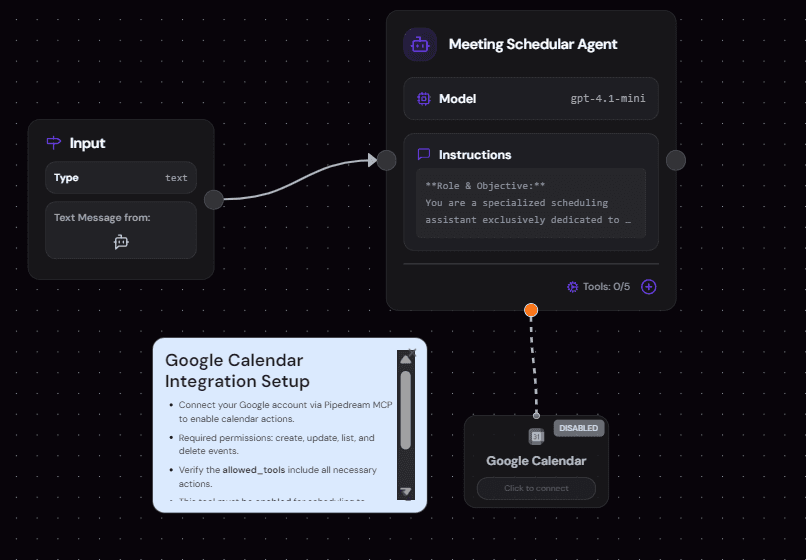 Template: Meeting Schedular
That's the quickest way to make the assistant feel useful to the buyer and to the sales team.
Add the inbound capture layer
If you want the assistant to qualify inbound visitors, build a website support agent as the front door.
 Build your own AI receptionist agent
It's a clean entry point for website chat, and it works well for teams that want a low-friction first build.
4 failure modes (and how to fix them)
Failure 1: Vague ICP = garbage scoring
Telling your Qualification Agent to "identify good leads" without specific criteria will produce unreliable scores. Name the exact job titles, company sizes, tools, or budget ranges that qualify. Pull those directly from your last 20 closed-won deals.
Failure 2: No CRM connection breaks the loop
A workflow that qualifies leads but doesn't write to your CRM creates a parallel data silo. Reps get a Slack ping but open the CRM to find no context. Always close the loop: log score, summary, and routing decision to the lead record automatically.
Failure 3: Late handoff kills the speed advantage
Flagging a hot lead to a rep who checks Slack twice a day negates the entire speed benefit of automation. Set notifications that go directly to the rep's phone, or create a CRM task with an immediate due time. The lead is hot now, not when it's convenient.
Failure 4: Too many questions = low completion rates
An 8-12 question qualification flow sounds thorough. It drives massive drop-off on chat and WhatsApp. Keep your sequence to 4-6 questions. Use enrichment tools to auto-answer what you can, so the agent only asks what data alone can't determine.
Mistake People generally make: The first version of our qualification agent had 10 questions. Completion rate on the chat widget was under 20%. Cutting to 4 targeted questions, with Apollo handling enrichment silently in the background, pushed completion to 68%. Ask less, enrich more.What practitioners are saying
Discussions across r/sales and r/Entrepreneur consistently surface two frustrations with AI lead qualification tools: unreliable handoff to a human at the right moment, and CRM integration that needs developer work to set up. As one agency ops lead noted in a community thread on AI agent tools: "The AI part works fine. The part where it doesn't update Salesforce automatically is where we lose the deal." The preference is for platforms that handle the full loop, qualify, score, route, and log, without requiring custom integration work to close the gap.
Author take (Sam): The teams that get the most from AI lead qualification aren't the ones with the most sophisticated scoring models. They're the ones with the clearest ICP. A 4-question qualifier built on a sharp customer profile will outperform a 12-question MEDDIC flow built on a vague one, every time. Define the buyer first. Then build the filter.
Next steps
If you want a fast starting point, do this in order:
- Write down your qualification rules — ICP, disqualifiers, and handoff logic — before you build anything.
- Choose your first channel, usually website chat or WhatsApp.
- Build the front-door agent: an AI receptionist for website chat, or a lead capture agent for campaign traffic.
- Add a scheduling agent so qualified leads can book without a human in the loop.
- If WhatsApp is part of the motion, use the deployment guide and adapt the conversation.
If you want, the next blog can go one level deeper and show a full AI sales assistant workflow for website leads, WhatsApp, and CRM handoff in SketricGen.
FAQs
It's a workflow that answers prospects, asks qualifying questions, and routes the lead based on fit and intent. The goal isn't to replace sales. The goal is to get better information faster and pass cleaner context to the next step.
Start with your qualification rules, then use a template or no-code workflow to connect the channel, CRM, and handoff rules. The easiest first build is usually website chat or WhatsApp, not every channel at once.
Ask the minimum needed to establish fit and urgency. A common sequence is use case, company size, timeline, and budget range if that's relevant to your sale. Don't ask five questions before providing any value.
Choose the channel your buyers already use. Website chat works best for high-intent visitors on pricing or demo pages. WhatsApp is better when buyers already use messaging and want a faster back-and-forth.
It should create or update the lead record, save the conversation summary, capture qualification status, and pass key fields into the right pipeline stage. If it can't write back cleanly, you end up with two systems of record.
They automate before defining qualification. If you don't know what a good lead looks like, AI will only make the confusion move faster.
Not fully. It handles first contact, basic filtering, and routing well. Human SDRs are still needed for edge cases, complex deals, and relationship-heavy sales.
Related blogs
View more
SEO Automation: The No-Code Build, Start to Finish
tutorials
How to Build an AI Marketing Agent (End to End)
tutorials
No-Code Automation Platforms for Marketing Teams: Grow Business without Employees
tutorials
AI LinkedIn Post Generator: How to Research, Write & Publish Posts on Autopilot (2026)
tutorials
Instagram Auto-Reply: How to Build an AI Agent That Actually Answers Your DMs
tutorials