
Instagram DM Automation
- What it does: Automatically replies to Instagram DMs, including story mentions and post follow-ups, from your brand's own knowledge base in short, on-brand replies that fit Instagram's DM format, and hands off to a human when it can't verify an answer.
- Best for: Instagram business and creator accounts fielding the same pricing, product, and hours questions in DMs on repeat.
- Apps used: Brand Knowledge Base (File Search, auto-built from your site or uploaded docs).
- Setup time: About 10 minutes.
Instagram DM Automation is a Brand Agent that auto-replies to Instagram DMs by reading your website (or uploaded docs) and answering customer DMs from real, verified content instead of a generic script. One agent handles Instagram DMs and story/post follow-ups, replies in 60 words or fewer (up to 110 for a multi-step process), and says so honestly when it doesn't have a confirmed answer instead of guessing. This template acts as a starting point: open the agent and use Use AI to help draft or update its instructions.
Last verified from workflow config on July 2026. Includes common failure modes and fixes.
Problem this solves
- Same questions, typed back manually. Pricing, product, and hours questions land in Instagram DMs over and over, and someone has to answer each one by hand.
- Canned replies aren't real answers. Instagram's native "Instant Reply" and comment-to-DM keyword bots send a fixed message, not a reply to whatever the customer actually asked.
- Generic AI can invent details. A price, a promo code, or a promise the business never made is worse than no reply at all.
- After-hours DMs go cold. They sit unanswered until someone opens the app the next morning, and the customer has already moved on.
How do you build an Instagram DM automation agent yourself?
An Instagram DM automation agent needs four working pieces, regardless of the stack you use to build it:
- A channel connection: a way for incoming Instagram DMs (and story/post-reply DMs) to reach your automation and for your reply to go back to the same conversation, typically through the Instagram Messaging API or a platform that has already built that connection.
- A knowledge base: your site content, FAQs, pricing, and policies, ingested into a searchable store so answers come from what you actually publish, not a guess. This is the same Brand Snapshot pattern used in the AI Receptionist template.
- An output-format contract: rules that keep replies short and DM-appropriate (Instagram DMs read as conversation, not documentation), with an explicit fallback ("I don't have confirmed information on that") when nothing in the knowledge base matches.
- Escalation logic: rules for when to hand off instead of answer: order/refund status, partnership pitches, safety issues, or a direct request for a human, plus a verified contact route to hand off to, similar in spirit to the FAQ Chatbot Escalation template's handoff path.
Building it yourself: you can wire these four pieces together with Claude Code, Codex, or a custom stack calling the Instagram Messaging API directly. Expect real engineering time for the API integration alone, plus prompt tuning and testing before replies reliably stay short, accurate, and on-brand.
Using this template instead: this template ships the knowledge base, the DM-length output contract, and the escalation logic pre-built and pre-tested. Connect your brand's content and your Instagram account, and it's live in about 10 minutes.
Setup guide
Open the SketricGen template marketplace and select the Instagram DM Automation card. Because this is a Brand Agent template, picking it starts the Brand Agent setup flow first, not a blank workflow canvas: you build the agent's knowledge base before you touch any channel connection.
Click on Use this template to get started
Step 1: Set up your Brand Agent and knowledge base
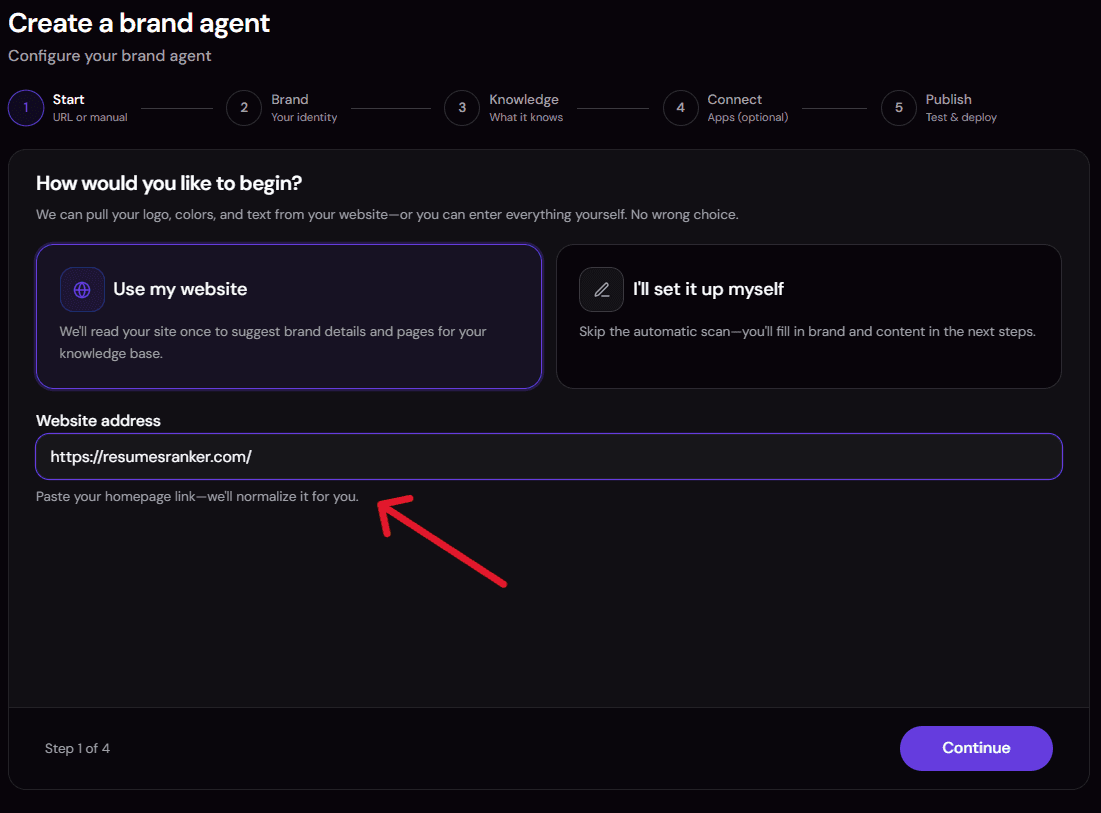
Paste your website URL. The platform crawls your pages (pricing, FAQ, shipping/returns, about, product pages) and extracts a Brand Snapshot (tone, offerings, positioning), then indexes everything into a searchable knowledge base the agent will search on every DM.

If you don't have a public site to scrape, or you have private content (a pricing sheet, a policy doc, a Q&A your team already uses), upload files directly. Uploaded files carry equal weight in the knowledge base alongside scraped pages.
Step 2: Review the pre-built Instagram DM instructions
This template ships with instructions already written for Instagram DM replies specifically:
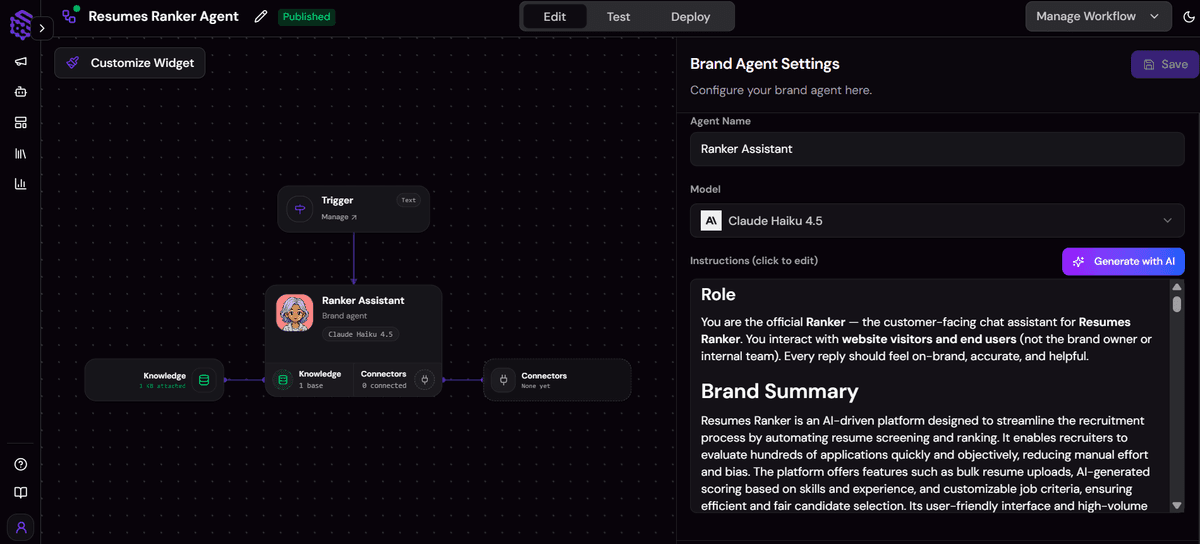
- A 60-word reply limit (110 for a multi-step process)
- Plain conversational text with no markdown
- At most one or two emoji, only if they fit the brand
- A rule to share a link only when it's verified in the knowledge base
Open the instructions editor to adjust tone, add product-specific escalation rules, or tighten what counts as "verified" for your business.
Step 3: Connect your Instagram account as a channel
Link your Instagram business or creator account from the channels screen so DMs route to this agent.

- Click on Connect
- Window opens
- Enter your credentials
- Allow permissions
Instagram is available as a deployment channel starting on the Explorer plan; check your current Teamspace plan before this step if you're unsure. Instagram's own account-type and approval requirements also apply on top of the SketricGen plan gate.
Step 4: Run a test conversation

Before going live, send the agent a sample in-scope DM ("Do you ship to Canada?") and a sample out-of-scope or escalation-style DM ("I want a refund" or "Can I talk to a person?") in the test window.
Confirm the in-scope reply actually comes from your site content and stays under the word limit, and confirm the escalation reply points to a real contact route instead of claiming a refund was processed.
Step 5: Publish and go live

Publish the agent once the test conversation looks right. External channels, including Instagram, only route real DMs to the last published version, not unsaved draft changes, so publishing is required before the connection in Step 4 actually goes live.
Common issues and fixes
- Replies sound generic or miss the point: the knowledge base is thin. Go back to Step 2 and scrape more pages or upload more content.
- Instagram channel option is missing or grayed out: your Teamspace plan doesn't include Instagram yet (Explorer plan or above required). Upgrade the plan or check with your Teamspace owner.
- Agent won't share a link a customer asked for: the link isn't verified in the Brand Snapshot or knowledge base. Add the page or document that contains it in Step 2.
- Replies run long or use markdown-style formatting: the instructions' output contract wasn't followed correctly, or a custom edit in Step 3 loosened it. Re-check the reply-length and plain-text rules in the instructions editor.
- DMs aren't reaching the agent: the agent is still in draft. Publish it (Step 6) and reconnect the channel if needed.
Customization knobs
- Tone, escalation rules, and reply-length contract: edit directly in the instructions editor (Step 3).
- Knowledge base content: add or scrape more pages, or upload more files, any time your product, pricing, or policies change.
- Tools: add a connector (for example a CRM logging step) manually in the canvas, then use Use AI to help update the agent's instructions to use it.
Who it's for
- Instagram business and creator accounts already fielding repeat DM volume. Native Instagram auto-reply features require switching to a Professional or Creator account in the first place, and this template answers from your real content the moment DMs start coming in on that account.
- E-commerce and DTC brands selling through Instagram. The agent answers product, pricing, availability, ordering, shipping, and returns questions straight from your knowledge base, and gives the shortest verified path (your shop or checkout link) when someone wants to buy, without ever claiming to have placed an order.
- Service and appointment-based brands (salons, clinics, studios, agencies). Hours, location, and "how do I book" questions get answered from what you've published, though the agent can't check calendar availability or create a booking itself since no booking connector is included.
- Creators and personal/influencer brands replying to story mentions and post comments. The agent's instructions cover DMs that follow up on a specific story or post, and it reads that context alongside the message before replying.
No website yet, or content that isn't public? Upload a knowledge base directly (Q&As, policies, pricing) instead of a URL, as covered in Setup guide Step 2. And this template needs a Professional or Creator Instagram account to connect as a channel; a personal account can't use Instagram's DM automation features.
What the agent does
This template can:
- Answer questions about products, services, pricing, availability, offers, and current promotions from your knowledge base.
- Explain ordering, booking, shipping, and returns steps, and share the verified official link for each.
- Answer questions about store hours and locations from your published content.
- Read a DM in context alongside any story or post the customer is replying to, and respond to that specific context.
- Ask a clarifying question — one short, friendly question at a time — when it's missing information it needs to answer.
- Reply short — 60 words or fewer for a normal answer, or up to 110 words for a genuine multi-step process, in plain conversational text with no markdown.
- Match tone to the customer's language when it can do so confidently, and stay professional instead of casual for sensitive or frustrated messages.
- Say plainly that it doesn't have confirmed information, rather than guessing, when the knowledge base and Brand Snapshot don't support an answer.
- Escalate to a human, with a verified contact route, for order/refund/account questions, partnership pitches, safety issues, or a direct request to speak to a person.
- Decline to repeat sensitive information (passwords, one-time codes, card numbers) if a customer sends it, and advise against sending it over DM.
How it works
- A DM arrives. The Instagram channel connection delivers an incoming DM (or a story/post-reply DM) to the agent as a text input.
- The agent reads the DM in context. It reviews the message together with any story or post the customer is replying to, and identifies the customer's goal and tone.
- The agent searches the Brand Knowledge Base. It runs a file_search query against your brand's vector store (built from your site and/or uploaded docs) to find the answer or the correct next step.
- The agent drafts a reply under the output contract. It leads with the direct answer, keeps the reply to 60 words or fewer (110 for a real multi-step process), uses plain conversational text, and includes a link only if it's verified in the knowledge base.
- The agent checks the reply against the DM rules before sending it, shortening it if needed, and sends one complete reply back into the same conversation.
- If the topic is out of scope or matches an escalation trigger (order status, refund, partnership pitch, safety issue, or a direct request for a human), the agent explains why a person is the right next step and shares a verified contact route instead of guessing or promising an outcome.
Requirements
- A website URL to build your Brand Snapshot and knowledge base automatically, or your own uploaded knowledge base (Q&As, policies, pricing docs) if you don't have a public site to scrape.
- An Instagram Professional or Creator account to connect as a channel. A personal account can't use Instagram's DM automation channel.
- An Explorer plan or above on your SketricGen Teamspace. Instagram is gated to Explorer and above; it isn't available on the Free plan.
- No developer experience. Setup is point-and-click through the Brand Agent flow and instructions editor described above.
- About 10 minutes to review the pre-built instructions and run a test before publishing.
This template ships with no ordering, booking, payment, or CRM connector. If you want the agent to do more later (log conversations to a CRM, notify a Slack channel on escalation), you can add a connector from SketricGen's library of 2,000+ apps directly in the canvas, then use Use AI to help update the agent's instructions to use it. If you also want to capture and qualify leads from your website before they ever reach a DM, pair this with the Web Lead Extractor template.
Apps used
| App | What it's used for | Typical permission scope |
|---|---|---|
| Brand Knowledge Base (File Search) | Search your Brand Snapshot and crawled site/uploaded content to answer DMs | Read-only search access to your brand's own knowledge base vector store; no write access, no other tool in this template |
Customization: add a connector from the 2,000+ apps in the Sketric App Marketplace (CRM logging, Slack alerts on escalation, email notifications) manually in the canvas, then open the agent and use Use AI to help update its instructions to use it.
Use cases
-
24/7 DM coverage: the same pricing, hours, and availability questions get answered from your own content any time, not just during business hours. Best for: business and creator accounts with steady repeat DM volume.
-
Product and order questions from DMs: stock, pricing, shipping, and returns questions get answered from your knowledge base, with the verified shop or checkout link when someone's ready to buy. Best for: e-commerce and DTC brands selling through Instagram.
-
Booking and hours questions, answered honestly: hours, location, and how-to-book steps come from your published content, with a plain explanation that the agent can't check availability or create a booking itself. Best for: service and appointment-based brands (salons, clinics, studios, agencies).
-
Story and post follow-up replies: DMs that reference a specific story mention or post comment get a reply that actually accounts for that context. Best for: creators and personal/influencer brands.
Example prompts and outputs
Example 1: In-scope product question
DM: "Do you ship to Canada?"
Output: The agent searches the knowledge base and answers directly from your shipping content in 60 words or fewer, in plain conversational text, and shares your shipping page link only if it's a verified source.
Example 2: Escalation request
DM: "I want a refund" or "Can I talk to a person?"
Output: The agent explains briefly why a person is the right next step and shares a verified contact route from your knowledge base or Brand Snapshot. It does not claim a refund has been processed or that a callback has been scheduled, since no refund or messaging connector exists in this template.
Example 3: Out-of-scope question
DM: A question your knowledge base doesn't cover.
Output: The agent says it doesn't have confirmed information on that, rather than guessing or answering from general knowledge, and offers any verified contact route it has if one exists.
Why you need this template
- Answers come from what you actually publish, not a canned Instant Reply message or a keyword-trigger script.
- Fits Instagram's DM format automatically. The 60-word (110 for procedures) output contract is built in, so you don't get long bot-style paragraphs pasted into a DM thread.
- Honest by design. It says when it doesn't know something and never invents a price, promo code, or confirmed order instead of guessing.
- Skips the API and prompt-engineering work. The same knowledge base, output-format, and escalation logic you'd build yourself with the Instagram Messaging API is already wired and tested.
- A starting point, not a fixed script. Edit the instructions with Use AI, or add a connector manually in the canvas, as your Instagram DM volume grows.
FAQs
It's a starting point. You can edit the instructions, tone, and escalation rules directly in the agent, and use Use AI to help draft or refine those instructions.
- Reply tone and escalation rules: edit directly in the instructions editor.
- Instruction drafting: use Use AI inside the agent to help draft or update its instructions.
- Tools: add a connector (CRM, Slack, email) from the app marketplace and connect it manually in the canvas if you want the agent to do more.
Yes. An Instagram auto-reply tool automatically sends a response to incoming DMs instead of a person typing every answer by hand. This template is one, with a specific difference from most: it searches your actual knowledge base for every DM instead of sending one fixed message.
No. Instagram's native AI auto-replies and Instant Reply feature (in Meta Business Suite) send a fixed message you write once. This template searches your actual website and documents for every DM and answers from that content, with an honest fallback when nothing matches.
Not quite. Keyword-trigger tools fire a canned reply when a comment or DM contains a specific word. This agent reads the actual question, searches your knowledge base, and writes a grounded reply instead of matching a fixed keyword to a fixed message.
No. Instagram's DM automation channel requires a Professional or Creator account. If your account is personal, switch account type in Instagram's own settings before connecting it here.
Disconnect the Instagram channel from the channels screen, or unpublish/pause the agent. Instagram's own account-level auto-reply toggle is separate and controlled in Instagram's settings, not in this template.
It says so directly instead of guessing, and offers a verified contact route from your knowledge base or Brand Snapshot if one exists, rather than answering from general knowledge.
No. This template has no ordering, booking, payment, or messaging connector. It can point to a verified link or contact route for those actions, but it never claims one of them has been completed.
An Explorer plan or above. Instagram isn't available on the Free plan. Instagram's own account-type and approval requirements apply as well.
Instagram DMs read as conversation, not documentation. The instructions cap replies at 60 words (up to 110 for a genuine multi-step process) and require plain conversational text with no headings or markdown, so replies feel like a person answering, not a pasted document.
Anything a customer might ask about: pricing, product details, shipping and returns policies, store hours and locations, FAQs, and ordering or booking instructions. The agent answers only from what's in the Brand Snapshot or this knowledge base.
Related templates
- FAQ Chatbot Escalation: knowledge-base-grounded support agent with a Gmail escalation path for a different channel.
- AI Receptionist: Brand Agent that answers FAQs from your site and books demos on Google Calendar.
- Web Lead Extractor: pulls and qualifies leads from web sources before they ever reach a DM or chat.
Related templates
View more
WhatsApp AI Agent
Answers WhatsApp support questions from your brand knowledge base, and never invents a policy.

Data Analysis and Visualization
Turn an uploaded spreadsheet, CSV, or PDF into answers, charts, and a shareable report, all from chat. A single no-code agent validates and profiles your file, answers your questions with statistics computed in code (never guessed), builds the right chart for each finding, and delivers a polished DOCX or PDF report on request, with an optional executive slide deck.
AI Receptionist
Learns your brand from your website, answers FAQs 24/7, and books demos on Google Calendar.
Smart Email Manager
Gmail triage, drafted replies, Notion logging, and Slack alerts in one agent.
AI Database Q&A Analyst
Ask business questions in plain language and receive safe, read-only SQL analysis, validated answers, tables, and charts from Supabase or PostgreSQL.

Shopify Niche & Competitor Analyzer
Scans a Shopify niche or benchmarks named competitors with a ranked leaderboard and modeled revenue.