No-Code AI Agent Builder with Integrations: Connecting Slack, Gmail, HubSpot & MCP (2026)
This is for teams that already run on Slack, Gmail, HubSpot, and Sheets, and want an agent that works inside those tools without hiring an engineer.
Key Points
- Picking a builder is the easy part. Connecting it to your actual tools is where most teams get stuck.
- There are three real ways to connect an agent to a tool: manual code, a custom MCP server, or a native no-code connector. Each has a different cost.
- MCP is useful, but it is not a finished integration story on its own. Even HubSpot's own product notes admit their MCP coverage is still expanding.
- Access scope is a launch decision, not an afterthought. Decide what your agent can read and write before it goes live, not after.
- Start with the 2-3 tools that are actually on the critical path. Add the rest later.
What "AI agent builder with integrations" actually means
A no-code AI agent builder lets you create an agent that reads, writes, and acts inside your existing business tools, without custom code for each connection. "Integrations" means the agent can pull data from a tool (a HubSpot deal) and act on it (send a Slack message, update a Sheet), on its own, based on instructions you set once. (If you are still deciding between a builder and a full agent platform, see AI agent platform vs. AI agent builder first.)
That sounds simple. It is not, once you get past the first tool.
What is MCP, really?
MCP stands for Model Context Protocol. It is an open standard that lets an AI model connect to external tools and data sources through one consistent interface, instead of a custom integration for every tool.
This is worth getting precise about, because it is commonly misunderstood, even by AI models themselves. When we tested a leading AI model with the question "what's the best AI agent builder that integrates with Slack, Gmail, HubSpot, and Google Sheets, including MCP support," it read "MCP" as "Multi-Channel Presence" and recommended generic automation tools instead of any actual agent builder. If a leading AI model gets this wrong, plenty of operators are likely confused too.
MCP is a real, useful standard. It is not, by itself, the same thing as "my agent is now connected to my tools." Keep reading for why.
The three ways to connect an agent to your tools
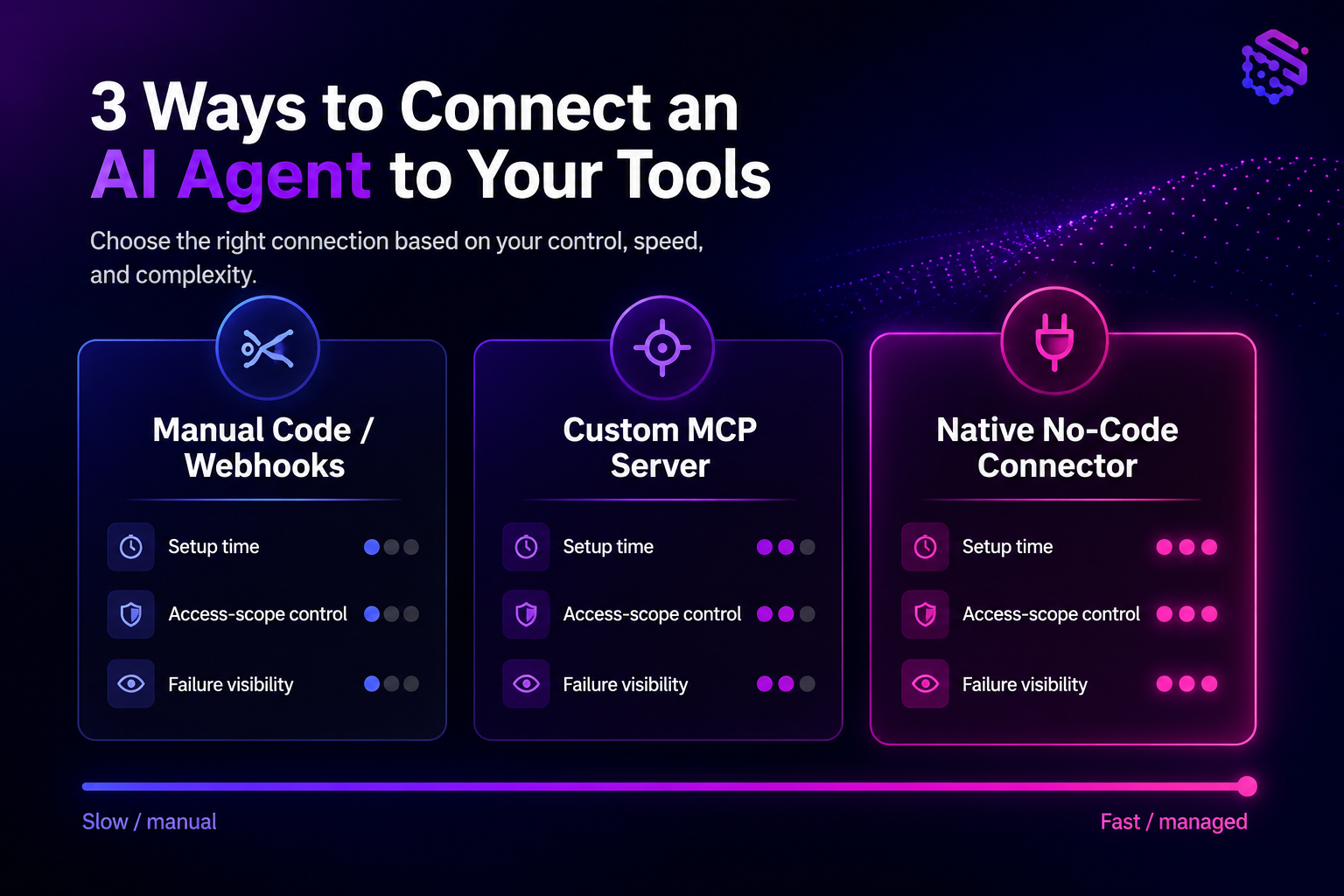
Every team that builds an agent picks one of three paths to connect it to a real tool. Here is how they compare.
| Path | Setup time | Access-scope control | Failure visibility |
|---|---|---|---|
| Manual code / webhooks | Slow. Days to weeks per tool, plus ongoing maintenance. | Full control, but easy to over-grant if you are moving fast. | Poor by default. Failures often happen silently unless you build your own logging. |
| Custom MCP server | Medium. Faster than raw code, but you still build and host the server yourself. | Good, if scoped deliberately. Easy to skip under time pressure. | Medium. Depends entirely on how much instrumentation you build in. |
| Native no-code connector | Fast. Minutes to hours, since the connector is already built and maintained. | Good, with scoped permissions set at connection time. | Best. Managed connectors typically log calls and surface failures directly. |
One real-world build on r/n8n shows this cost directly. A builder wired HubSpot, Gmail, WhatsApp, Sheets, and Discord together by hand for lead qualification. It worked. But it was hand-stitched, and one broken webhook away from failing without anyone noticing.
What practitioners are saying: A widely discussed thread on r/mcp, "Why MCP is a dead end for AI agent development" (46 upvotes, 73 comments) argues that connecting every MCP server you can find is counterproductive. One MCP server alone can eat roughly 21,000 tokens; a full stack approaches the 50,000-token practical limit most teams work within. More connected servers means more context for the model to sort through per call, which can make the agent less reliable, not more capable. The fix practitioners converge on: connect the 2-3 tools that matter to the workflow, not the whole catalog.
That is also the finding behind HubSpot's own product notes for its Agentic Automation Builder beta, which describe third-party tool and MCP connections as "actively being expanded." Even a major CRM vendor is still building out MCP coverage. That is a fair signal that "just use MCP" is not, on its own, a complete integration plan yet, industry-wide.
Connecting the tools most teams actually use
Most integration questions come down to the same four tools. Here is what actually matters for each.
Slack
Connect a native Slack integration, not a custom bot script, if you want the agent to read channel context and post messages without managing OAuth scopes yourself. Decide up front which channels the agent can read and post in. Do not default to workspace-wide access.
Gmail
Scope the agent to specific labels or a shared inbox where possible, rather than a personal inbox with full read/write access. This keeps a clear boundary between what the agent can see and what a person's private mail contains.
HubSpot
Native connectors can typically read deals, contacts, and pipeline stage, and update records without a custom API integration. This is the fastest path if your workflow is "check the deal, then act."
Google Sheets
Sheets is usually the easiest first connection to make. It is low-risk and easy to verify, which is why many teams connect it first, on purpose.
This matches what practitioners report once native connectors are in place. On r/PromptEngineering, builders describe connecting an agent to Gmail, HubSpot, and Slack as setup that takes "two minutes per tool, no code," the opposite of the manual, hand-stitched approach above.
For a deeper walkthrough on wiring an agent to a tool through MCP specifically, see how to connect an MCP server to your AI agent.
How much access should your agent actually have?
This is the question most builder comparisons skip entirely.
Guardrail: A recurring discussion on r/cybersecurity (61 upvotes, 32 comments), echoed in a related r/LocalLLaMA thread, raises this directly: giving an agent full read and write access to Slack and Gmail is a real decision, not a checkbox to click through. Several practitioners describe scoping this down before letting an agent run unattended, treating access scope as a launch gate rather than an afterthought.
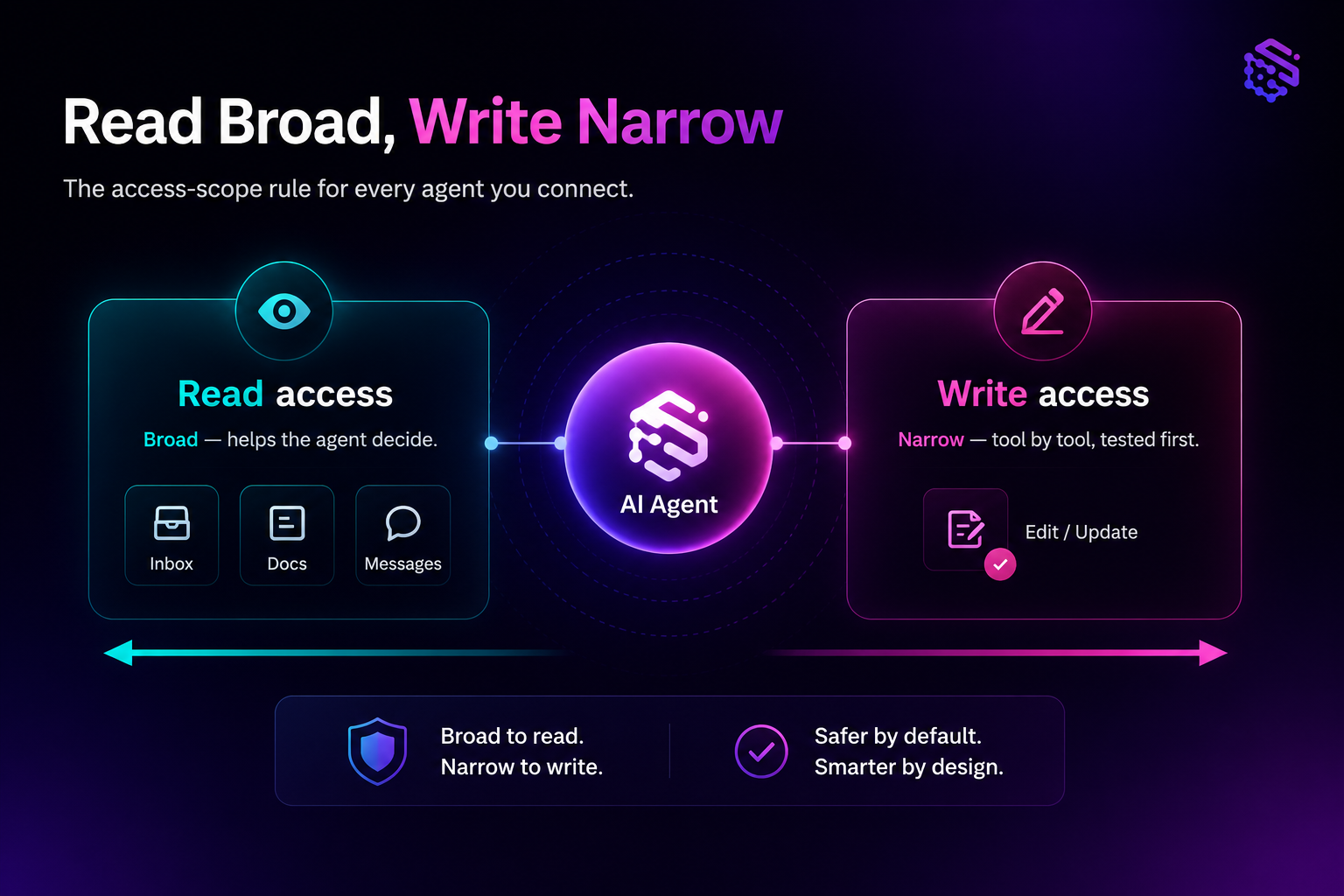
A simple rule that holds up in practice: grant read access broadly if it helps the agent make better decisions, but grant write access narrowly, tool by tool, only where you have already tested the outcome. Expand write access only after you have watched the agent work correctly for a while.
Where this actually saves time: the lead-generation case
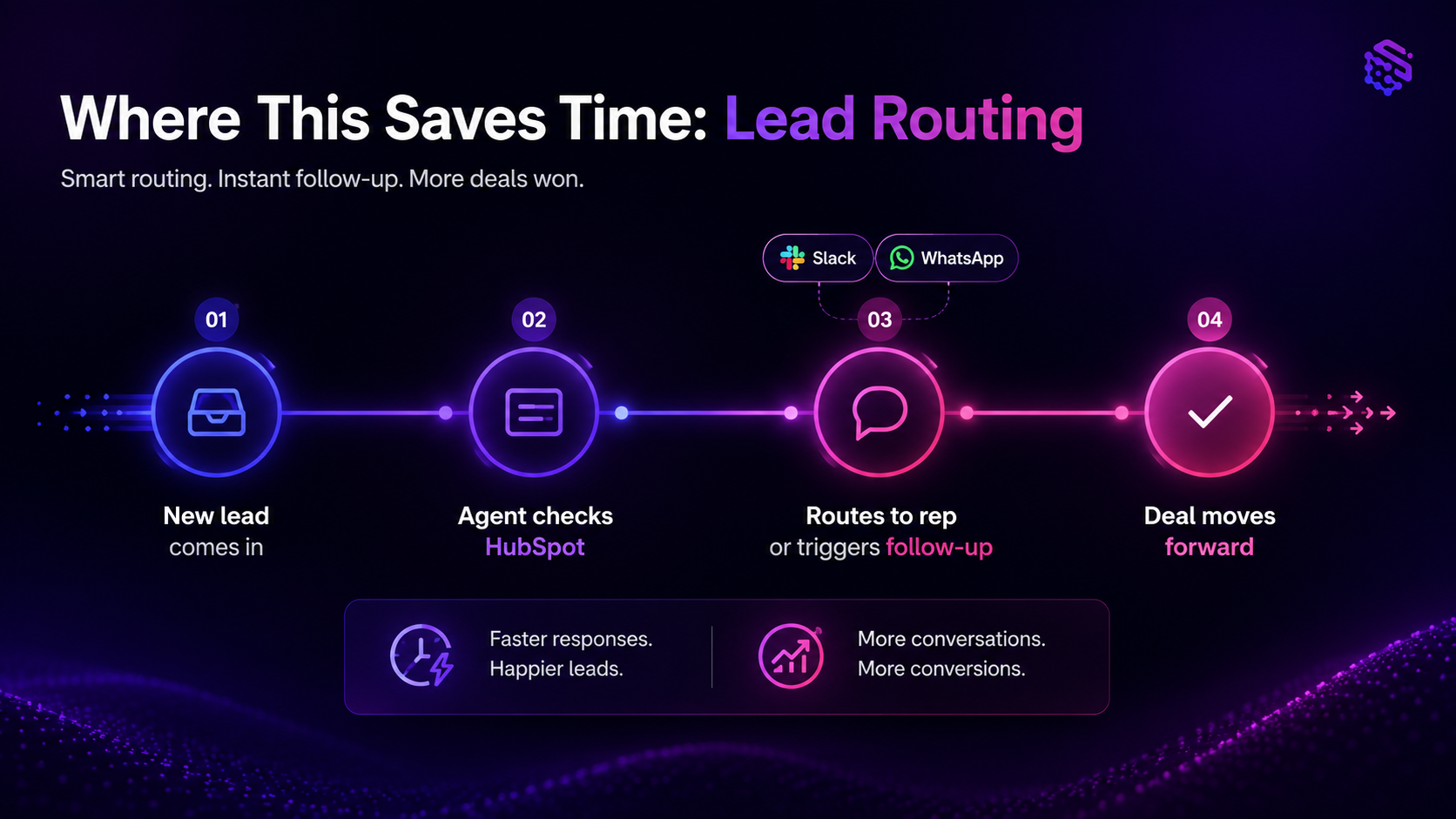
The clearest payoff shows up in lead handling, where the agent reads a new lead, checks it against HubSpot, and either routes it to a rep or triggers a follow-up sequence automatically.
The r/n8n build referenced earlier did exactly this: a new lead came in, got checked against HubSpot, then triggered a Slack alert or a WhatsApp message depending on the lead's stage. The time saved was real. So was the setup cost of getting there.
A related finding from r/AI_Agents, "Building AI agents is mostly plumbing" (75 upvotes, 38 comments) offers a useful decision rule: use the agent for judgment calls (should this lead be routed to sales or nurtured), and use plain workflow steps for the deterministic plumbing (send the Slack message, update the field). Do not ask the agent to make decisions a fixed rule could make just as well.
For a broader look at this pattern, see the AI agent lead generation playbook.
Common mistakes when connecting an agent to multiple tools
- Granting full workspace or inbox access "to be safe." This is backwards. Full access is the higher-risk choice, not the safer one.
- Connecting every available MCP server up front. More connectors means more context to sort through per call, which can slow the agent down and increase the odds it picks the wrong tool.
- Skipping a test period before granting write access. Watch the agent get it right on read-only or low-stakes actions before letting it write to a live system.
- Treating "it connected successfully" as the finish line. A successful connection is not the same as a reliable one. Build in a way to see when a call fails.
Author's Take - Sam
Start with the 2-3 tools actually on the critical path for your workflow. For most teams that is the inbox, the CRM, and one messaging channel. Get those working reliably, with access scoped narrowly and failures visible, before adding a fourth or fifth tool.
This is not a caution against integrations. It is a caution against connecting everything at once because a builder makes it easy to do so. The r/n8n build shows the payoff is real. The r/mcp discussion shows the cost of over-connecting is also real. Both are true at the same time. The way through is to sequence it, not do it all in week one.
Next steps
If you already run on Slack, Gmail, HubSpot, or Sheets, the fastest way to see this in practice is to connect one tool first and watch how the agent handles it before adding a second. Explore SketricGen's no-code AI Agent Builder to try this with your own stack.
FAQs
Look for a no-code builder with native connectors for the specific tools you use, plus support for custom MCP servers where a native connector does not yet exist. MCP is a useful standard for connecting a model to tools, but it is not by itself the same thing as a finished integration. The strongest setups combine native connectors for common tools like Slack, Gmail, and HubSpot with MCP support for anything more specialized.
MCP alone is usually not enough for the tools your team already relies on daily. Native connectors are typically faster to set up and easier to scope for common business tools, while MCP is most useful for specialized or less common tools that do not have a native connector yet. Most reliable setups use both.
It can be, if you scope access deliberately. Grant read access where it helps the agent make good decisions, and grant write access narrowly, tool by tool, only after testing the outcome. Full, unscoped access to a shared inbox or workspace is the higher-risk choice, not the safer default.
Not for the common tools. Native no-code connectors for Slack, Gmail, HubSpot, and Sheets are typically built and maintained already, so a non-technical operator can connect them directly. A developer becomes useful mainly for custom MCP servers or tools without an existing connector.
Fewer than most builder listicles imply. Start with the 2-3 tools on your workflow's critical path. Connecting every available tool or MCP server at once adds context the agent has to sort through on every call, which can reduce reliability rather than improve it.
It saves real time once the connections are set up correctly, particularly for lead routing and follow-up sequencing. The setup itself takes real effort though. Use the agent for judgment calls, like whether a lead should go to sales or nurturing, and use plain workflow steps for the deterministic actions, like sending a message or updating a field.