How to Choose the Best AI Agents for Shopify in 2026
Evaluation framework based on live SERP analysis, published pricing data, and merchant reports from Q4 2025 – Q2 2026.
Most "best Shopify AI" guides list tools by features. That's the wrong approach.
Shopify merchants don't need to find a single "best" tool. Instead, they need to evaluate which capabilities matter for their biggest operational drain: answering order status questions, triaging complex support, helping shoppers find the right product, processing returns without human effort, or recovering abandoned carts. Each job requires different capabilities and success metrics.
This guide walks you through five evaluation criteria. Use this framework to audit any AI agent—whether you're considering a standalone tool, a helpdesk with AI built in, or building a custom workflow. Match each criterion to your biggest bottleneck. Then pick the right tool for that job.
Who This Is For
- Shopify merchants at 50 to 5,000+ orders per month who want to reduce support costs or lift conversions with AI
- Non-technical operators evaluating specific tools — most picks here require zero code to install
- Merchants who already tried a generic chatbot, found it useless for complex queries, and want to understand why before buying again
Key Points
- WISMO ("where is my order?") accounts for 50–65% of Shopify support tickets and costs $5–22 per manual resolution — it's the highest-ROI job to automate first
- No single AI agent handles all five jobs well; choosing by job rather than by feature list avoids wasted spend
- Shopify Sidekick is designed for internal store management, not customer-facing support — merchants reported getting stuck in bot loops trying to reach human agents throughout 2025
- This post covers five jobs: order tracking, support triage, product discovery, returns, and upsell/cart recovery
- If you need two or more jobs handled in one coherent workflow, or deployment across Shopify and another channel (WhatsApp, Slack), a no-code builder is usually the right move
At a Glance: 5 Evaluation Criteria for Shopify AI Agents
| Job / Criterion | What to Look For | Price Range | Success Metric |
|---|---|---|---|
| WISMO / Order Tracking | Real-time Shopify data access; live tracking updates | $0.99/resolution or $60/mo | % of WISMO tickets deflected |
| Support Triage + Escalation | Action authority; defined human escalation; resolution tracking | $39–60/mo | Resolution rate + escalation rate |
| Product Discovery | Semantic search; natural language understanding; add-to-cart action | Check site | Conversion lift; return rate drop |
| Returns + Refunds | Returns policy embedded; label generation; refund authority | Check site | Return-to-resolution time |
| Upsell + Cart Recovery | Cart data access; timing logic; channel match (on-site, SMS, email) | From $29/mo | Revenue per conversation |
| Multi-Job Workflows | One agent covering 2+ jobs; workflow visibility; API-first design | Free trial–SaaS | Coverage across jobs; iteration speed |
Why Most "Best Shopify AI Agent" Guides Miss the Point
Every article in this SERP names 5–10 tools and calls them all solid. That framing is useless unless you know which job each tool was built for.
Shopify's own AI assistant, Sidekick, handles internal admin tasks well: discount code generation, campaign drafts, store analytics. It was not built for customer-facing support at scale. In 2025, after Shopify's CEO mandated AI across all support workflows, The Logic documented merchants making 20+ attempts to reach a human agent through Shopify's AI-gated interfaces. That is what using the wrong tool for the wrong job looks like.
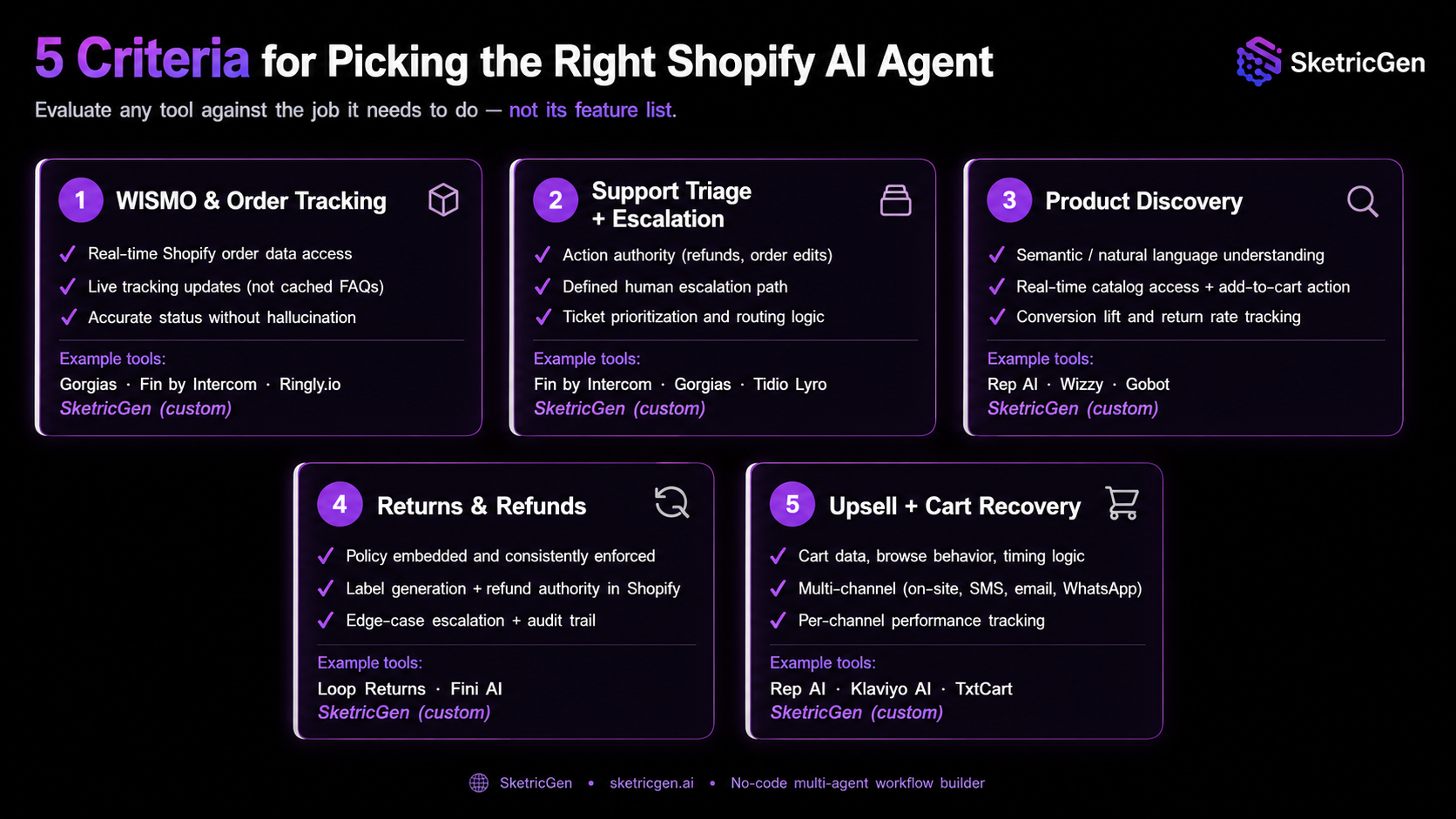
The five sections below outline evaluation criteria for each job. Use them as a checklist: when you're evaluating any AI agent (standalone, built-in, or custom), audit it against the right criterion for your biggest bottleneck.
Criterion 1: WISMO and Order Tracking
The first job is simple: answer "where is my order?" accurately, in real time, without a human.
WISMO queries account for 50–65% of all inbound support tickets on most Shopify stores. At $5–22 per manually resolved ticket, a store processing 2,000 orders a month easily spends $3,000–6,000 monthly on this single question. Automating WISMO delivers the fastest, most measurable ROI of any AI deployment.
Evaluation checklist:
- Direct, real-time access to your Shopify order data
- Live tracking updates, not cached FAQs
- Accurate fulfillment status without hallucination
Why it matters: Without it, the agent answers from FAQs or cached data, leading to wrong tracking status, customer frustration, and more callbacks. Many WISMO agents appear capable but fail this test in practice.
| Tool | WISMO Capability | Shopify Data | Price |
|---|---|---|---|
| Gorgias | Pulls live order status, tracking updates, shipping details | Native deep integration | From $60/mo + $0.90–$1/AI-resolved ticket |
| Fin by Intercom | Handles order lookups and shipping status end-to-end | Pre-built Shopify data connector | $0.99/resolution, no platform fee |
| Ringly.io | AI phone agent: answers WISMO calls 24/7, not just chat | Real-time Shopify order data | Check site for current pricing |
| SketricGen (Custom) | Build custom WISMO workflow with real-time order data and live tracking | Native Shopify integration; connect in 2 minutes | Free trial, then SaaS pricing |
When to choose a custom workflow for WISMO: If you need WISMO + another job handled in the same workflow (e.g., escalation), or if you want to deploy the same workflow on WhatsApp and Shopify in parallel.
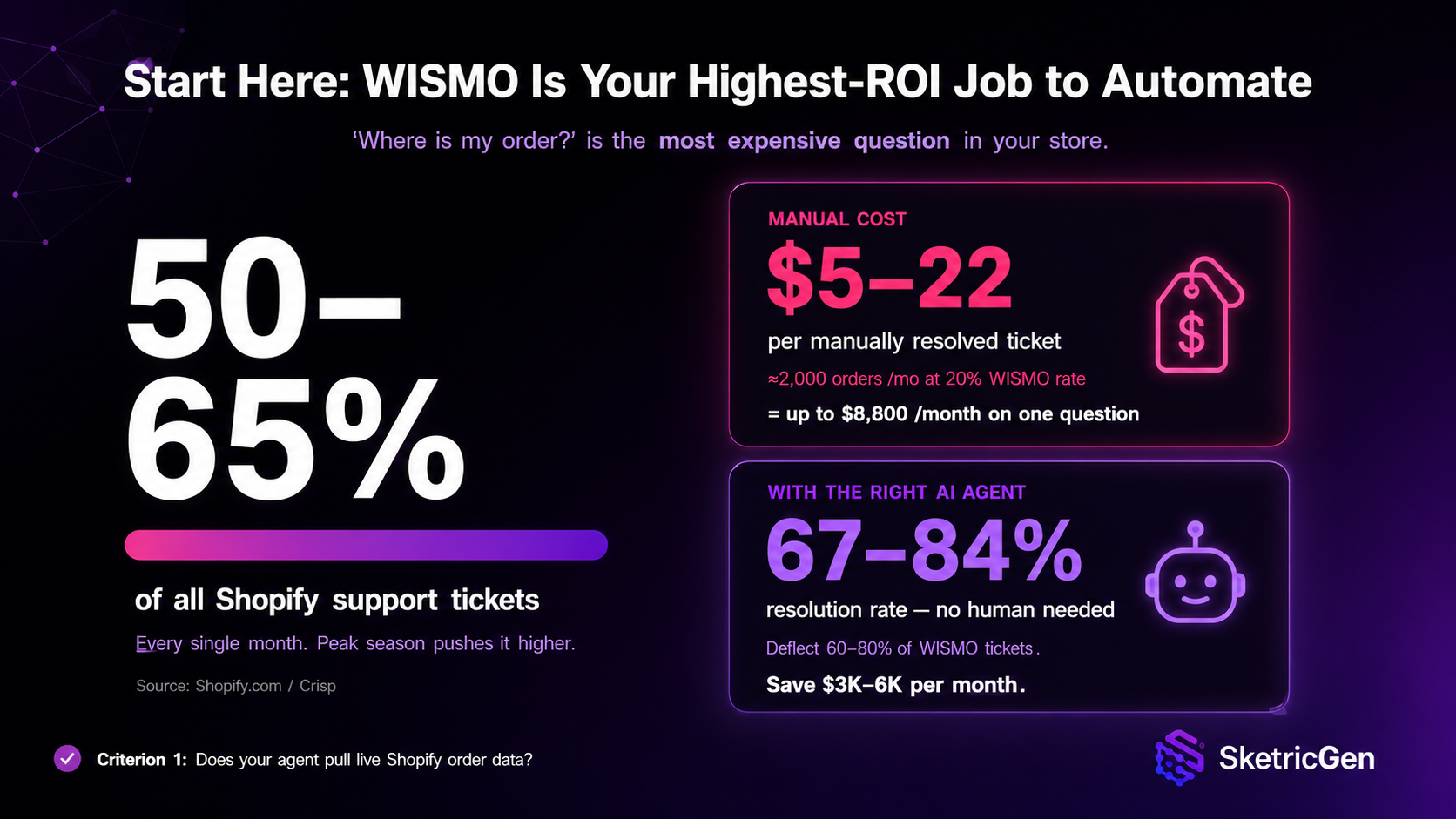
Failure mode: Agents without live Shopify order data give generic "check your confirmation email" replies. Customers escalate to phone or social. Ticket volume goes up, not down.
Pro tip: On any free trial, ask the agent: "What is the status of order #[real order number]?" If it cannot pull live data from your Shopify admin and give an accurate answer, do not buy it. This test eliminates roughly half the tools marketed for WISMO. If you're building custom, SketricGen's Shopify data integration handles this out of the box—just connect your store and describe the workflow in plain English.
When to choose a custom workflow for WISMO: If you need WISMO combined with another job (e.g., WISMO + escalation to Slack), or if you want to deploy the same workflow on WhatsApp and your website in parallel.
Criterion 2: Support Triage and Escalation
This job is harder than WISMO: handle the full range of inbound queries, resolve what can be resolved, and escalate the rest without trapping customers in a loop.
Most chatbots fail here. An agent that handles 70% of tickets but loops the other 30% does not save money. It damages retention. Research cited by Alhena AI puts it starkly: 53% of customers would switch to a competitor if permanently forced into a bot-only loop.
Evaluation checklist:
- Real escalation path to a human (not a FAQ link)
- Action authority: can it issue refunds, modify orders, or only inform?
- Ticket prioritization logic for routing the right issues to the right people
- Tracking of resolution rates and escalation rates
Why it matters: Agents trained only on help articles cannot take action on complex issues. They promise escalation and deliver a FAQ link instead. This is the loop pattern documented in Shopify's own community forums.
| Tool | Resolution Rate | Human Escalation | Action Authority | Price |
|---|---|---|---|---|
| Fin by Intercom | 67–84% (ecommerce) | Yes – inbox handoff | Refunds, order edits, returns | $0.99/resolution |
| Gorgias | 60–67% | Yes – routes to helpdesk queue | Refunds, subscription edits, order changes | From $60/mo |
| Tidio (Lyro) | 60–67% | Yes – live chat handoff | Informational triage; limited direct action | From $39/mo |
| SketricGen (Custom) | Depends on configuration | Yes – define escalation flow in plain English | Full action authority (any Shopify action via API) | Free trial, then SaaS pricing |
Failure mode: Agents trained only on help articles cannot take action on complex issues. They promise escalation and deliver a link to a FAQ page. That is the loop pattern documented in Shopify's own community forums.
What merchants are actually saying: A September 2025 incident reported by The Logic documented a merchant making 20 separate attempts to reach a human through Shopify's AI-first support interface, each redirected back to automated responses. A separate analysis from Surebright found high-growth brands "forced to play cat and mouse with a chatbot" for weeks while payout holds went unresolved. The pattern is consistent: Shopify's native AI handles simple questions and breaks on account-specific issues requiring action authority. SketricGen's multi-agent approach separates triage from escalation, so you can define exactly when and how an agent hands off to a human.When to use a custom multi-agent workflow for triage: If you need triage combined with discovery, WISMO, or any custom combination, a multi-agent approach lets you build separate agents for each decision point. You define exactly which issue types escalate to humans and which get resolved by the agent.
Criterion 3: Product Discovery and Recommendations
This job: help shoppers find the right product using natural language, without leaving your store or switching to Google.
Shopify's default search is keyword-based. A shopper who types "something warm for hiking in rain" gets zero results unless you've tagged products with those exact words. A semantic search or recommendation agent, by contrast, understands intent, matches it against your catalog, and surfaces the right product in the same session.
Evaluation checklist:
- Real-time catalog access and indexing
- Natural language understanding (not just keyword matching)
- In-cart action capability (can the agent add items or just recommend?)
- Tracked conversion lift and return rate impact
- Ability to explain why it recommended each product
Why it matters: Quiz tools fail on open-ended queries. The shopper doesn't want to answer five questions; they want one good recommendation.
| Tool | Approach | Best For | Price |
|---|---|---|---|
| Rep AI | In-session personalization; adds to cart and executes in same session | High browse-to-cart drop-off; fashion, home, beauty | Check site |
| Wizzy | Semantic search + product discovery engine | Stores with 200+ SKUs; high return rates from wrong-product purchases | Check site |
| Gobot | Quiz-based guided selling | Gift shops, supplements, complex product matching | Check site |
| SketricGen | Build semantic search + add-to-cart workflow; connect product data and define matching logic | Stores wanting custom matching rules or multi-channel deployment (Shopify + WhatsApp) | Free trial, then SaaS pricing |
When to use a custom workflow for discovery: If your matching logic is non-standard (e.g., "recommend based on purchase history + weather API data"), or if you want to test discovery on both your website and WhatsApp before committing to a third-party tool.
Shopify merchants running Rep AI reported conversion lifts of 15–35% depending on product category, per March 2026 data.
Failure mode: Quiz tools fail on open-ended natural language queries. The shopper doesn't want to answer five questions; they want one good recommendation. Semantic search surfaces the right product but doesn't help close the sale. For conversion lift, pair a discovery tool with a recommendation or upsell layer.
Decision rule: If your return rate is above 10%, fix discovery before adding an upsell agent. High returns usually mean shoppers bought the wrong product. A semantic search agent addresses the root cause. An upsell agent layered on top of broken discovery makes things worse, not better. For custom discovery workflows, you can connect product data, define matching logic in plain English, and measure lift without coding.
When to use a custom workflow for discovery: If your matching logic is non-standard or you want to experiment with discovery on multiple channels (Shopify + WhatsApp) simultaneously before investing in a third-party platform.
Criterion 4: Returns and Refunds
This job: take a return request end-to-end (intake, label generation, refund authorization, ticket closure) with no human in the loop for standard cases.
E-commerce return rates average 15–30% across most categories. For a store doing 2,000 orders a month at 20% returns, that is 400 return workflows monthly. At five minutes each, that's 33 agent hours every month, just on returns.
Evaluation checklist:
- Your returns policy embedded and applied correctly
- Label generation integration (with carrier APIs)
- Refund authority in Shopify (not just approval workflows)
- Edge case escalation for out-of-policy returns
- Audit trail for every return decision
Why it matters: Agents that initiate a returns flow but lack refund authority create a worse experience than doing it manually. They promise resolution and cannot deliver it.
| Tool | Approach | Best For | Price |
|---|---|---|---|
| Loop Returns | Dedicated Shopify returns management with customer self-service portal | Any store with consistent return volume | Check site |
| Fini AI | Multi-action AI agent: refunds, returns, and cancellations end-to-end | Stores wanting one agent for all post-purchase resolution | Check site |
| SketricGen (Custom) | Build custom returns workflow with policy enforcement and label generation via carrier APIs | Stores with non-standard return rules or multi-channel returns (email, WhatsApp, SMS) | Free trial, then SaaS pricing |
When to use a custom workflow for returns: If you need returns logic that differs by product type, customer tier, or location. You can define the logic once and deploy it across Shopify and other channels without rewriting.
Pro tip: Confirm action authority before deployment. Test with a real return request on your staging Shopify store. If the agent can't issue a refund directly, skip it—you'll create more work, not less. If you're building custom with SketricGen, define your returns policy once and the agent enforces it consistently across all requests.
Criterion 5: Upsell and Cart Recovery
This job: re-engage cart abandoners and trigger upsells at the right moment (on-site, via SMS, or email) without annoying the customer into unsubscribing.
Cart abandonment averages 70%+ across ecommerce. Not all of those carts are recoverable; some were abandoned because the price was wrong, not because of friction. The recoverable ones left due to uncertainty, distraction, or a question that went unanswered. The key is channel match. On-site chat recovers in-session intent; SMS and email recover post-session.
Evaluation checklist:
- Cart data and order history access
- Browse behavior tracking and intent signals
- Timing logic (when to trigger; when to wait)
- Multi-channel deployment (on-site, SMS, email, WhatsApp)
- Per-channel performance tracking
Why it matters: Upsell agents that trigger on mismatched products or fire immediately after checkout (before the order ships) produce unsubscribes, not revenue.
| Tool | Channel | Best For | Price |
|---|---|---|---|
| Rep AI | On-site chat | In-session cart recovery; immediate upsell during browse | Check site |
| Klaviyo AI | Email + SMS | Post-session recovery; DTC brands with an engaged email list | Plan pricing on site |
| TxtCart | Conversational SMS | High-AOV stores; SMS-first buyer demographics | From $29/mo |
| SketricGen | Multi-channel (on-site, SMS, email, WhatsApp) | Stores wanting one workflow deployed across multiple channels with unified messaging | Free trial, then SaaS pricing |
When to use a custom workflow for cart recovery + upsell: If you want to run cart recovery on Shopify + WhatsApp in parallel, measure both channels independently, and adjust timing/messaging per channel without rebuilding each tool separately. You can also test custom triggers (e.g., "upsell only if cart contains X product").
Failure mode: Upsell agents that trigger on mismatched products or fire immediately after checkout (before the order ships) produce unsubscribes, not revenue. Start with cart recovery only. Measure for 30 days. Then layer in post-purchase upsell.
Mistake People Make: Activating upsell triggers and cart recovery at the same time makes it impossible to tell which one is driving revenue. Run them as separate experiments with a 2-week gap between activations. Then attribution becomes clear, and you can cut the underperformer fast. With SketricGen, you can deploy both on Shopify and WhatsApp separately, run them as concurrent experiments, and measure each channel independently.
When You Need Multiple Tasks: Build With SketricGen
The tools mentioned above each handle a single job well. If you need two or more criteria covered by one coherent agent—a workflow that answers WISMO, routes complex tickets to a human, and triggers an upsell after a return is approved—you need something different.
A no-code multi-agent workflow builder can cover this. You describe your workflow in plain English. Max, the AI orchestrator, builds and configures the multi-agent system and connects your Shopify store to the tools you use (messaging, email, CRM, or any of 2,000+ apps in the integration marketplace).
The key difference from single-purpose tools: you're building agents that decide, act, and hand off based on context. Each agent in the workflow has a specific role. You can trace exactly what ran, when, and why, which makes iteration fast rather than opaque. You can also run the same workflow across multiple channels without rewriting it.
This approach makes sense when:
- You need one agent covering 2+ criteria without stitching separate tools together
- You want the same workflow deployed on Shopify and another channel (WhatsApp, embedded widget, API)
- Your use case is custom enough that no off-the-shelf tool supports it (e.g., "WISMO + product discovery + escalation to a specific Slack channel")
- You want to build, test, and iterate fast without waiting for a vendor's feature roadmap or engineering cycles
Start with the AI Receptionist template — it handles intake, triage, and routing in one connected workflow and takes about 10 minutes to configure.
For a step-by-step install walkthrough: How to add an AI agent to your Shopify store — no-code guide
Author Take — Sam
The Gorgias vs. Fin question comes up constantly. The answer depends on whether you need action authority inside Shopify.
If your agents need direct action (issue refunds, edit orders, update subscriptions), Gorgias includes both helpdesk and AI. If you want pure AI resolution at lowest per-ticket cost without action authority, Fin wins on pricing below 5,000 tickets a month.
But here's the trap most merchants fall into: they pick the best tool for one job, then realize their real problem spans multiple jobs. WISMO + triage + discovery isn't solved by a single point tool. That's where custom matters. A first workflow can take 10 minutes to get running, and the real leverage is iteration speed after launch. You get traces showing exactly where the agent is failing, so you fix the right thing instead of guessing.
Next Steps
Start with WISMO if you are not sure which job to automate first. It has the highest volume, the clearest ROI, and the most predictable outcome.
- Install a top-ranked agent in 10 minutes: How to add an AI agent to your Shopify store
- Build a multi-job custom workflow: Start free
- Ready-made starting point: AI Receptionist template
- See how AI agents work across ecommerce platforms: How AI agents help ecommerce sites boost sales
FAQs
Yes, but not for customer-facing support. Shopify Sidekick is an AI assistant built into the admin panel — it helps with internal tasks like generating discount codes, drafting campaigns, and pulling store data. For customer support, order tracking, or sales conversations, you need a third-party agent. Shopify covers Sidekick's full scope at shopify.com/magic.
WISMO stands for "where is my order?" It accounts for 50–65% of all inbound support tickets on most Shopify stores. An AI agent with real-time Shopify order access resolves WISMO queries instantly, at any hour, without a human agent. The key requirement is that the agent must connect to live order data, not static FAQs. An agent answering from FAQs will produce wrong or outdated tracking status and increase ticket volume instead of reducing it.
Based on published data, Fin by Intercom averages 67–84% resolution rate for ecommerce brands. Gorgias and Tidio Lyro typically run 60–67%. Resolution rate matters, but check two other things before comparing: what actions the agent can take (refunds, order edits), and whether it has a defined human escalation path when it cannot resolve something.
Yes. You can describe your workflow in plain English — Max builds and configures the multi-agent system for you. It connects to Shopify and 2,000+ other apps. Deploy as a website widget, WhatsApp bot, or via API. The full no-code install guide walks through the setup step by step.
Gorgias is a helpdesk platform with an AI agent built in. Your human team and the AI share one inbox, and the AI can take direct actions in Shopify (refunds, order edits). Fin is a standalone AI agent that connects to Shopify through a data connector, with no helpdesk layer. Gorgias suits teams managing human and AI agents together. Fin suits stores that want pure AI resolution at the lowest per-ticket cost and do not need a helpdesk.
Three failure modes cover most cases: (1) no real-time Shopify data access (the agent answers from static FAQs, so order status answers are wrong); (2) no escalation path (customers loop when their issue requires action authority the agent doesn't have); (3) wrong job match (a product recommendation bot deployed for support triage, or a support bot deployed to handle returns it cannot action). Check all three before concluding that AI agents don't work for your store.
Related blogs
View more
AI LinkedIn Post Generator: How to Research, Write & Publish Posts on Autopilot (2026)
tutorials
Instagram Auto-Reply: How to Build an AI Agent That Actually Answers Your DMs
tutorials
No-Code AI Agent Builder: The Complete Guide to Building Your First Agent (2026)
tutorials
AI Code Review Tool for GitHub: Automate PR Reviews with a No-Code Agent
tutorials
WhatsApp AI Chatbot for Customer Support: Why (and How) to Build One in 2026
tutorials